A healthy product feed isn't one with zero errors. It's one that still represents the catalog and campaign strategy you intended to run, which is a higher bar than product approval.
Some of the most expensive feed problems never trigger a clean disapproval. Products stay eligible, campaigns keep spending, and a taxonomy change, broken custom label, stale inventory value, or missing identifier quietly changes which products get advertised and how they get segmented. You don't want a ROAS drop to be the alert that your feed logic changed three weeks ago.
Merchant Center's Needs attention page, under Products, is a useful starting point. It surfaces both account-level and product-level issues affecting eligibility and data quality, which is to say it tells you what Google thinks is wrong. That's a narrower question than whether your catalog still behaves the way you configured it.
Say 98% of your products remain eligible, but a source-data change stops populating custom_label_0 = high_margin across part of the catalog. Merchant Center has no reason to reject those products, because from Google's perspective they're still valid items. From your perspective, you may have just changed the campaign.
If that label feeds listing groups, reporting, or separate Performance Max campaigns, those products no longer follow the segmentation strategy you built. Spend can shift without anyone touching Google Ads.
What you actually want to know is whether the same products are reaching the same campaigns with the same commercial signals. SKU coverage, variant grouping, custom-label distributions, price freshness, and impression coverage tell you more about that than an account-wide approval percentage. Feed health isn't just what enters the platform; it's what survives the trip into the campaign.
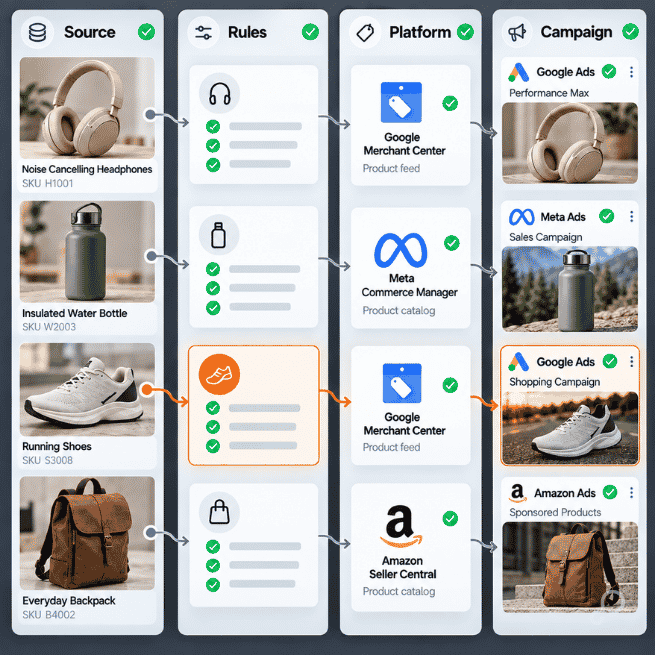
Here's where this breaks: somebody changes the source catalog, but your downstream transformations keep running exactly as configured.
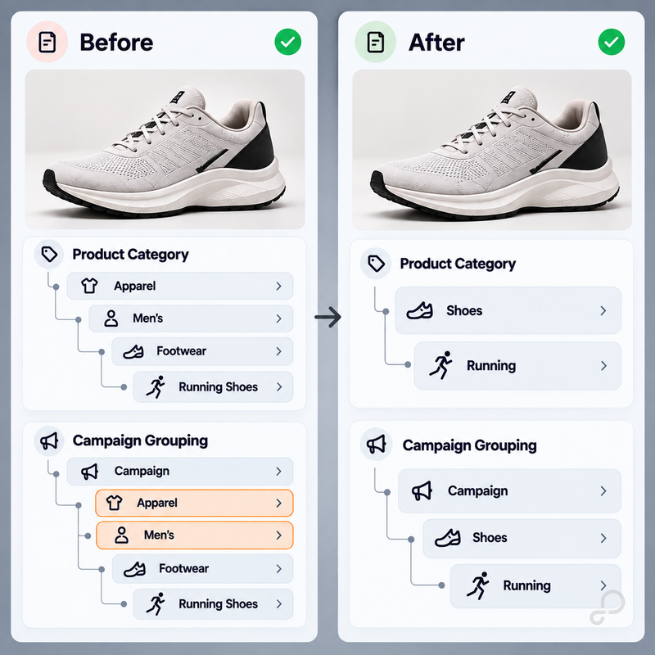
Say your PIM team changes a category hierarchy from:
Apparel > Men's > Footwear > Running Shoes
to:
Shoes > Running
The new product_type is perfectly valid. The feed processes, the products remain eligible, and no error fires anywhere in the chain.
It also cut your segmentation depth in half. Google's product_type spec only caps the field at 750 characters and five submitted values, so nothing in Merchant Center objects. The constraint lives one system over: Google Ads documents that product types can be subdivided up to five times inside a listing group, so the > characters you send is what determines how deep you can actually partition. Four levels became two, and the campaign structure that depended on levels three and four has nowhere to attach.
Worth knowing before you compensate by stuffing the field: Google uses only the first product_type value to organize bidding and reporting in Shopping campaigns. Submitting five values doesn't give you five parallel taxonomies to subdivide on.
Nobody touched the Google Ads campaign. Operationally, the PIM team changed an input the campaign structure depends on.
That's why a useful audit follows the entire path:
Source catalog → transformations → channel feed → platform processing → campaign
Check what came from the source. Check what your rules turned it into. Then compare the submitted assortment against what the channel processed and what ultimately entered the campaign. Otherwise, you end up debugging the symptom three systems away from the cause.
One of the fastest feed-health checks is figuring out what made it through.
Suppose someone changes a filter and 500 seasonal SKUs disappear. During the same week, your catalog adds 500 evergreen products, so the total feed count is almost unchanged and everything looks fine until somebody notices the seasonal category isn't spending.
That's why an account-wide SKU count isn't enough. Break coverage down by the dimensions that matter to the business and the campaign: category, brand, product type, market, availability, margin tier, or whatever labels you're using for segmentation. The goal isn't to prove that the feed contains roughly the right number of products, it's to confirm that it contains the right assortment.

The same thinking applies to feed rules, because a rule can execute successfully and still produce the wrong business outcome. In GoDataFeed, filters and feed rules let you exclude products and reshape values per channel without touching the source catalog, and your audit shouldn't stop at "the rule ran." Feed Preview shows the before-and-after value for each SKU and the status where an excluded SKU dropped out, which is the difference between knowing a rule executed and knowing what it produced.
A missing required field is relatively easy to find. A field containing a wrong-but-valid value is harder, so start with the fields your downstream logic depends on rather than treating every attribute as equally important.
If product_type drives listing groups, watch how its values change. If custom_label_0 controls margin segmentation, monitor its distribution. If item_group_id controls variant relationships, audit whether those relationships still look the way you expect.
The question isn't just, "Does this attribute exist?" It's, "What breaks downstream if this value changes?"
That distinction matters because none of these changes has to break anything to cost you money. A taxonomy change alters campaign grouping, a custom-label change moves products between the groups your reporting and bidding depend on, and a variant-mapping change reshapes the assortment reaching a product set. Valid data and correct data aren't always the same thing.
Identifiers are a good example.
A GTIN warning doesn't automatically mean "write a rule to make the warning go away." First figure out why the GTIN is missing or invalid. Maybe one supplier stopped sending identifiers, maybe the same GTIN appears across distinct variants, or maybe a source mapping starts sending MPN values into the GTIN field. Those are three different problems, and treating them as one "feed error" makes troubleshooting harder.
Google's own guidance points in the same direction: "Only provide a GTIN if you're sure it's correct. When in doubt, don't provide a GTIN (for example, don't guess or make up a value)." Read that next to the other half of Google's position, which is that products with missing or incorrect GTINs may have limited visibility. Omitting an identifier isn't free, so the decision is between a known coverage cost and an unknown data-integrity cost, not between a problem and a clean feed.
Use feed rules for deterministic corrections: mapping, formatting, normalization, or transformations where you know what the correct output should be. Don't use them to invent information you don't have. If the source doesn't contain the truth, fix the source, and if you don't own the PIM and that fix is a quarter-long ticket, exclude the affected products instead of fabricating a value that will propagate into every channel you publish to.
The same principle applies to variants, and this is where platform diagnostics get thin. If three color variants stop sharing the intended item_group_id, you've turned one product family into three unrelated items.
Google's variant checks are built around products that already share an item_group_id. "Missing attribute value for grouped variants" fires when products share the ID but don't consistently carry the same variant attributes. "Too many variant values" fires when a variant attribute carries multiple values inside one group. "Mismatched brand for same variant" fires when products share the ID but don't look like the same product family. All three catch variants wrongly grouped together or grouped incompletely.
The split case is the gap. When a product family stops sharing an item_group_id entirely, the only check that reaches it is "Same brand and MPN but differing item group ID," and that one requires those products to also share a brand and MPN. Variants that differ on either are processed as unrelated products with nothing logged.
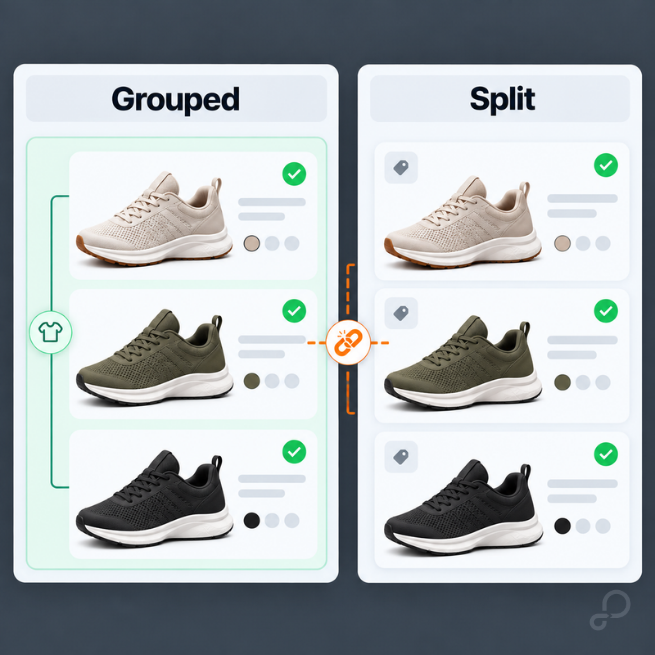
Meta documents the requirement without documenting the failure. Meta states that all variants for a given item_group_id must have every variant field populated, and it reads item_group_id from the feed and exposes it through the Product Set API as retailer_product_group_id, alongside product_type and custom_label_0 through custom_label_4. A product set built on that field inherits the break. Meta's Catalog Diagnostics API covers eleven diagnostic types, including missing and invalid attributes, category problems, image quality, and event-source issues, but publishes no diagnostic type for variant grouping.
That's the shape of the problem on both platforms: a documented requirement, no enforcement signal, and a product set or listing group quietly serving a different assortment than the one you designed.
Say you use this margin logic against decimal margin values:
IF margin >= 0.40 → high_margin
ELSE IF margin >= 0.20 → mid_margin
ELSE → low_margin
That rule populates custom_label_0, which you use to segment products for reporting, listing groups, or different PMax strategies.
Now your source system changes margin from a decimal to a whole-number percentage, so a product that previously supplied 0.42 now supplies 42. Nothing is missing, no field is blank, and every value still parses. Every product in the catalog now clears the 0.40 threshold, and your entire assortment is labeled high_margin.
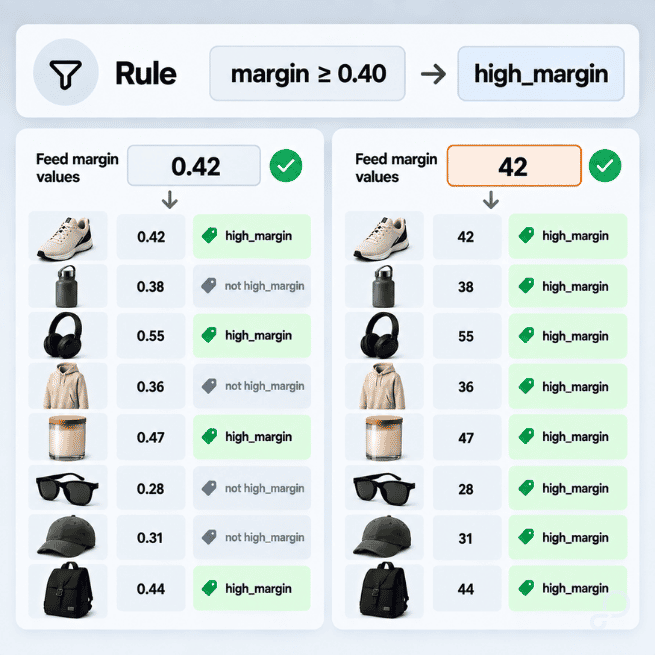
If you've historically had 20% of the assortment in high_margin and that jumps to 85% overnight, don't congratulate yourself on a fantastic quarter. Check the rule.
That's why distribution checks are often more useful than completeness checks. Apply the same idea to categories, brands, availability, price bands, product types, margin tiers, and eligible SKU counts. You're looking for changes in the shape of the catalog, not just blank fields, and those changes often surface a problem before Merchant Center flags anything at all.
Sometimes the source is right, and the feed is still wrong, because the problem is timing.
If a fast-selling SKU goes out of stock at 10:15 a.m. but your next scheduled feed push isn't until midnight, your source of truth isn't the problem. Your synchronization window is.
Google closes that gap on your behalf whether you asked or not. Automations, the current name for what used to be called automatic item updates, is enabled by default in Merchant Center. Google's extractors read your landing page and override the value it serves: "If your most recent product upload contains a product that costs $4 USD, but your product page lists it as $3 USD, we'll update the product to $3 USD in your ads or free listings."
Note what that does and doesn't touch. Your data source is never modified, so the item stays live at the corrected price while every rule you built downstream — price-band labels, margin tiers, promotional segments — still evaluates against the value you sent. The serving layer and your segmentation layer are now describing different products.
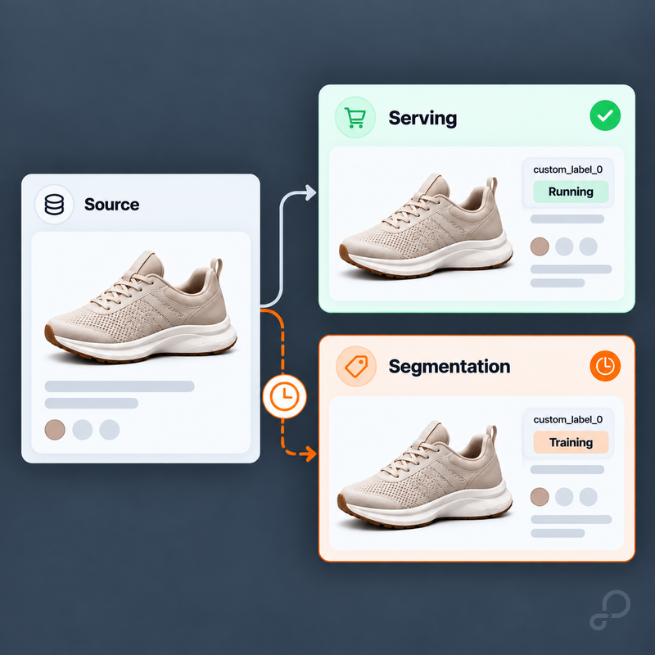
Turning Automations off doesn't restore your submitted values. Google's own API documentation states it plainly: when item updates are off, items with mismatched data aren't shown. Correction and suppression are the two options, and the submitted-value-serves-as-sent option isn't on the menu. Enabling automatic updates also reduces your exposure to preemptive item disapproval, the account-level enforcement track Google applies when policy review finds price or availability mismatches between your product data and your landing pages.
The trap is assuming the correction clears the record. Google continues to treat price mismatches as critical errors that can lead to account suspension even while Automations is correcting them, so a feed that looks healthy in the serving layer can still be accumulating policy exposure.
There's also a default most merchants never see. Availability correction runs one direction: Google applies it to items that are out of stock on your website but in stock on Google. Restoring items that are back in stock on your site but still showing out of stock on Google requires opting into strict availability updates. The default removes ads and the opt-in restores them, which is worth checking before you spend a week debugging why restocked SKUs aren't spending.
Google also states the limit. Automations "may not work for products with frequent price or availability value changes (for example more than once per day)," which describes the exact inventory your promotions run on, and the documented failure mode there is disapproval rather than correction.
None of that is an argument for disabling the correction layer. It's an argument for measuring the gap between a source change and the corresponding channel update, and closing it with sync frequency. Pay particular attention to fast-selling products, limited inventory, flash promotions, and SKUs with frequent price changes. The more volatile the data, the less useful a once-a-day definition of "healthy" becomes.
Feed freshness isn't just a technical metric. It determines how long your campaigns can operate on information that is already wrong.
A monthly feed audit won't help much if your PIM migration broke product_type yesterday. Some audits need a calendar and others need a trigger.
Run a targeted audit after an ERP or PIM migration, feed-rule change, catalog restructure, major promotion, new-market launch, or campaign reorganization. Any change that touches source data, transformation logic, channel requirements, or campaign segmentation deserves a downstream check.
Then use a simple operating cadence for everything else, separating what a system watches from what a person reviews.
Daily, as alerting: processing failures, sharp SKU-count changes, disapproval spikes, stale feeds, and price or inventory mismatches. These are thresholds, not a task someone works through by hand.
Weekly, as review: assortment coverage and attribute distributions by category, brand, or campaign label. Check identifiers, unexpected exclusions, and eligibility shifts.
Monthly or before major campaigns: taxonomy, mappings, transformation rules, channel-specific logic, and whether the resulting feed still supports your current campaign structure.
One number sets the outer bound on all of it. Products expire from Merchant Center 30 days after their last refresh, so a data source that runs successfully while quietly omitting a subset of SKUs will drop those SKUs without failing once. Google can also refresh products on its own by crawling validated structured data on your product pages, which makes the failure intermittent rather than clean — some omitted SKUs survive, some expire, and the pattern won't match any single upload.
The cadence should follow the cost of missing the problem. A two-day delay on a low-volume attribute issue might not matter, while two days of incorrect inventory or margin segmentation during a promotion absolutely can.
A single health score is a useful alarm and a poor diagnosis. It tells you something moved, not which layer moved it.
So build the view around a more useful question:
Where did the catalog stop behaving the way we expected?
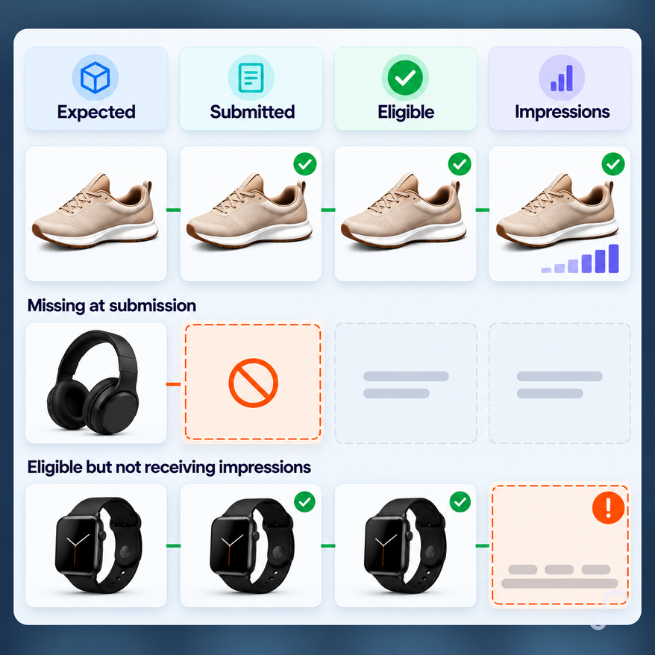
Start with expected versus submitted versus eligible SKUs. Then look at critical attribute completeness, price and inventory freshness, custom-label distributions, taxonomy changes, and the share of eligible inventory actually receiving impressions.
That last metric doesn't come from Merchant Center. You build it from the Google Ads shopping performance report segmented by item ID, joined against your eligible set, and the gap between the two lists is usually more diagnostic than anything in the approval column. Products that are eligible and invisible are telling you something about listing group coverage or bidding, not about feed validity.
Most importantly, segment those checks. A 5% coverage drop across your highest-revenue category deserves more attention than a 15% drop across products you've intentionally deprioritized.
In GoDataFeed, that means reading the workflow in order: what came in from the source, which mappings or rules change it, what gets filtered out and at which stage, and what the next compiled feed will contain. The Validation Summary flags errors, warnings, and optimizations after the feed compiles and before it's submitted, and Feed Preview tells you which layer produced the value. You're not just checking whether an export completed; you're identifying which layer changed the assortment.
Feed managers shouldn't stop at "fixed."
Say an audit finds that your high-margin category has strong Google eligibility but almost no PMax exposure. Start with the feed signals: check custom_label, product_type, filters, and whether those products actually reached the intended campaign. If those inputs look right, move downstream.
Check listing groups, asset-group structure, campaign inclusion, bidding constraints, and product-level performance. Know which lever you're pulling. In Performance Max, listing groups sit inside an asset group and only include or exclude products, with bidding handled at the campaign level. In Standard Shopping, product groups can carry bids, but only under manual CPC or enhanced CPC. Under Smart Bidding, they behave much like PMax listing groups and function as segmentation and exclusion rather than a bid lever, so adjusting the structure won't move spend the way you expect.
At that point you've eliminated the feed as the likely cause and can troubleshoot the media layer with confidence.
That's the operational point of a feed audit. You're not maintaining a pristine XML file; you're maintaining the inputs that decide what can advertise, where products get grouped, and which campaign and bidding strategy get to act on them.
Start with one sweep:
Expected products → submitted products → eligible products → products receiving impressions
Then break the gaps out by category and campaign label. That's usually where the real problem shows itself.
In this post
Carlos Rodriguez is a seasoned content marketer with a background in marketing and advertising. Formerly at the helm of his own marketing agency, he now dedicates his expertise to guiding ecommerce merchants and marketers in mastering multichannel strategies. Outside of work, Carlos is an avid reader and hiker, often found traversing the mountain ranges of Cundinamarca like El Quinini.
Run a free feed audit and see which of your titles are matching queries you'd never choose to bid on.