





















































Google Merchant Center ignores your bidding strategy the moment product data is mismatched or missing.
And if you’re manually resolving "Limited" warnings or hunting down UPCs in outdated warehouse spreadsheets, you’re just throwing away hours of work.
This approach is a losing game against an algorithm that demands 1:1 data parity to grant auction eligibility. Your Shopping campaigns aren't just "underbidding" the competition, they are being shadow-banned by Google’s global catalog because you are treating important values as optional metadata. Missing data, in fact, can directly prevent performance marketers from utilizing the core technical levers necessary to improve their Ad Rank.

Here’s how to fix it fast.
Missing or non-unique identifiers (GTIN, UPC, or EAN) are the most common scaling bottlenecks in retail media. When these identifiers are absent, Merchant Center Diagnostics triggers a "Limited" status. This isn't a mere warning; it is a shadow-ban. Google cannot match your product to its global catalog, so it assigns a lower confidence score to your SKU, forcing you to pay more for the same placement or losing the auction entirely.

Stop waiting for the warehouse to fix the ERP. Use a Supplemental Feed to map missing identifiers externally. Create a lookup table that connects your internal SKUs to a verified list of GTINs.
Implement this rule logic in your feed management tool:
If [gtin] is blank AND [identifier_exists] is 'yes', then pull value from [Supplemental_GTIN_File].
By resolving this bottleneck, you move products from "Limited" to "Approved," instantly expanding your eligible auction pool without increasing your target CPA.
Generic categorization is a tax on your ad spend. If your feed relies on broad back-end categories like "Apparel > Shoes," you are forcing the PMax algorithm to guess your relevance. High-scale growth requires forcing the algorithm into granular auctions through optimized product_type strings.
The Data Governance Requirement
Map your raw back-end categories to high-granularity front-end strings. This moves the product from low-intent discovery queries to high-intent search results.
.avif)
Use an If/Then rule to inject technical attributes into your taxonomy:
If [title] contains 'Waterproof' AND [category] is 'Running Shoes', then set [product_type] to 'Men > Trail Running > Waterproof Shoes'.
Granular strings increase your Quality Score. When your product_type exactly matches the search intent, the algorithm rewards you with lower CPCs and higher-priority placements.
ROAS leakage occurs when "Zombie Variants"—low-margin, out-of-stock, or high-return sizes—eat the majority of your daily budget. In Meta Catalog Manager and Google Shopping, a specific variant often generates high clicks but zero conversions because of inventory gaps.

Establish "Signal Parity" by syncing inventory data via API-driven updates every 15 minutes. Manual uploads are too slow for $50M+ brands with high velocity.
Implement a Quantity-Based Suppression Rule to protect your ROAS:
If [inventory_count] is less than 5, then set [availability] to 'out_of_stock'.
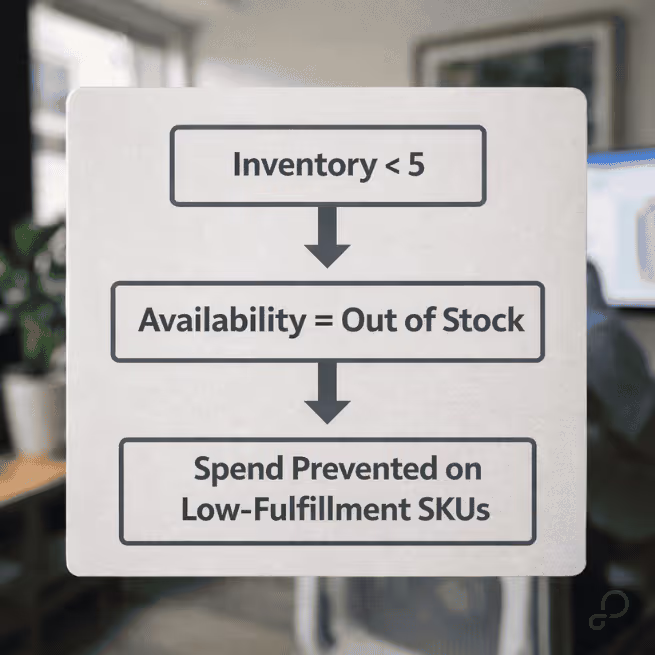
This rule effectively "shadow-pauses" low-stock items. By preventing spend on products that cannot be fulfilled, you reallocate that budget to your deep-stock "Core" items, improving your overall Marketing Efficiency Ratio (MER).
Missing the "Special Offer" badge during a peak sales period is a technical failure that kills your CTR. This usually happens because of mismatched promotion_id attributes between your feed and the Merchant Center Promotion Feed.

Use Regex (Regular Expressions) to perform bulk edits across thousands of SKUs in seconds. Manual mapping is an operational bottleneck that prevents you from moving fast during flash sales.
Apply a Regex Find/Replace rule to your seasonal custom labels:
Find: ^(.*) Replace: $1_BFCM_2026.
Instant badging across your entire catalog ensures you don't lose the "Special Offer" visual hook. High-volume brands that automate this process see significantly higher CTRs compared to those relying on manual Merchant Center uploads.

By resolving data feed bottlenecks and enforcing taxonomy precision, you evolve the feed from a static file into a dynamic performance lever.
Still draining resources on tasks that are better off automated?
Stop fighting bottlenecks. Start a free trial of GoDataFeed and our team will build your first optimized feed for you—completely free of charge.
Bryan is a digital marketer with roots in journalism and creative writing. Over the past decade, he's helped hundreds of online retailers develop and implement ecommerce marketing strategies. When he isn't educating retailers on ecommerce, he's out exploring South Florida and stalking local breweries.
Run a free feed audit and see which of your titles are matching queries you'd never choose to bid on.

.avif)