




















































When a shopper asks ChatGPT, Perplexity, Google AI Mode, or Microsoft Copilot to find something, the AI pulls from a product feed you submit, plus what it can find on the web. The feed is the one input you fully control, and its quality is a big part of whether your product is eligible to show up. If you're on Shopify or Etsy, getting listed is automatic; on the others it's a free feed or a quick application. Getting recommended is a separate contest, decided by how complete and accurate your data is.
If you've connected everything and still can't find your own products in an AI answer, this page explains why, surface by surface.
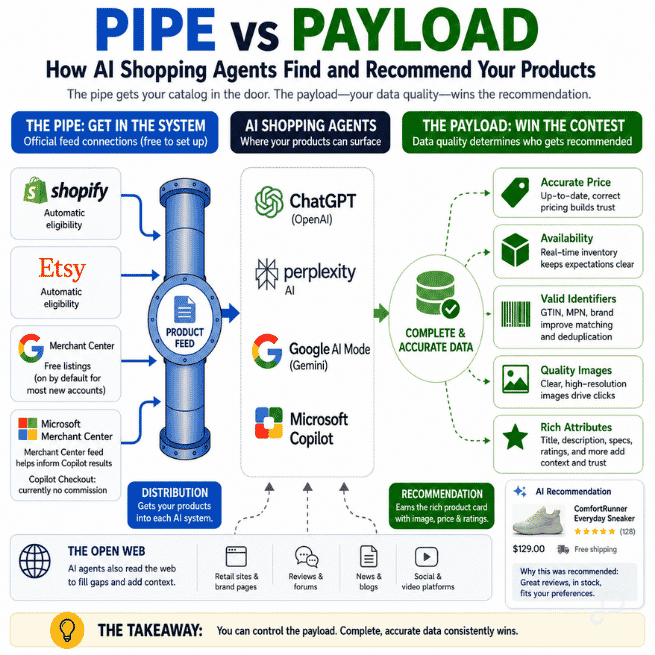
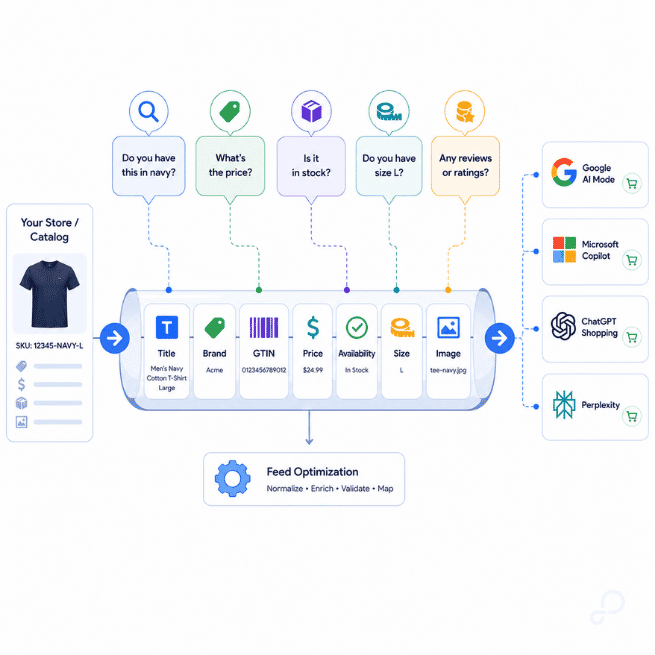
Each platform gives you an official way to submit product data. OpenAI has a feed spec under the Agentic Commerce Protocol. Perplexity takes a Google Shopping–format feed, the same one you already built for Merchant Center. Google pulls your Merchant Center feed into the Shopping Graph, which is what AI Mode reads. Microsoft works from its own Merchant Center. That connection is the pipe, and it's free to set up on all four. The payload is what each AI considers when it builds an answer: attribute completeness, price accuracy, valid identifiers, and image quality.
All four also read the open web, but none of them treat your website as equal to your feed. OpenAI's own docs call the feed you submit "a complete catalog export treated as the source of truth." Microsoft says Copilot uses "both information found on the web and from a merchant's feed." Google checks your feed against your live product page and can disapprove products when the two don't match. So the feed is the part you control, the web is what fills the gaps, and gaps are where bad data comes from.
Early ChatGPT shopping relied on the website rather than a feed, scraping retail sites for product data, and it returned stale stock, incorrect prices, and inaccurate shipping details. Forrester analyst Emily Pfeiffer explained to CNBC why scraping fell short: "Crawling and scraping is inadequate to get the full breadth of product data that you need to do a good job of commerce." A feed you control provides the AI with fuller, more accurate product data than crawling alone can. But complete data still has to win a place in the answer.
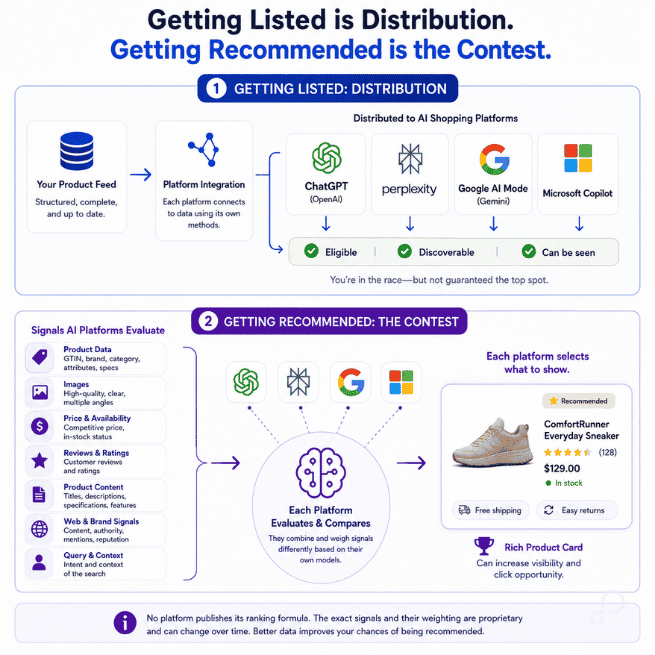
Getting listed and getting recommended are two different jobs, and the first one is cheap. Shopify stores are automatically discoverable in ChatGPT and syndicated to Perplexity product cards through Shopify Catalog. Google's free listings are on by default for new accounts, and a Microsoft Merchant Center feed already helps inform Copilot's organic results. But that only gets your catalog in the door. Strong, complete data helps earn the rich product card with the photo, price, and ratings shoppers click. Thin data gets a plain mention, or the answer goes to a competitor whose feed carries more signal.
This is why merchants who connected everything still can't find their own products in ChatGPT. Often, the connection worked. The data lost the contest.
One idea, four different systems. All four read a merchant-submitted feed as the product data you most directly control, but each has its own way in, required fields, ranking signals, and eligibility rules. Check here before you assume ChatGPT's setup works on Perplexity.
Three patterns stand out. Organic recommendations are separate from paid placements on all four surfaces, and the platforms do not document any simple way for ad spend to buy an organic recommendation. Price and availability mismatches are recurring eligibility risks, although each platform handles them differently. Perplexity’s merchant setup is reported to support Google Shopping–format data, while Microsoft Merchant Center can import an existing Google Merchant Center catalog—so some of the feed work you have already done may carry over.
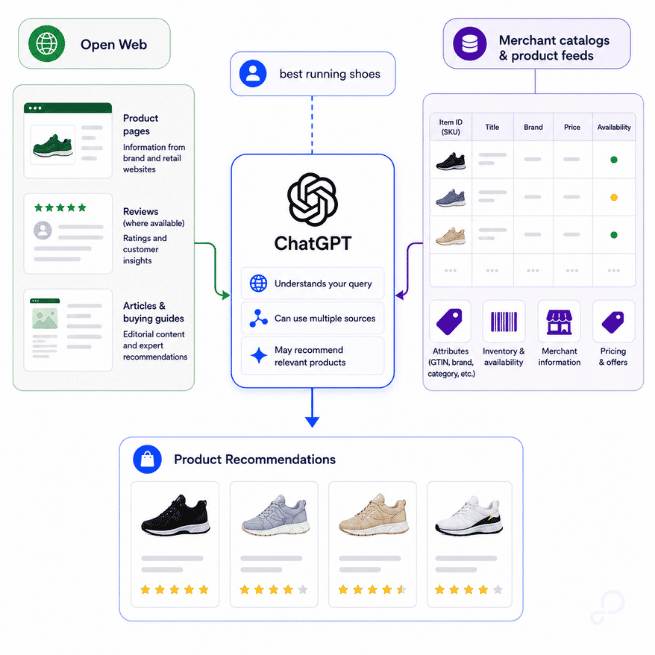
ChatGPT shopping has two lanes that work separately. One is organic, where your feed makes products eligible to show up when someone asks for a recommendation in chat. The other is ChatGPT Ads. OpenAI says products you submit through Ads Manager run as ads only during the beta, so they won't appear in ChatGPT's organic answers. Paying for the ad doesn't earn you the organic recommendation.
This is where it costs people money. You turn on ChatGPT Ads, you see your product appear, and assume you are “in.” Yes, but only in the paid lane. Organic is a separate connection you still need.
Organic listing is free. If you sell on Shopify or Etsy, your catalog is already integrated without an application. Other merchants can apply at chatgpt.com/merchants. OpenAI does not publish its complete ranking formula, but optional fields such as variants, reviews, and Q&A give ChatGPT more product information to display and compare. They won't guarantee a better rank, but a fuller feed is a stronger one.
If you do run ChatGPT Ads, GoDataFeed has an ads-only connector. Check the current product limits and eligibility in Ads Manager before you rely on them.
For the full 15 required fields, ranking signals, and the ads-versus-organic split, see the ChatGPT sub-hub.
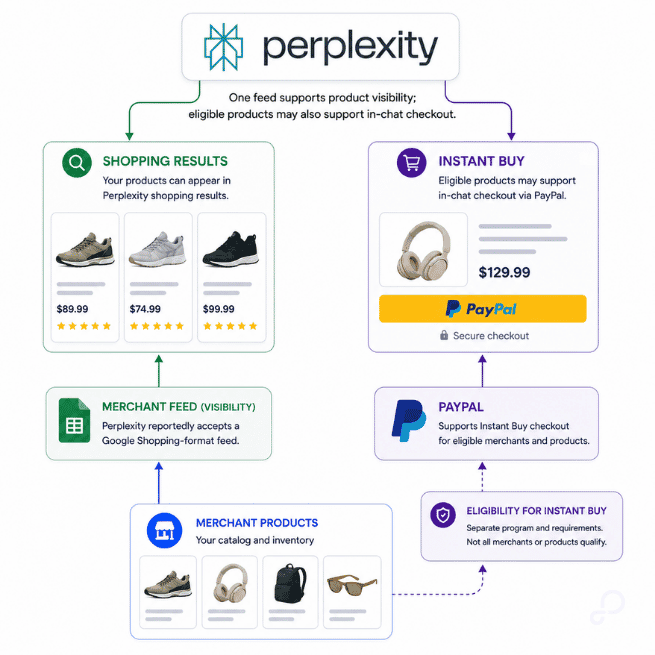
Perplexity appears to take a Google Shopping feed, the same one you already built for Merchant Center, so most of the work is done. You apply at perplexity.ai/merchants, and there's reportedly a review before you go live. The program itself is free, results aren't sponsored, and there's no placement to buy your way into. Perplexity's model has been zero-commission for merchants, but confirm the current terms when you apply rather than assuming.
If you sell on Shopify in the US, your products can already show up in Perplexity's shopping cards through Shopify Catalog. The in-chat Instant Buy checkout is a separate track with its own rules.
Perplexity hasn't published a full feed spec or ranking formula, unlike Google and OpenAI. Its public guidance names a few things that help a product get recommended, but most of the feed and GTIN details come from practitioners, not Perplexity. By most accounts, GTINs do a lot of work here. They match your product to the correct listing and exclude duplicates from the comparison cards. Treat that as good practice, not a proven rule. Either way, it points in the same direction: a clean, complete feed beats a big one with gaps.
So if you're already on Merchant Center, you're basically out of reasons not to. Applying is free, and how well you do comes down to the data you control.
The Perplexity sub-hub covers how to enroll, what's known about matching, and how often to refresh.
AI Mode reads Google's Shopping Graph, and your Merchant Center feed is one of the sources that fill it. So if you're already set up, your products may be eligible to appear. Free listings are on by default for most new accounts. For older ones, turn them on under Marketing, then make sure your products are approved.
Keep your feed and your product page matching. If the feed shows one price and the page shows another, Google can disapprove the product, which can pull it from free listings and cut its reach across the shopping surfaces your feed powers.
You can't buy an organic recommendation because paid placements are separate. Organic visibility comes down to relevance, approval status, and accurate data.
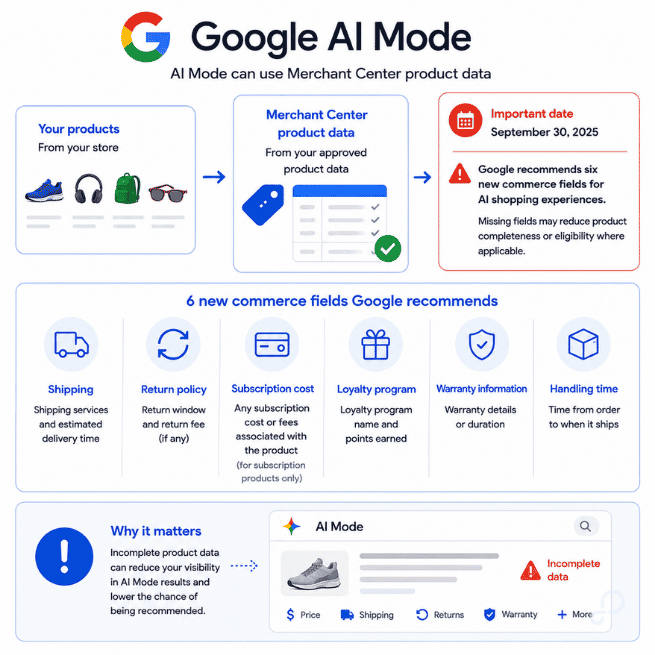
In May 2026, Google added six optional fields called conversational attributes: question_and_answer, related_product, variant_option, item_group_title, popularity_rank, and document_link. They're not required for approval, but they give Google more structured context for AI shopping. Ask "Does this phone have a headphone jack?" and question_and_answer is the field that answers it. They won't guarantee a higher rank, but they go beyond what a standard feed carries.
Then the deadline. Google shuts down the legacy Content API for Shopping on August 18, 2026. Programmatic integrations using it have to migrate to Merchant API. File uploads and Google Sheets aren't affected. Check your Merchant Center data sources, and confirm the migration plan with your platform.
The Google sub-hub covers conversational attributes, UCP readiness, and the migration steps.
Copilot answers shopping questions using two sources together: your Microsoft Merchant Center feed and the open web. Microsoft says it uses "both information found on the web and from a merchant's feed." Your feed is the part you control, so accurate prices, stock, and images give Copilot reliable information to work from.
If you already run Microsoft Ads or Google Shopping, Copilot is an easy add. Microsoft accepts Google-formatted feed files and has a Google Merchant Center import tool, so you can reuse a lot of the setup you've already done. It won't move everything automatically, though. Not every field or product is guaranteed to carry over, so check what actually lands.
Discovery and checkout are separate layers. Your feed handles discovery. Checkout inside Copilot needs UCP, which adds the transaction layer, and Microsoft made UCP-ready feeds generally available for US merchants. Shopify merchants are auto-enrolled, with controls in the Shopify admin. PayPal and Stripe merchants onboard through those partners. Right now, Copilot Checkout runs on Copilot.com and the Copilot mobile app, with more surfaces planned.
If you turn on checkout, Microsoft says it charges no commission or affiliate fee, and you stay the merchant of record. The word "today" in their wording matters: it's their current policy, not a permanent promise.
Setup adds three Merchant Center settings for checkout — return policy, customer support, and Copilot Checkout — plus UCP feed attributes like native checkout eligibility, product warnings, and a Merchant Item ID.
The Microsoft sub-hub covers the checkout paths, the required fields, and the UCP setup in full.

A missing GTIN doesn't mean the same thing everywhere. Assume Google's rules apply across the board, and your products quietly drop off the other three.
ChatGPT doesn't require GTINs. OpenAI's spec leaves both GTIN and MPN optional, so if you make products that never had a GTIN, you're not shut out here, as long as your other required fields are in order.
Google wants a GTIN when one exists. Skip it and your performance drops. Put in a wrong one and you risk disapproval.
Microsoft depends. If the manufacturer assigned a brand, GTIN, or MPN, include what exists. Only when a product has none of the three do you set identifier_exists to false.
Perplexity is the one to watch. It publishes no identifier rule at all. Most people in the field say GTINs are what Perplexity uses to match and de-duplicate products, but that's a best guess, not a documented rule.
GTINs are optional on some surfaces today, but optional and unimportant aren't the same thing. Where they're used, they help match your products and build trust in your data, and a surface that skips them today could require them tomorrow. So keep it simple: if a product has a GTIN, add it everywhere. It helps, and it costs nothing to stay ahead of the next rule change.
On Google and Microsoft, if a product has no identifiers, set identifier_exists to false and it isn't penalized for it. And a missing GTIN isn't the same as no identifier, since a brand or MPN often still applies.
So half your catalog missing GTINs doesn't lock you out of AI shopping. Add the ones you have, include brand and MPN where they apply, and flag the rest where the surface allows. You're covered now, and when the rules change.

One rule protects you on every surface: your feed and your product page have to agree on price and stock. Google enforces this directly and disapproves products that don't match. Microsoft requires accurate feed data too. ChatGPT and Perplexity say less about it, but the discipline pays off everywhere, because a feed that contradicts your live page is a feed the AI can't trust.
Refresh a full feed daily, and faster where the platform supports it. Google's Shopping Graph refreshes over 2 billion listings an hour, so stale data is always losing to fresh. One caution: OpenAI's own docs aren't consistent on intraday updates, so follow what your actual integration supports rather than assuming.
What gets you pulled is specific to each surface. On ChatGPT, prohibited products (adult, alcohol, nicotine, gambling, weapons, prescription medications) get removed, and repeat violations get the seller banned. To pull a product yourself, set is_eligible_search to false or drop it from the next snapshot. On Google, a price mismatch, bad identifier, broken page, or policy violation triggers disapproval, and a disapproved product falls out of free listings and everything those listings feed. On Microsoft, inaccurate data, dead URLs, or failed fetches suppress the listing. On Perplexity, a feed that fights your page is reported to cost you visibility, though Perplexity keeps its exact rules private.
The pattern underneath all of it: these surfaces read your data at the moment they answer a shopper, so the feed you fixed last week only counts if it's still right today. When a product flickers in and out of AI results, the cause is almost always upstream, in how current and consistent your feed is, not in anything you can adjust on the campaign side. That's the difference between chasing symptoms and fixing the source.
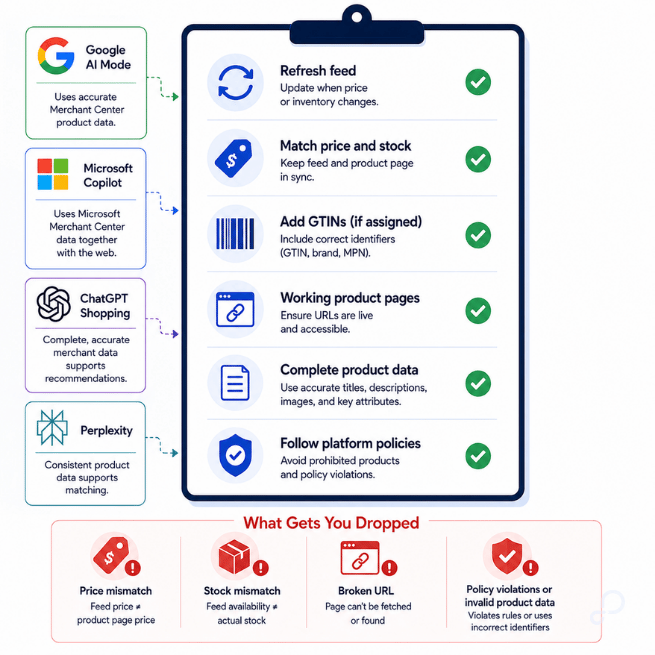
Clean catalog data is the shared foundation for every AI surface. The data-quality work carries across all of them, but the field names and rules don't, so treat this as your baseline and check each one on its own terms.
1. Fill your identifiers. Add a valid, manufacturer-assigned GTIN wherever one exists, including on surfaces where it's optional, since requirements can tighten over time. Never invent or approximate one: an incorrect GTIN can cause disapproval or matching errors. For products with no GTIN, brand, or MPN, set identifier_exists to false only where the destination supports that field. Otherwise, follow the surface's own schema.
2. Rebuild titles for a question, not a storefront. Your site says "The Classic Weekend Tee." A shopper asks for a "men's navy cotton t-shirt, large." Put the attributes that identify the product (brand, type, material, color, gender, size) into the feed title when they apply, and keep each surface's title limit in mind. You don't have to change what shows on your site.
3. Complete the fields each surface rewards. Required fields make a product eligible; they don't guarantee it gets listed or recommended. Optional fields add context that can help you stand out, though none is a guaranteed ranking lever: reviews, Q&A, and variants on ChatGPT; the six conversational attributes on Google. Check your feed against each column in the table above.
4. Match price and availability to your product pages. Your feed, your page, and your checkout should agree. A mismatch can get a product suppressed or disapproved, though not every surface publishes exactly how it handles it. Update as fast as each surface allows, and don't assume intraday updates work everywhere.
5. Model your variants correctly, per platform. Give each variant its own ID, price, image, and attributes. The field names differ: Google uses item_group_id, OpenAI uses group_id. Don't copy one platform's variant setup into another.
6. Clean your images. Use working URLs, real product shots, and no placeholders, watermarks, or promo overlays. Google disallows those outright. Other surfaces set their own image rules, so check each one.
7. Set a refresh cadence per surface. A daily full feed is a solid floor. Go faster where the platform supports it. Don't lock yourself to one universal cadence: OpenAI's best-practices page leans on daily snapshots, so follow what your integration actually supports.
8. Then connect and check. Enroll or set up Merchant Center, then verify approvals, fetch status, and how your products actually render. Connecting is the entry point, not the finish line.
Steps 1 through 7 are the work GoDataFeed is built to do. Its rules engine maps your attributes to each channel, applies the fixes, and delivers the feed. FeedPilot gives you prebuilt rules matched to your import type, channel, and catalog goals, so you're not building from scratch. And for step 2, Try AI writes optimized titles and descriptions through GoDataFeed's OpenAI integration. You review the AI values after the feed compiles, before anything goes out. The AI drafts, you approve, and on surfaces that drop a listing over one wrong field, that last check is what protects you.
[Build note: implement as FAQPage JSON-LD schema, generated from final copy.]
Why aren't my products showing up in ChatGPT? If you're on Shopify or Etsy, you're already integrated, so it's your data, not your connection. Fill the 15 required fields, then add reviews, variants, and Q&A. Getting ingested and getting recommended are two different contests, and thin data loses the second one.
I'm on Shopify. Am I automatically in ChatGPT, Perplexity, and Google? For listing, mostly yes. Shopify catalogs are discoverable in ChatGPT and can surface in Perplexity cards through Shopify Catalog, and Google free listings are on by default for new Merchant Center accounts. Auto-enrollment gets you listed, not recommended, and Perplexity's full program still needs an application.
Do I need GTINs for AI shopping? Depends on the surface. ChatGPT marks GTIN and MPN optional. Google wants a GTIN where one exists. Microsoft needs it only if the manufacturer assigned one. Add a real GTIN wherever you have one, even where it's optional, because requirements tighten over time.
Half my products don't have GTINs. Am I locked out? No. ChatGPT doesn't require them. On Google and Microsoft, flag genuine no-identifier products with identifier_exists set to false. Perplexity publishes no rule, though it's reported to lean on GTINs for matching. Missing GTINs cost you on some surfaces, never all of them.
Do I need to be a big brand to show up in AI answers? No. Perplexity's program is free, Google's free listings feed AI Mode at no cost, ChatGPT charges no fee on purchases made on your own site, and Microsoft takes no commission on Copilot Checkout. The contest is data quality, not budget.
If I run ChatGPT Ads, will my products also show in organic answers? No. Per OpenAI, products in an ads feed run as ads only during the beta and won't appear in organic ChatGPT conversations. Organic is a separate feed.
Does Microsoft charge a commission on Copilot Checkout? No. Microsoft takes no commission or affiliate fee, and you stay the merchant of record. Their exact wording is "Today, Microsoft does not take a commission," so read it as current policy, not a permanent guarantee.
Do I need Microsoft Merchant Center for Copilot Checkout? Yes, an MMC account is required to onboard, and MMC feeds also inform Copilot's organic results. Checkout runs through Shopify auto-enrollment, a PayPal or Stripe application, or MMC with a UCP-ready feed.
Can shoppers actually buy inside these AI surfaces right now? It varies and keeps changing. ChatGPT moved transactions back to merchant sites in March 2026. Microsoft's Copilot Checkout is live for US, English-language merchants in USD. Google's UCP checkout uses the native_commerce attribute. Perplexity offers Instant Buy through PayPal for enrolled merchants.
How often do I need to update my feed? Daily is the safe baseline everywhere. Add an intraday path (the API on ChatGPT, a faster fetch on Microsoft) if your prices or stock change during the day.
Will the Google Content API shutdown break my feed in August? Only if you run a programmatic Content API integration. Those must migrate to the Merchant API before August 18, 2026. File uploads and Google Sheets aren't affected, and managed platforms handle the migration.
Should I wait until AI shopping settles down before investing? No. The part that keeps changing is checkout and fees. Feed requirements mostly change by adding fields, not replacing them, so the feed work is stable and pays off no matter who wins the checkout race.
Eliza is a content strategist with a love for creativity, big ideas, and crafting the perfect meme. With a background in marketing and project management, she helps online retailers navigate ecommerce channels and the must-know features that drive growth. Beyond the feeds and funnels, you’ll find her chasing live music and her next go-to restaurant.
Run a free feed audit and see which of your titles are matching queries you'd never choose to bid on.

