





















































Most feed issues aren’t about bad data. They’re about bad timing—when your catalog updates and your channels don’t follow.
If you’re still updating pricing manually or fixing Merchant Center errors after the fact, you’re not managing a feed. You’re chasing one.
That lag costs you: broken PMax asset groups, misfiring Meta ads, suppressed SKUs on Amazon.
This isn’t about saving time. It’s about protecting performance.
Note: Platform behavior and enforcement rules change frequently. Always validate feed logic against current documentation from Google Merchant Center, Meta Commerce Manager, and Amazon Seller Central.
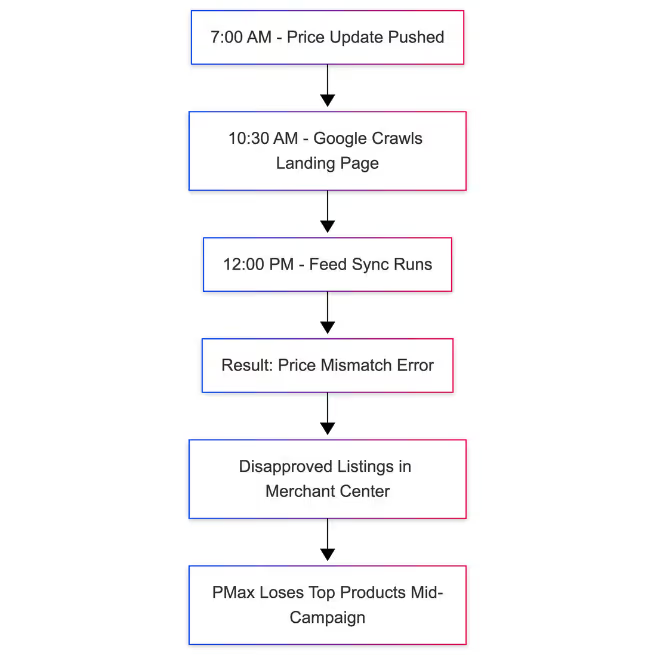
Say your team pushes a price update at 7 a.m.
Your feed syncs at noon.
Google crawls your landing pages at 10:30 a.m.
Now you’ve got a pricing mismatch, disapprovals before lunch, and top products offline.
These weren’t edge-case SKUs. They were your best sellers—the ones you wanted PMax to push harder.
Instead, you’re doing emergency diagnostics on what should’ve been a routine change.
Manual feed updates don’t just slow you down—they leave gaps. And gaps are where performance leaks out.
Even a small delay between your backend and your campaigns can trigger:

These aren’t hypothetical. They’re common. And once they happen, you’re not just fixing the feed—you’re fixing lost performance.
You don’t need a fully automated feed. You just need rules for the pieces that fail predictably—and impact revenue the fastest.

Here are four high-leverage feed automations:
If it’s not sellable, it shouldn’t be visible. Start with this rule:
IF inventory = 0 OR availability = blank → exclude from export

Whether it's Shopping or Meta DPAs, showing out-of-stock products just burns budget. Most feed platforms support this rule out of the box.
Private-label and dropship catalogs often miss brand data. That’s a fast track to disapprovals—especially on Meta and Google.
Use this fallback:
IF brand = blank AND MPN exists → set brand = 'Generic'
Google doesn't require “Generic” by name—but it prevents disapproval in cases where brand is mandatory and missing. Just make sure it's not misleading to customers.
Meta’s product approval rules are stricter than Google’s—and more volatile. What passed yesterday can get flagged today.
Add a title rule like:
IF title contains “%”, “FREE”, “BOGO” → remove/replace
Especially if you’re using the same feed across channels, set up Meta-specific overrides to prevent flagging. Review these rules quarterly against Meta’s latest content policy.
Custom labels give you control, but they don’t segment anything by default. You still need campaign logic to act on them.
Example logic:
IF price > $100 → custom_label_0 = high-ticket
 IF product_type contains "clearance" → custom_label_1 = promo
This helps you group SKUs by margin, lifecycle, or promo eligibility—and then structure campaigns or bidding rules around them.
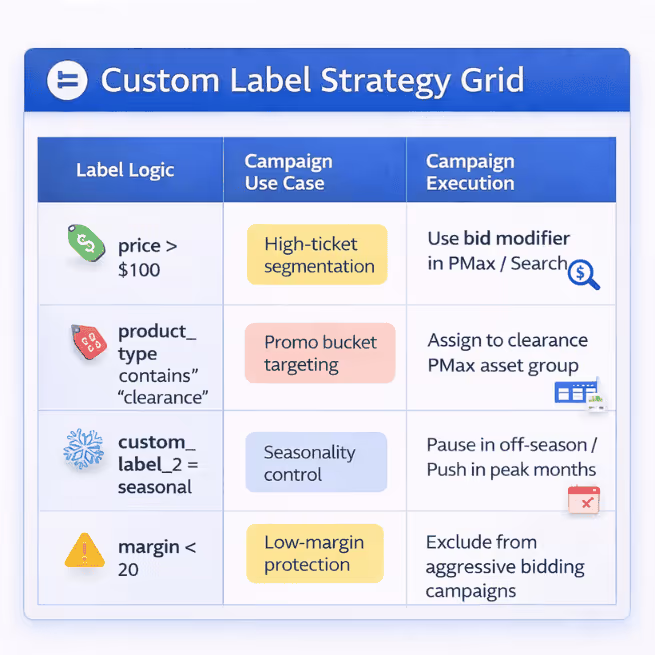
Just remember: labels don’t do the work. The campaign setup does.
[Here’s how to schedule feed rules so updates run exactly when you need them—no manual fixes.]
They break because something changed in the data—and the feed didn’t reflect it.
You’ll feel it when:
product_type changed and wasn’t updated in time
None of these are fixable mid-flight without losing momentum. All are preventable with simple automation rules.
Need another set of eyes on your feed setup?
We work with ecommerce teams to find the feed issues that don’t throw errors—but still cost revenue.
If that sounds familiar, it’s probably worth a conversation.
Carlos Rodriguez is a seasoned content marketer with a background in marketing and advertising. Formerly at the helm of his own marketing agency, he now dedicates his expertise to guiding ecommerce merchants and marketers in mastering multichannel strategies. Outside of work, Carlos is an avid reader and hiker, often found traversing the mountain ranges of Cundinamarca like El Quinini.
Run a free feed audit and see which of your titles are matching queries you'd never choose to bid on.

