




















































Your campaigns are serving, your ROAS is holding, and Merchant Center isn't flashing red at the account level. So the catalog is fully live, right?
Not quite. A product can be disapproved, stop serving entirely, and never show up as an error in your ads data. It doesn't trip an account-level alert, it doesn't email you, and it doesn't appear as a line item in your campaign reports. It just drops out of the auction, and the first signal you get is coverage that quietly erodes over the following weeks.
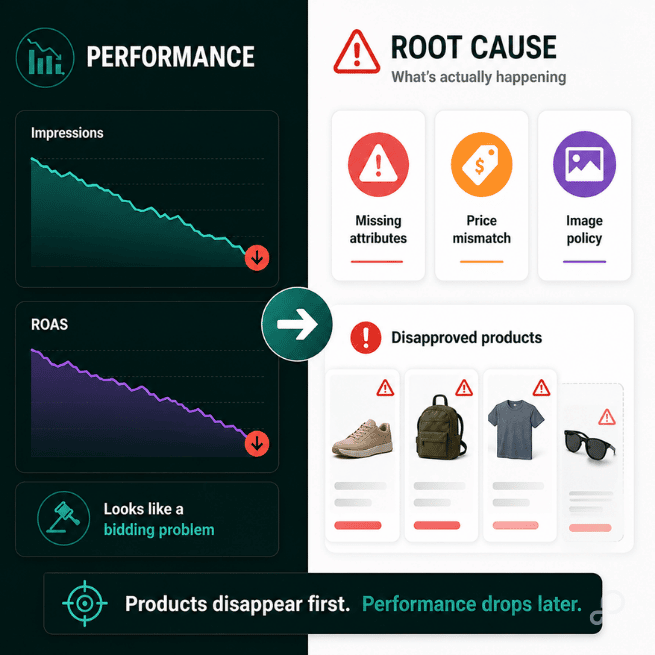
In a typical apparel catalog, about one in five Shopping listings is carrying at least one active disapproval [Source: GoDataFeed audit data, 2024–2025]. Most of them went dark without anyone noticing.
It comes down to how Google handles a policy violation.
Google doesn't reject your ad when a product violates policy. It removes that one product from the ad and keeps serving everything else. The check runs per-product, per-attribute, per-channel — one wrong field takes down one listing, not the whole feed. That granularity is exactly why it stays invisible: the campaign keeps running, the rest of the catalog keeps serving, and nothing about the account looks broken.
Three things keep the disapproval count higher than teams expect. Google updates Shopping policies continuously, and it doesn't warn you when a change starts catching products that passed last week. Merchant Center logs disapprovals in the diagnostics tab, but it never pushes an alert — you have to go looking. And a disapproved product is removed silently, so instead of showing up as a disapproval in your ads data, it just stops generating impressions.
That last one is the trap. In your campaign reports, a disapproved product and a product nobody's searching for look identical.
A disapproval never lands as a line in your ad account — you see it in your ROAS, weeks later, once budget has already concentrated on the products still serving.
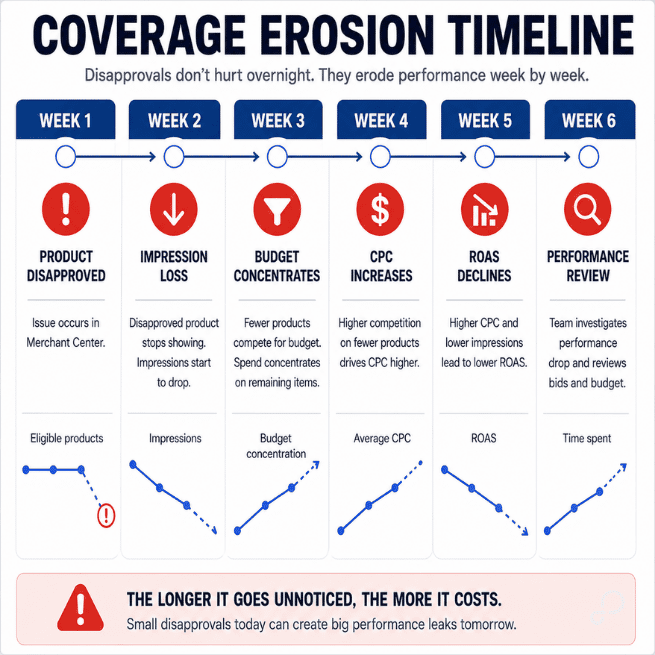
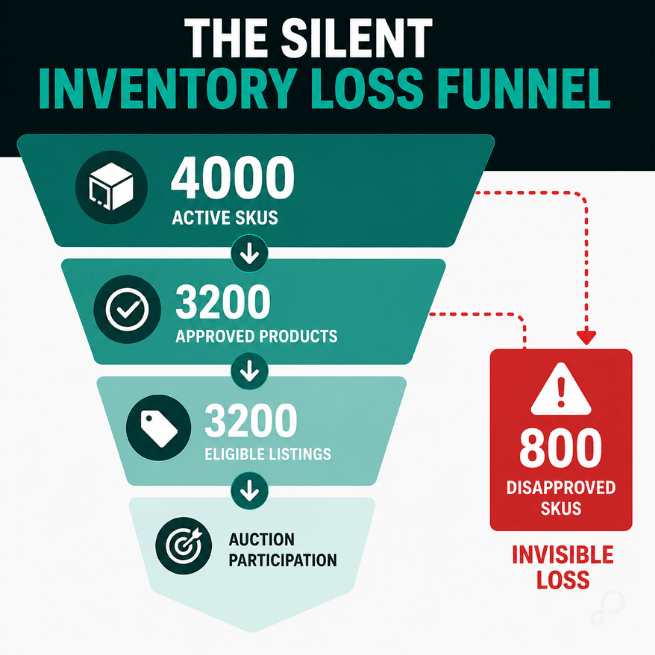
You lose eligible inventory. If 800 of 4,000 SKUs are disapproved, a fifth of your catalog can't serve, even though it's still sitting in the feed and marked active on your site. Your CPCs climb, because the budget that would have spread across the full catalog now concentrates on what's left, and the auction for those products gets more expensive without a single bid change. And you hand competitors the coverage gap: every query your disapproved products should have answered gets answered by someone else, so you never see the lost auction, only flat impressions.
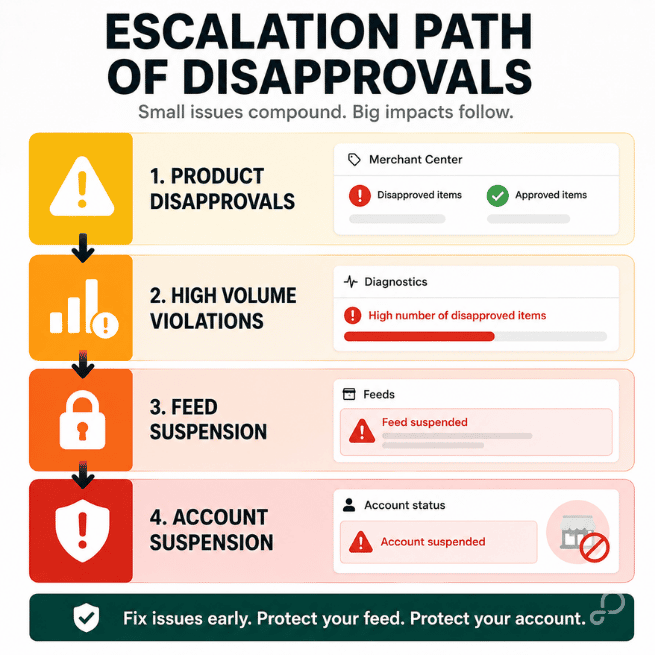
It also compounds. Repeated or high-volume violations escalate a product-level disapproval into a feed-level suspension, and from there into an account-level suspension. Most teams never reach that stage, but a lot of the feeds we see also never check diagnostics often enough to know how close they are.
In the UI it reads like a bidding or budget problem, when the cause sits one level down, in a feed that's quietly serving fewer products than you think.

The uncomfortable part is that the data is already in Merchant Center. The disapproval count, the reasons, the specific SKUs — they're all in the diagnostics tab, if you know which numbers to pull and how to read them.
Doing that manually, across thousands of SKUs, on a catalog that changes every sync, is its own kind of nightmare. And clearing disapprovals after they've already pulled products from the auction isn't prevention; it's cleanup.
There's a specific set of diagnostics that tells you most of what you need in about five minutes, and a way to validate products before the feed ever reaches Google so they don't get disapproved in the first place. Both are laid out, step by step, in the deck.
Feed Forensics · Issue 03 walks through the four Merchant Center numbers that surface most disapprovals fast, the five attributes behind most apparel disapprovals, and the pre-submission validation that catches them before Google does — so the fix is targeted instead of a full-catalog scramble.
If you run apparel or any large catalog on Shopping or Pmax, it's worth knowing how many of your listings are disapproved and serving nothing right now.
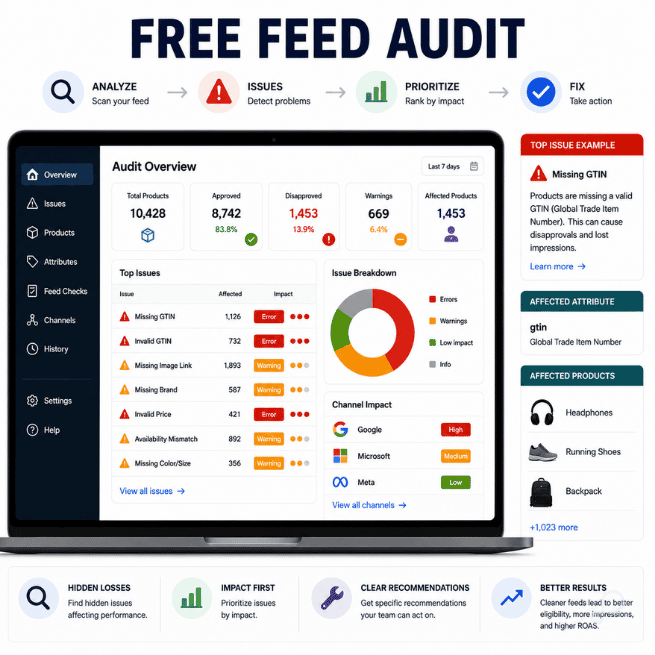
See what's in your feed — and what's already been pulled. Run a Free Feed Audit. It scans your catalog and flags the disapproved products, the attributes causing them, and the specific SKUs that have dropped out of the auction.
Feed Forensics is a monthly series on product data, feed architecture, and channel performance.
In this post
Carlos Rodriguez is a seasoned content marketer with a background in marketing and advertising. Formerly at the helm of his own marketing agency, he now dedicates his expertise to guiding ecommerce merchants and marketers in mastering multichannel strategies. Outside of work, Carlos is an avid reader and hiker, often found traversing the mountain ranges of Cundinamarca like El Quinini.
Run a free feed audit and see which of your titles are matching queries you'd never choose to bid on.

.png)