





















































In their most basic form, product feeds are CSV, TXT, or XML files containing the product information that is used by marketplaces, shopping engines, and social commerce channels to display product listings.
And while most campaigns employ product feeds simply to move product data from one place to another, power sellers use product feeds as a competitive advantage.
Believe it or not, a product feed can drive the success or failure of an ecommerce campaign.
Data dumps might seem like a quick solution to get products published on channels, but in most cases, they just lead to missed opportunities — and wasted ad spend.
Shopping channels and marketplaces use product data as an indicator of campaign quality. Channels look at the data in a product feed to draw conclusions and determine whether or not to show products to potential shoppers.
Power sellers use optimized product feeds to outmaneuver competing products for impressions, clicks, and sales. Here are 3 ways you can use product feed optimization to improve performance:
Channels only have one thing to go on when their algorithms are deciding what listings to show shoppers: your product data.
What’s included in your product feed makes all the difference. Better, more complete product data wins every time.
Do your product listings match your store data? Is your inventory up-to-date? Are all product updates current? Let’s hope so.
Nothing spells campaign chaos like having old, inaccurate data on your product listings. Not only is it a bad shopper experience, but it can also cost you getting booted off some channels.
Your store has an identity. Tone. Style. It’s why your customers love you.
But when you’re paying top dollar to marketing channels for impressions and clicks, you want to stick to the best practices that will get you the most conversions. Product feeds give you flexibility over your product data, allowing you to manipulate and enhance your store’s data in order to capitalize on every impression.

One way or another, if you sell products online, you’re going to use product feeds.
Now, whether you a) manage product feeds manually or b) by using your web store’s built-in product feed or c) by using a product feed automation tool, that is the question.
As you’re reading this you’re probably thinking, Of course GoDataFeed is going to suggest that I use a product feed automation tool. Obviously. It’s what they do. Right?
Well… Not so fast.
You have three options to manage your multichannel product feeds and it’s important that you understand each before you make a decision:
This is exactly as it sounds. You manage product data using a spreadsheet that you update manually on Excel or Google Sheets or OpenOffice Calc, etc. Every time a change is made, you re-upload the file in CSV or TXT format to each channel.
This option should only be considered by sellers with very small catalogs and a lot of time to spare.
These require a direct connection between your web store host and the channel you want to sell on.
Store-in-a-box solutions like Shopify and BigCommerce usually build content API feed options to popular channels like Google and Facebook. This option offers a quick, no frills way to connect your store's product data to channels.
The downside of this option is the lack of customization, optimization, and automation. Your data will be published on Google and Facebook (and any other channel with a native content API feed) exactly as it exists in your store (see also: data dump). For that reason, this option should be used only by newer sellers who aren’t ready to take on product feed optimization.
For more advanced sellers who want to "optimize" their product feeds to meet their marketing goals on each channel, there is a better option.
Enter the product feed automation solution.
Before we explain what an automated product feed solution is, let's first define what Product Feed Optimization is.
Product feed optimization is the process of modifying and enriching product attributes in data feeds for the purpose of improving KPIs on ecommerce marketing channels. Product feed optimization has been shown to improve impressions, impression share, click-through rate, quality scores, cost per click, cost per acquisition, and conversion rates.
A few simple examples of common product feed optimization tactics:
Product feed automation tools like GoDataFeed make it easy to optimize product feeds. Here's why:
For some merchants, these tactics and tools might be overkill.
For everyone else, an automated product feed solution is the best way to manage product feeds at scale. Our users, for example, rank time savings, improved performance, and reduced labor costs as the top 3 reasons they use GoDataFeed.
The trick to choosing a product feed automation tool is to opt for a “scalable” solution; that way you don’t overpay for features or allotments you don’t need.
Now that we’ve established what product feed optimization and automation are, let’s look at who benefits from the use of product feed management tools like GoDataFeed.
If you have a dozen products, product feed automation probably isn’t necessary. The more products you have, though, the more need you’ll have for a tool that makes handling all that data simpler.
A common mistake product feed automation naysayers make is assuming data is static. It’s not. Prices change, inventory changes, colors are discontinued, sizes shift. If your product data changes even a little bit, a product feed automation tool can save tons of time. Not to mention the headaches you’ll avoid by not submitting incorrect data.
This might be the most practical use for product feed automation.
When you design your online store, you format your product pages and the data housed within them in a way that aligns with your brand. Your product titles, descriptions, bullet points, images, etc., are all put together in a way that fits your website’s style, tone, and aesthetic. Few sellers design their online stores thinking, “I need to make sure my product pages fit Google’s requirements.” Or Amazon’s. Or Facebook’s.
The fact is, your product data rarely comes out of the box “optimized” for marketing on any other channel besides your online store. Unfortunately, Google, Amazon, Facebook, Walmart, Pinterest, and all other ecommerce marketing channels will only accept product feeds that are formatted to match their required fields.
What’s worse, their requirements are all different.
So how do you optimize for each channel while maintaining your store’s brand identity? If you guessed product feed automation, you’re catching on
A product feed automation tool is the single best option to manage your product catalog laterally to multiple channels. Fun fact: product feed automation tools are sometimes referred to as multichannel feed tools.
Some power sellers understood really early on that optimized product data was their golden ticket. You can identify these by their expensive yachts. For the rest of us, now — like right now, stop reading and go optimize your product feed — is the best time.
Other good times to optimize product feeds…
We mentioned this before. Your product feeds are the single most important source of information to channels. It’s where their algorithms figure out whether to show your products — or not. If your campaigns are not doing as well as you’d like, it’s product feed optimization time.
Search Engine Land ran an experiment on product feed optimization. What they found was both alarming and encouraging. By simply running rule-based title updates through their feeds they were able to increase impressions by 2,000% and CTR by 88%.
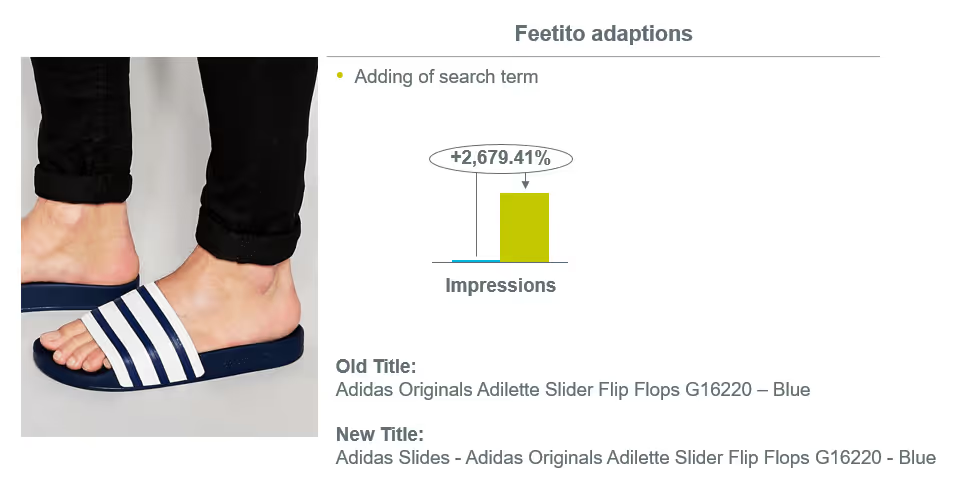
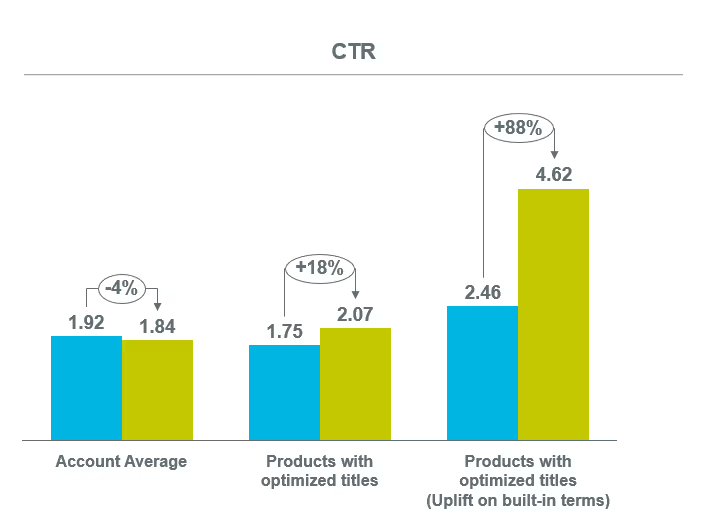
A new channel can be a great incentive to dive into your product data. A fresh start. Get in there, identify gaps in your product content, enhance titles, spruce up descriptions, add bullet points, enhance relevance with use cases, add images. Use this new channel as a gateway to better product data practices. Then apply what you’ve done to previous channels and see how much better you’ll do.
Warning: Always make changes carefully. If your existing channels are performing well enough, apply spot changes rather than bulk changes. Monitor performance of new data carefully before committing to new practices. And ALWAYS back up previously used data in case you need to revert back to former listings.
People talk about “product listing optimization” like it’s some magic wand that might fix all your campaign problems. It’s not magic, but the results can be magical.
Imagine you spend a few minutes reformatting your product title structure, a few minutes concatenating data fields into one really juicy product description, and another few minutes getting the rest of your fields just right (i.e., color, brand, etc.). And then, like magic, you start seeing double, triple, quadruple the number of impressions and clicks.
It sounds like hyperbole, but it’s a common occurrence. No bid, no budget, no magic wand can do for your campaigns what a solid product feed optimization strategy can do.
The first step is to lock down your required fields. These vary from channel to channel, but assuming you are starting with Google as most merchants do, here’s a quick checklist.
Most attributes in this group reference data that doesn't change. Attributes like condition and gender have static values that won't ever need to be modified or improved.
"Optimization" in these cases it’s more about ensuring the field is being used and appropriate values are entered.
In other cases, "optimization" refers more to standardization.
For brand-identifying attributes like brand, GTIN, and MPN, you’ll want to use values that will be recognized and accepted by the channel. These are considered semi-customizable because the supported values can vary.
For example, GTIN allows the following values and formats:
For subjective attributes like material, pattern, and color you’ll want to match your shoppers' preferred terms.
Let’s look at standardized color attribute examples:
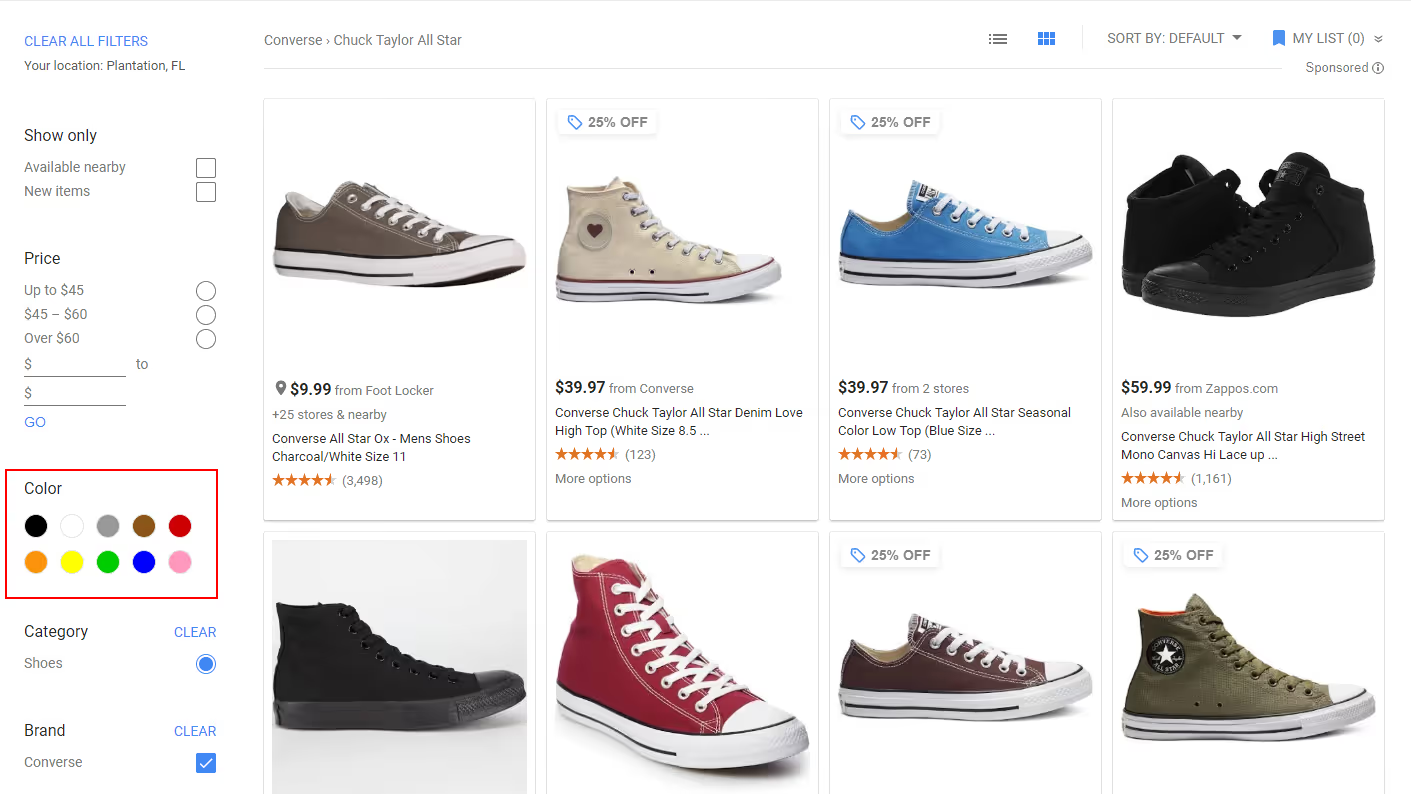
Google, like most shopping channels, has a limited list of color selection options. That’s why, when optimizing your product’s color value, you always want to stick to “common” colors.
Are your products designed with exotic colors like light salmon and dark tangerine and desert sand and lavender blush? That’s OK. The solution here is to replace your product’s unique color values with the related standard color.
Here are a few examples:
Use standard colors in the product titles too. Product descriptions, however, should provide the added detail of the unique color. We also recommend submitting a high-quality color swatch as an additional_image to give shoppers a more accurate feel for your actual color.
For helping channels index your products and display them properly when shoppers filter for color, use common colors.
These are the attributes that allow you to get creative and gain a real advantage over your competitors’ listings.
These attributes are what most people think of when they think of “product feed optimization” and “product listing optimization.”
Of all the things you can do to improve your product feed’s performance, optimizing the title might be the most effective use of your time. It can be done fairly quickly and has the potential to drastically improve results.
We recommend concatenating your product title from multiple key attributes. By doing so, you increase your titles’ relevance for a variety of searches — and improve your chances of matching search queries.
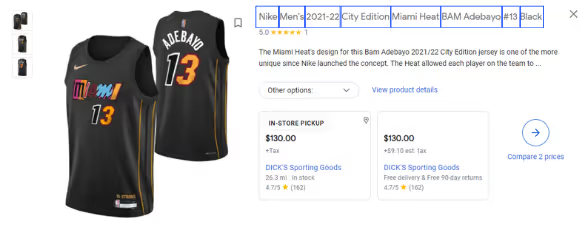
Here are some commonly used templates by product category:
Most marketing channels don’t let you use keyword targeting in shopping campaigns the way you might target on text ad campaigns. But that doesn’t mean you can’t use keyword research to fine-tune campaigns. You just have to be sneaky-creative about it: use them in your product descriptions.
Expand your keyword list by thinking up ways your shoppers might search for your products.
Don’t settle for data “as is” and definitely don’t settle for just the required fields. If you, like everyone else, are submitting the bare minimum, what’s going to persuade the channel’s algorithm to move your listings into prime position?
The more information you provide, the better your product listings will be.
It’s as simple as that.
Here’s the checklist we use internally to ensure our product feeds are filled to the brim with product data that is useful to shoppers and channel algorithms:
Data accuracy is a full-time job.
You can’t afford to present shoppers with inaccurate availability, incorrect values, or broken links. Worse yet, if it happens enough, channels might take action to penalize you for it.
Your product feed should always reflect any and all data changes in your store and in your inventory. The solution? Update and submit your product feed daily.
The easiest and most effective way to do this is to use a product feed automation platform. GoDataFeed, for example, analyzes your product data and submits a delta file with updates to data multiple times per day to ensure your product listings stay up to date.
Of course, you can do this manually as well. It’s a much more tedious process but it can — and must — be done. The point is, regardless of how you achieve it, your data needs to be accurate.
Now that you have a strong foundational knowledge of product feeds, it’s time to get started.
Whether you’re managing feeds manually, through your web store’s content API, or through a product feed automation platform, there’s no way around it. You need a product feed if you want to get your products into channels like Google, Amazon, and Facebook.
Use the information on this blog post to guide your strategy or reach out to our product feed experts for more information.
Bryan is a digital marketer with roots in journalism and creative writing. Over the past decade, he's helped hundreds of online retailers develop and implement ecommerce marketing strategies. When he isn't educating retailers on ecommerce, he's out exploring South Florida and stalking local breweries.
Run a free feed audit and see which of your titles are matching queries you'd never choose to bid on.

.avif)