





















































Retargeting
whatever Merchant Center holds.
Display remarketing assembles each ad from your Merchant Center product data - image, title, price. GoDataFeed keeps that data valid and current, so the ad a returning shopper sees matches your store.
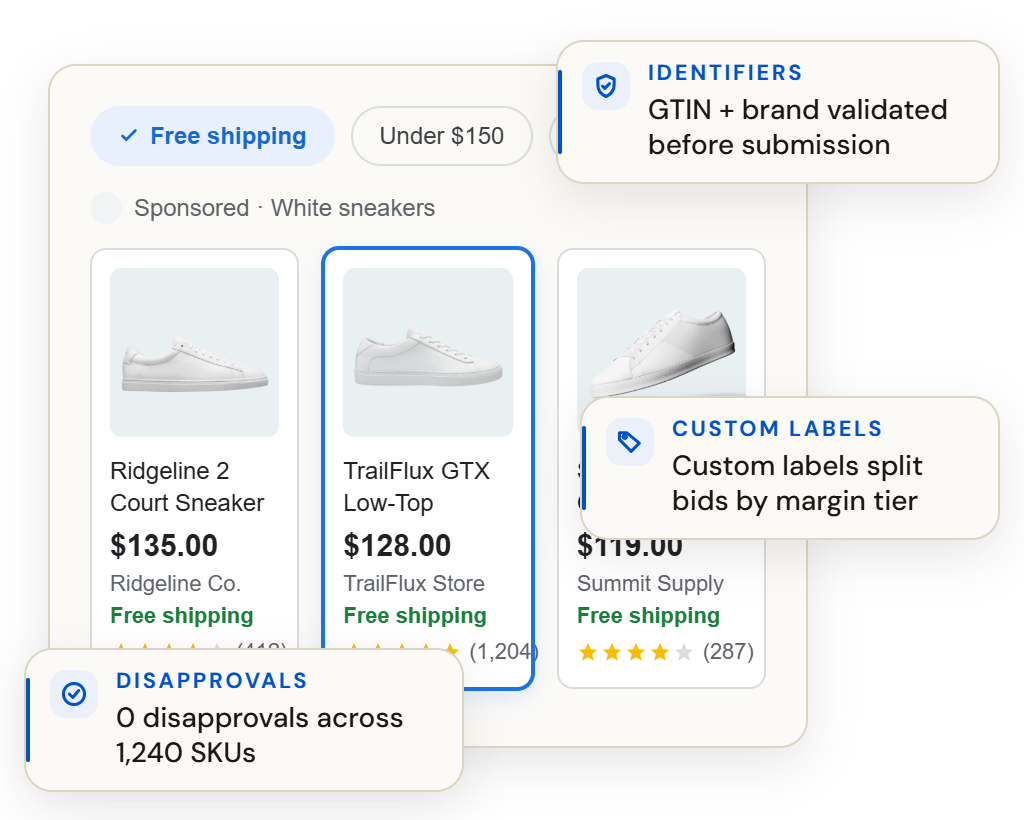
What the ad renders
A shopper who already visited gets shown your product again - at whatever price and availability the feed last reported. Stale data burns the warmest clicks you buy.
Products validated against Google’s spec, because a disapproved item drops out of remarketing.
Scheduled updates keep rendered ads aligned with your store between full syncs.
Formats and fields built for ad rendering, not storefront display.
Item groups keep the remarketed product the exact one the shopper viewed.
How it works
01
Your catalog imports automatically with pricing, inventory and imagery.
02
A maintained template covers Merchant Center requirements; your rules refine the rest.
03
Price and availability refresh automatically between full catalog pushes.
Thirty minutes, live, on your data — the mapping, the rules, the validations, the fix list. Or watch the demo tour first: the recorded version, no meeting required.
1
catalog behind remarketing, Shopping and every Google surface.
60+
channels one connection can feed.
0
warm clicks spent on sold-out products.
Questions, answered
Where do remarketing ads get product data?
From your Merchant Center feed. GoDataFeed keeps it spec-compliant and current, so ads render correctly.
What happens when an item is disapproved?
It drops out of remarketing. Pre-push validation catches spec issues before they cost you the audience you already paid to build.
How fresh is the data?
As fresh as your schedule - price and stock can refresh more often than the full catalog.
Go deeper
At a glance
Type
Channel
Connection
Feed format
Refresh
Order sync
No
Plan
Identity key
Before you start
Note
GoDataFeed optimizes, enriches, validates, and keeps your product data in sync across Google, Meta, marketplaces, and AI shopping.
