Getting products approved is the minimum requirement for running a shopping campaign. Approval gets the product into the auction. Enrichment helps it enter the right auctions.
That's the real job of product data enrichment. It gives the channel enough context to classify the item, and it gives your campaign enough business data to decide whether that item deserves more spend.
Merchant Center's Needs attention area, formerly Diagnostics, can identify a missing required GTIN, an invalid price, or a landing-page problem that makes a product ineligible. It cannot tell you that a technically valid title is too generic to capture relevant searches.
Consider a product submitted as:
TrailFlex 2
That title may match the product page and pass validation. But it doesn't tell Google what the product is, who it's for, or which searches should trigger it.
A more useful title would be:
North Peak Men's Waterproof Trail Running Shoes - Black - Size 10
The second version gives Google enough context to identify the item as a men's trail-running shoe, connect it to waterproof footwear searches, and distinguish the black size-10 variant.
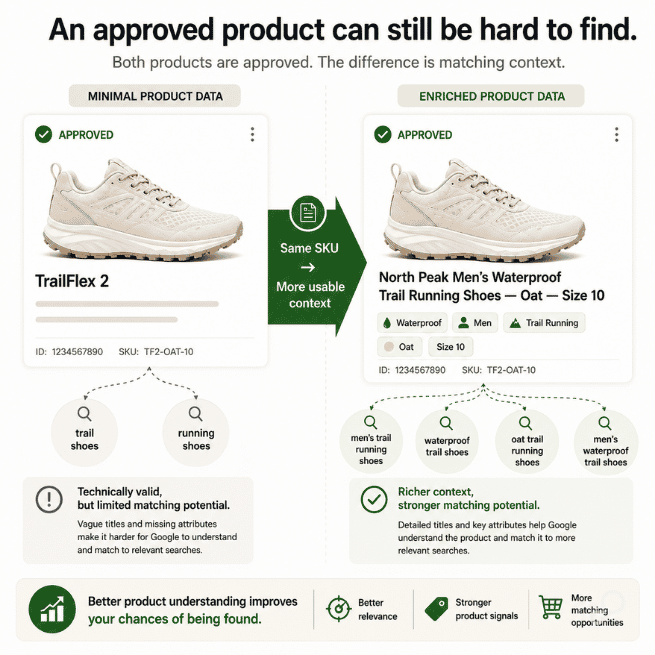
This is where it breaks. Feed teams use approval rate as their main quality metric, fix their disapprovals, see nearly every product active, and assume the catalog is campaign-ready. What you actually want to look at is how many active products receive impressions, which searches trigger them, and whether spend reaches the products that make commercial sense.
A generic completeness score won't tell you which missing fields matter. Audit brand, gtin, and mpn for product identification; title, color, and material for matching; and custom labels for campaign control.
Then stop counting only blank fields. A populated value isn't necessarily useful.
For example:
product_type = Apparelsale_price remains active after the promotion endscolor says bluegtin contains an internal SKU instead of a manufacturer-assigned identifier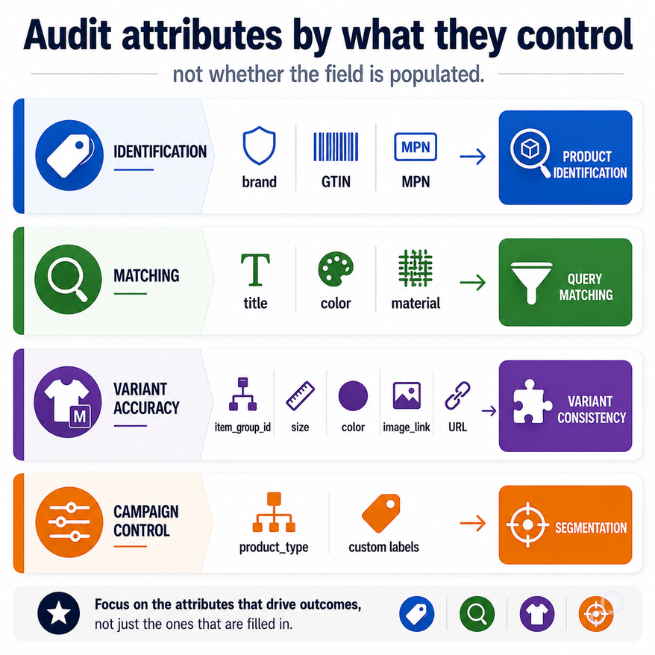
Products that have manufacturer-assigned identifiers should submit the correct identifiers for each sellable variant. Products without valid identifiers can be harder for Google to classify and may not qualify for every Shopping program or feature.
That does not mean you should invent a GTIN for products that legitimately do not have one. The goal is identifier accuracy, not identifier coverage.
A surprising amount of "missing" data already exists somewhere in the catalog. It may live in variant options, metafields, specifications, category breadcrumbs, manufacturer files, or an ERP export.
Don't apply one source hierarchy to the entire feed. Decide which system owns each attribute.
Shopify may own the current variant URL. Your ERP may own inventory and cost. Your PIM may own material and dimensions. The manufacturer file may be the authority for GTIN and MPN.
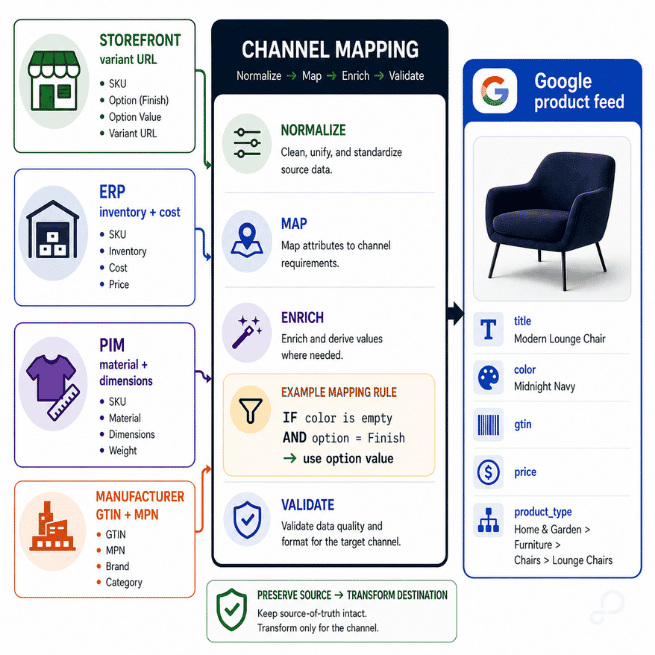
Once ownership is clear, mapping rules can recover the data without changing the storefront catalog:
IF color IS EMPTY AND variant_option_name = "Finish"
THEN color = variant_option_value
Don't let color normalization trip you up. Google expects the color value to match the customer-facing value on the landing page.
If the storefront calls the color "Midnight Navy," use:
Google color: Midnight Navy
Google title color term: Navy
That preserves variant consistency while placing the term shoppers are more likely to search for in the title. Normalizing an internal code such as BLK to Black is appropriate only when Black is also the customer-facing value.
In GoDataFeed, this work belongs in the channel mapping layer. Preserve the source value, transform the destination value where the channel allows it, and rerun the logic as the catalog changes.
Extract before you infer. Enrichment should expose reliable product facts, not create claims the source data cannot support.
Storefront merchandising and shopping-platform retrieval serve different jobs. Copying the product-page title into every destination rarely gives each channel the detail it needs.
A category-specific title rule for apparel might be:
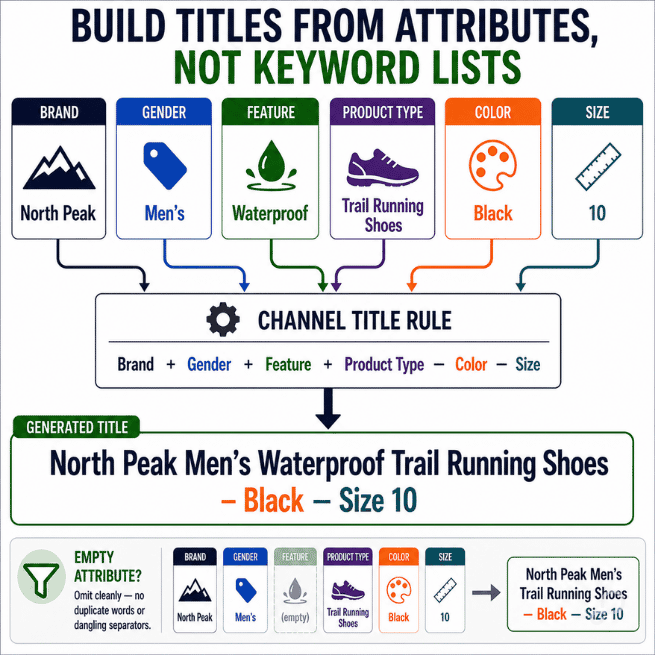
[Brand] + [Gender] + [Feature or Material] + [Product Type] + [Standard Color Term] + [Size]
The TrailFlex example would use:
Brand: North Peak
Gender: Men
Feature: Waterproof
Product type: Trail Running Shoes
Standard color term: Black
Size: 10
The transformation should omit empty components cleanly. Otherwise, automated enrichment produces duplicate words, dangling separators, and titles that look generated because they were generated badly.
You also don't need one universal "optimized" title. Google may benefit from query-relevant attributes, while a marketplace may require a specific category syntax. For Meta catalogs, front-load the product identity and important variant details, and don't assume every placement will display the full title before truncating it.
Use the same trusted attributes across channels, but assemble them for the destination. That is channel-specific enrichment, not inconsistent product data.
Teams often copy the same broad category into google_product_category and product_type. That may satisfy the feed, but it collapses the hierarchy the media team needs for reporting and product partitions.
The two fields do different jobs, and they don't have the same depth:
google_product_category: Apparel & Accessories > Shoes
product_type: Footwear > Men's Footwear > Running Shoes > Trail Running Shoes
Google's taxonomy stops at Shoes. There is no "Athletic Shoes" or "Trail Running Shoes" node to reach. Apparel & Accessories > Shoes (ID 187) is a leaf. That's why the granularity has to live in product_type, which carries your own merchandising structure and has no depth limit.
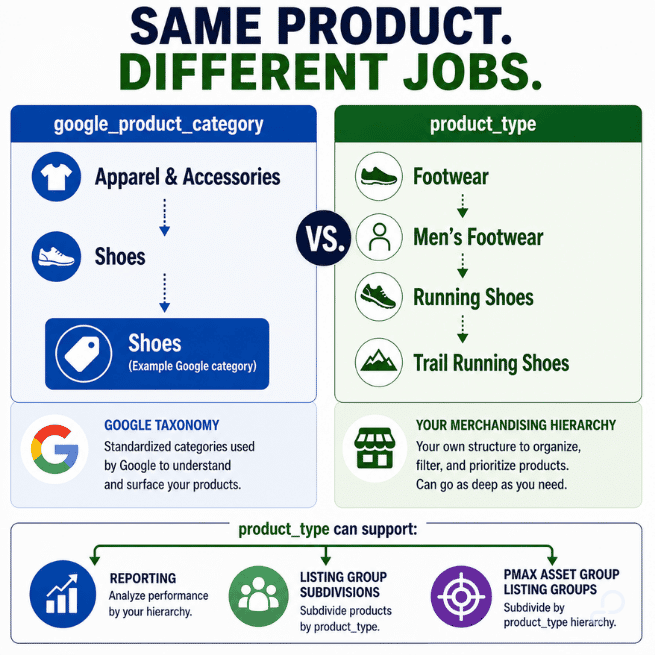
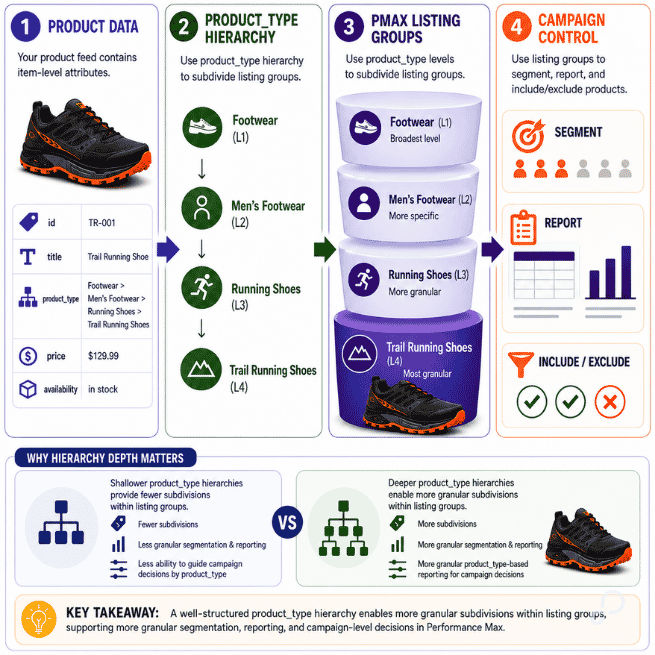
Submitting only Shoes in product_type throws away that context. A complete breadcrumb lets you analyze footwear broadly, isolate running shoes, or build a listing group for trail-running products.
IF department = "Men" AND category = "Shoes" AND activity = "Trail Running"
THEN product_type = "Footwear > Men's Footwear > Running Shoes > Trail Running Shoes"
Google Ads can use product_type to subdivide product groups and Performance Max listing groups. That gives the media team usable controls without forcing them to rebuild the catalog inside the ad account.
Google knows the price and availability you submit. It does not automatically know your margin, inventory pressure, return rate, sales velocity, or clearance plan. You have to provide or derive those signals.
One workable custom-label structure is:
Keep each label focused on one dimension:
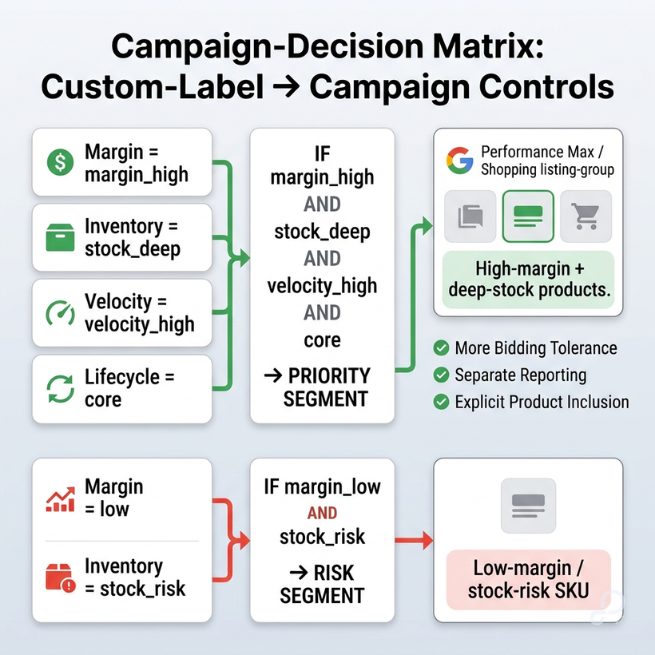
IF margin_percent >= 50 THEN custom_label_0 = "margin_high"
IF inventory_quantity >= 20 THEN custom_label_1 = "stock_deep"
Then combine the signals when building a campaign or listing group:
Include when:
custom_label_0 = "margin_high" AND custom_label_1 = "stock_deep"
Google currently supports five custom labels for Shopping, Performance Max, and Demand Gen campaigns. Without them, Google can still optimize using product performance and auction signals. What you lose is the ability to explicitly segment, filter, and compare products using your internal business dimensions.
If you submit cost_of_goods_sold and implement conversions with cart data, Google Ads can also report gross profit metrics. Custom labels remain useful when you need campaign controls based on margin bands, inventory position, or lifecycle.
Two groups can produce the same ROAS without producing the same business result. One may have enough margin and inventory to tolerate a higher acquisition cost. The other can hit the same ROAS and still be the worse place to put the next dollar.
Commercial labels introduce a less obvious problem. Products can move between groups too often.
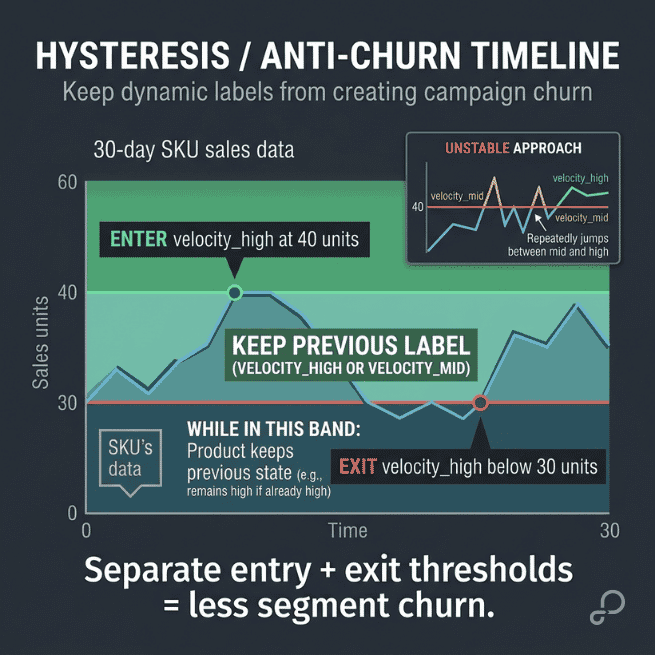
A SKU might jump from velocity_mid to velocity_high after one strong weekend, then fall back three days later. If reporting or product inclusion depends on that label, short-term noise keeps changing the segment's product mix.
Use rolling evaluation periods, minimum data requirements, and separate entry and exit thresholds:
SET custom_label_2 = "velocity_high"
WHEN units_sold_30d >= 40 AND in_stock_days_30d >= 21
KEEP "velocity_high"
UNTIL units_sold_30d < 30
Changing a custom label does not create a new Merchant Center product when its product ID remains stable. The problem is operational. The SKU keeps moving between targeting and reporting groups.
Choose the metric based on the decision. Units sold may work for replenishment. Revenue velocity, contribution profit, or conversion rate may be more useful for campaign segmentation.
Parent-level data can easily overwrite child-level truth.
If every child inherits a parent title containing "Black," a blue SKU may end up with a blue image, color = Blue, and a title that says "Black." Each field looks valid on its own, but together they describe different variants.
Keep shared information such as brand and core product type at the parent level. Every child should retain its own stable id, while all children in the family share the same item_group_id.
Resolve color, size, price, availability, image, and landing-page selection on each sellable child. When the manufacturer assigns variant-specific GTINs or MPNs, submit the correct identifier for each child. Whenever possible, the product URL should preselect the exact variant submitted in the feed.
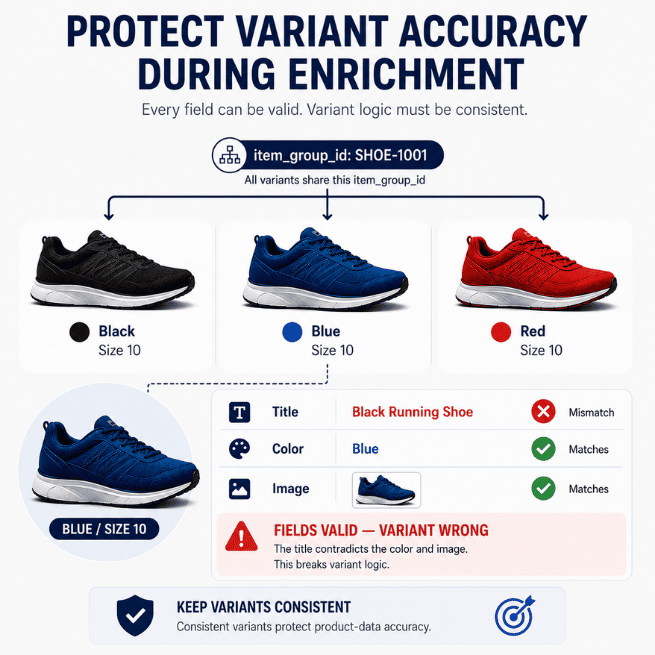
The platform validates individual fields. It doesn't always notice that five valid fields describe three different products.
That gap is the reason field-level validation isn't enough. Merchant Center checks whether each value is formatted correctly and uses an accepted value. It does not check whether the values agree with each other, or whether a campaign label still matches the product's real state.
Validate four layers, not one:
The platform only enforces the first layer. Write rules for the conflicts it can't see:
IF custom_label_1 = "stock_deep" AND inventory_quantity < 5 THEN flag_product
A product labeled deep-stock with five units left is valid on every individual field and wrong as a whole. Test enrichment against simple products, variants, sale items, clearance items, and products with incomplete identifiers before you publish catalog-wide.
Enrichment that passes validation still has to prove it changed exposure. Attribute coverage tells you the feed is fuller. It doesn't tell you the catalog got more competitive.
Measure the outcomes the enrichment was supposed to move:
Test by product cohort instead of changing the full catalog at once. Enrich one category, hold the rest, and compare. Judge success by better-qualified exposure and tighter control over spend, not by attribute coverage or raw impression growth. A feed can gain impressions on the wrong queries and lose money doing it.
Product enrichment isn't a catalog cleanup you complete once. Source data changes, promotions expire, inventory moves, and new categories enter the catalog. The cycle stays stable even when the catalog doesn't: Audit → Map → Enrich → Validate → Export → Measure → Refine.
Tie each rule to the event that makes it necessary:
Start with one category. Use Google Ads product reporting or Merchant Center performance data to find active SKUs receiving little or no exposure. Then review Merchant Center's Needs attention area and inspect the submitted product data for missing, generic, stale, or contradictory attributes.
Don't enrich the feed to make it look complete. Enrich it when the added data changes classification, matching, or campaign control.

In this post
Carlos Rodriguez is a seasoned content marketer with a background in marketing and advertising. Formerly at the helm of his own marketing agency, he now dedicates his expertise to guiding ecommerce merchants and marketers in mastering multichannel strategies. Outside of work, Carlos is an avid reader and hiker, often found traversing the mountain ranges of Cundinamarca like El Quinini.
Run a free feed audit and see which of your titles are matching queries you'd never choose to bid on.