




















































Google Shopping is the entry point to all things retail on Google. Product listing ads, dynamic remarketing ads, local inventory ads, Manufacturer Center, you name it, these all depend on a Google Shopping foundation. So it makes sense that Google Shopping is far and away the most important marketing channel for ecommerce marketers looking to reach Google's one billion users.
As such, it’s important to be meticulous when launching and managing your campaigns on it. This is not a "set it and forget it" scenario. Paying close attention to every level of your campaign’s structure can mean the difference between hordes of happy shoppers flocking to your store and piles of burning ad spend.
First, get to know the system. Google Shopping is the product of two platforms:
Google Merchant Center is where your Google shopping feed lives. It retains all of your product data in a format that’s compatible with the Google Ads platform and -- more specifically -- how Google Ads takes in Shopping campaign data.
Google Ads is where your shopping campaigns live (listing ads, budget, bids). It’s also where you can see reporting data and make changes to campaign settings.
Each of these platforms plays a vital role in the health of your Google Shopping campaigns so it’s important that you understand how each works in relation to your campaigns.

Second, have a plan for ongoing campaign optimization. Establishing a sustainable and repeatable plan of action will set up your campaign for success.
The plan we follow is made up of four steps:
In this Guide, we lay out our campaign optimization plan and provide detailed best practices to help you set up and manage campaigns for optimal performance.
Any good business strategy begins with thorough planning. To properly plan your Google Shopping campaign strategy, set your sights on these three areas :

Keywords can be as much about your customers as they are about your products. How are customers looking for your products? What phrases are they typing into Google to search? Are they just beginning to do research? How much do they know about the products they want to buy?
These are important questions because searches can tell you a lot about buying intent. Understanding what your customers are searching for can give you a big advantage when creating product titles and descriptions in Google Shopping.
To dig up useful search queries that match your products use these tools:

Your products vary. By price, by margins, by inventory, by seasonality… And while these attributes might seem trivial on paper, they can help you create smarter campaigns (or hurt your campaigns if ignored).
Knowing how your products vary based on these attributes will allow you to segment the catalog you push to Google using custom labels. You can then use those custom labels to create optimized campaigns with bidding strategies tailored to each segment’s unique CPA.
We recommend a combination (or all) of these segmentations for new Google Shopping campaigns:
For the purpose of Google Shopping campaigns, goals should always revolve around a target cost per acquisition (CPA). The reason for this is that you want to keep sales and costs in perspective at all times.
With that said, it’s important to note that not all acquisitions are created equal. Traditionally speaking, acquisitions in Google Ads are synonymous with conversions, which are synonymous with sales. One sale = one conversion = one acquisition. But to find lasting success in Google Shopping, you’ll want to look beyond transactional acquisitions: Customer lifetime value (CLV) is the ultimate measure of campaign success.
We’ll look closer at creating and measuring CLV in Step 4: Campaign Monitoring.
The quality of your product data, more than anything else, will determine your products’ success on Google Shopping. That’s because Google looks at data quality in order to assign the ad relevance portion of your Quality Score.
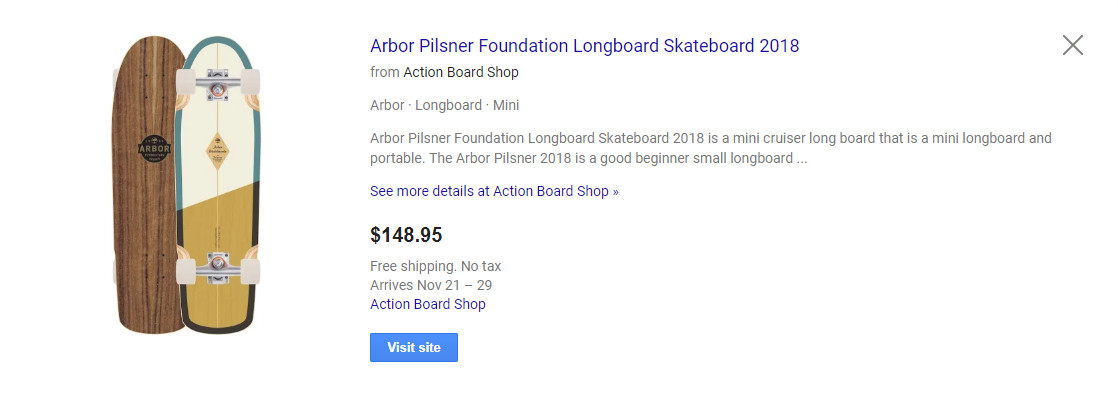
Quality Score, which is ultimately what determines whether your products appear for any given search, consists of three parts:
Ad relevance, which is measured entirely based on the fields in your product feed, is most closely affected by:
Other important fields that can affect your ad relevance and/or CTR:
Product titles should be descriptive but not long-winded. They should be search-friendly but not “stuffed” with keywords. The formula for the perfect product title will vary for each seller and each product, but here are a few formats we’ve found to be effective.
Note: Some of the title attributes that we provide in the following examples may differ for your ad, depending on how you classify your products. It’s important to come up with your own formulas based on what you know about your products and your customers -- and test, test, test -- before settling on one for good.
Brand + Product Type + Gender + Keyword 1 + Keyword 2 + Color + Size
i.e., Nike Pro Short Sleeve Training Top Men’s Short Sleeve Pullover Carbon Heather/Black/Black in Large
Product Type + Keyword 1 + Keyword 2 + Color + Size
i.e., Business Cards - 16 point Matte Finish in Multicolor - Standards Size 3.5” x 2”
Brand + Model Number + Material + Product Type + Size + Color
i.e., CharBroil Classic 480 40000 Propane Gas Grill with 4 Burners - Black
Things to keep in mind while creating your product titles:
Although the character limit for product descriptions is 5,000 characters, the optimal description length is 500 characters.
Keep the descriptions keyword-rich and product-specific. Include common uses to your products.
Do not include other available variants, i.e., color, size, material, etc., as doing so can cause the wrong product to show. For example, if you list a black dress and include in the description that it is also available in red, Google might show the black dress to a shopper searching for a red dress.
The first 100 characters of your product description carry the most weight. Be sure to include the most important information at the beginning of the product description.
As noted in the product title optimization section above, brand is very important to how Google indexes your product listings and how it serves them up to relevant search queries. And that’s just in the title. Google actually requires brand as its own feed attribute.
If it’s your brand, this gives you the opportunity to control how your brand appears in Google Shopping, though it’s important to take into account how your shoppers will look for your brand when they search.
If you’re a retailer, get to know the brands you sell. Run your brands through the same steps as keyword research to get a good feel for how they appear in top listings.
In either case, whether a brand owner or retailer, be sure to list the brand of every one of your products. No exceptions.
Unique Product Identifiers (UPI) are among the most important attribute in your feed. These are Manufacturer's Product Number (MPN) and Google Trade Identification Number (GTIN).
The MPN is usually the SKU and the GTIN might be the UPC or ISBN. If you have already provided the Brand for your products (and, yes, you should have), you’ll only need one UPI; either MPN or GTIN. If you have both, though, use both.
It is vital, however, to only submit accurate values in UPI fields. Google uses UPIs to group the products it serves up to a search, so the values you enter in UPI fields should be universally used for that product. In other words, all listings in Google Shopping for that product -- yours and competitors’ -- should share that UPI.
False or incorrect UPIs will prevent Google from matching your products to established product groups, which can severely lower your impression share.
The Identifier Exists value should only be used for custom products or one-of-a-kind products or products created before GTINs were introduced, such as:
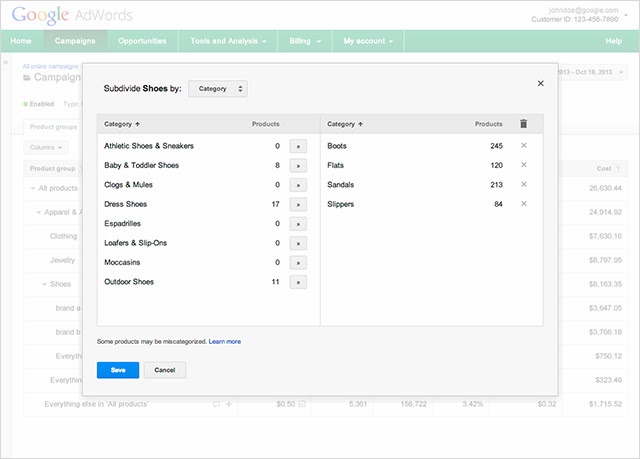
Google’s category tree is exhaustive but not perfect. Your products will undoubtedly fit into one of its branches. In some cases, your products might fit into multiple branches. The most important thing to note when categorizing your products is that you want to be as accurate as possible for your intended searches; that means choosing the branch that your shoppers will most likely associate with your product while getting as far down the taxonomy tree as possible.
Product Type is immensely helpful in providing clarity to Google about your products. It gives you a measure of control beyond Google’s taxonomy. It’s especially useful to retailers whose products don’t fit neatly into the taxonomy tree.
In order to get the most out of the Product Type field:
For example, consider using logic to assign Product Type:
Product images don’t directly affect ad relevance but they have a huge impact on CTR. Follow these product image best practices for best results:
More than anything else, price will be the determining factor for purchase. Especially if your products are sold by other retailers advertising on Google Shopping.
Before committing to a price, search your products and scope out the competition’s price range and position relative to pricing. Although Google does not report pricing as part of its Quality Score metrics, research shows that increases in selling price negatively affect ad placement and impression share in Google Shopping SERPs.
A study by Search Engine Land found that products whose prices are lower than the market average generate the “lion’s share” of traffic in any given seller’s Google Shopping inventory.
“The difference in impressions,” says Andreas Reiffen, author of the study, “is clear proof that the Google Shopping algorithm favors products with lower prices and therefore serves those product ads for a higher number of relevant searches.”
Google provides some additional (required and optional) fields for apparel products. These can help your products in two distinct ways:
Attributes and acceptable values:
If you sell in the U.S., you must set up tax rates for each state you charge taxes for. If you sell in the U.S. but don’t charge tax, indicate that in your tax settings.
There are multiple options for tax rate and these can be applied both at the account and data feed level. Be sure to consult your tax advisor to understand which options would work best for your business.
Shipping rates that can be set up in your Merchant Center settings:
If you use carrier-calculated rates, shipping rates will be based on dimensions, weight, user location and origin postal code. The following attributes are required in your data feed for the carrier-calculated option:
This field only has three accepted values:
This field only has two accepted values:
We've already discussed how custom labels allow you to group products in ways that make sense to your business rather than Google’s categorization structure. Now let’s talk about implementing custom labels as attributes in your data feed.
You can have up to five custom labels in your product data feed. These start with 0 and end with 4.
Be sure to assign a specific definition for each of the five custom labels and specify the possible values for each. Use these custom labels consistently across all products in your Merchant Center account, assigning the appropriate value to each product according to the custom label definition.
Each of the five custom labels can only have one value per product.
The values for custom fields will vary based on your products and your business’ unique needs. In the following section, we'll go into detail about how you can "strategize" using custom labels, but for now, just note that there are common examples that can easily be adopted by most (if not all) sellers:
Bids play a key role in your PLAs’ position (ad placement in relation to competitors’ ads) and frequency (how often ad is served for qualified search queries). That’s why it is imperative that your bids strike a perfect balance between budget and impression share. Bid too high and you’ll overspend, bid too low and you’ll miss out on shoppers.
To toe this line, you’ll need to account for the following factors:
Look familiar? It's your Custom Labels!
How much is a PLA worth to you? Campaign managers often use “guesstimated” bids that don’t take into consideration profitability levers. Instead of guessing, use the data to apply levers to either modify your bids or optimize your budget.
One way to pragmatically establish bids is to use a formula like this to devise a target bid range:
The bid range allows you to adjust bids based on business needs while working within a profitable range.
Understanding your store's unique factors will let you create custom bidding strategies. Here are some factors that should be included in your custom bidding strategy:
Remaining competitive will require a smart bidding strategy and a workable budget. If your bids are high in relation to your budget, your PLAs will be at a disadvantage. Google estimates how many clicks will deplete your daily budget and, if all else is equal and your competitors’ budget will allow for more clicks, their ads will appear.
A way around this might be to pool your weekly budget into concentrated timeframes rather than spreading them out 24 hours a day across the whole week.
i.e., $10 a day but only within the hours of 9 a.m. and 5 p.m. (instead of $10 from 12 a.m. to 11:59 p.m.), or $70 a week but only Friday through Sunday so that each day gets $23 a day instead of $10.
To do so, think about your target audience. Who are they? When do they shop? But don’t just guess. Look at your site’s analytics.
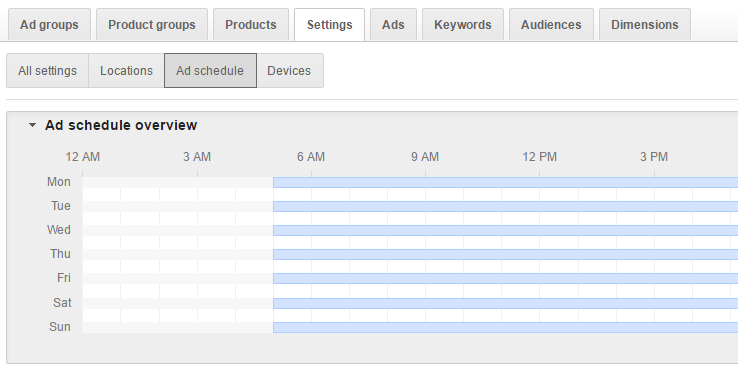
Then establish target timeframes. Is it weekdays 6 p.m. to midnight? Is Monday through Thursday 9 a.m. to noon?
Use the information you have about your customers’ shopping behavior to set a campaign ad schedule that will maximize your products’ impression at exactly the right times.
Even the most sophisticated Google Shopping campaign will fail if it’s not monitored and optimized regularly. You should be checking in on your campaigns daily, though not every check-in needs to be in-depth.
The general health of your campaigns can usually be determined by looking at these three KPIs:
For quick daily check-ins, look out for these red flags:
Zero or low impressions - This is the most common issue and it’s usually attributed to either...
Impressions but no clicks - This means that, although Google is serving your ads, shoppers aren’t clicking. That’s usually because of the visible factors in the ad preview:
Clicks but no conversions - This is almost always a result of the landing page and checkout process. Does the landing page inspire buyer confidence? How easy is it for shoppers to check out? Do new visitors have to create an account before being allowed to make a purchase? Is shipping not free? All these elements might affect whether shoppers commit to buy.
Deeper analysis, however, should be done weekly for campaigns with heavy traffic, monthly for campaigns with lighter traffic. For this analysis, focus on identifying trends. That means establishing benchmarks in the early stages of the campaign and revisiting those to identify patterns in performance.
Conversion rate can be a simple yet powerful metric. It tells you how effective your Google Shopping campaigns, landing pages and overall strategy are.
AOV is one of the most telling metrics when measuring profitability of your Google Shopping campaigns. It will tell you which products are the biggest drivers of revenue.
Take the total amount of revenue divided by number of orders during the same period. Use this formula to determine AOV of channel, brand, sku, category, and any other product grouping important to your store.
Successful retailers know the secret is not just in selling. It’s in selling profitably. The first guard against unprofitable selling is managing your cost.
For online retailers, this often comes down to measuring costs accrued by individual verticals (i.e., sales channels, brands and even SKUs).
Cost-of-Sale Percentage (COS%) is the actual total cost of converting an item relative to the revenue it generated. For example, if one item with a $100 price tag sold and took $15 in click costs to convert, the COS% for that item at that point is 15%.
Unfortunately, you have to have a sale first in order to get this value. So what happens when a product has not sold yet? (See estimated cost of sale percentage below.)
GoDataFeed’s ECOS% preempts cost of sale to avoid running up the tab on Cost of Sale for products that haven’t acquired a sale yet but are already accruing ad spend.
ECOS% fills in the blank for COS% for products that have yet to convert. This provides a reliable predictor of what the actual COS% might be assuming the next click is a sale.
CPA tells you how much you’re spending on average to achieve a sale.
Say your monthly ad spend on Google Shopping is $5,000 and with that you’ve acquired 202 sales. Your CPA then would be $24.75.
It is vital to measure CPA in relation to AOV to determine your Google Shopping campaign’s profitability.
Use GoDataFeed’s analytics tools to create CPA and AOV reports for Google Shopping to monitor CPA.
ROAS tells you how much revenue your campaigns are generating in relation to your campaign spend. In other words, for every dollar invested in Google Shopping, how much money did you get back in revenue?
Use GoDataFeed’s cost reporting feature to measure ROAS for your Google Shopping campaigns and cut this report by SKU to identify which products are your big sellers (and which are just costing you money).
The beauty of Google Shopping (compared to, say, Amazon) is that you own the customer once the point of sale has been completed, so you can to market to them as you see fit from that point forward.
That’s where CLV comes in. CLV is a prediction of the net profit attributed to the entirety of the relationship with a customer. Once that initial transaction has taken place, that customer relationship is yours to nurture.
Measuring CLV can be challenging, given the multiple variables involved, but essentially it looks something like this:
For example:
If...
Then...
CLV is an accurate predictor of a campaign’s long-term value and should be included in your Google Shopping reporting.
Understanding your campaign KPIs is the first (and most important) step in the optimization process. How do you know what to optimize if you don't know where you stand?
Next up, identify the KPIs that need your attention. Think about the elements that affect these needy KPIs and how you can improve these elements to make an impact. For example:
We use the traditional marketing funnel to organize our KPIs. For example, I wouldn't tackle CPA optimization until I've optimized my impressions and clicks (because CPA falls farther down the funnel).
Once you've identified areas of need and grouped them accordingly, revisit the first three steps of this plan (campaign strategy, feed optimization and bidding strategy) to ensure each is up to snuff.
Continually monitoring your campaigns and taking the appropriate actions to optimize for each KPI is the only way to ensure long-term profitability in Google Shopping (and any other marketing platform for that matter).
Success on Google Shopping is easily attained, but it won’t happen by accident. Your best chances of achieving it will come from a combination of good planning, quality product data, smart bidding strategies, meticulous campaign monitoring and ongoing optimization.
We can be useful in all four of those categories, so let us know if you would like more information on how we can help.
In this post
Bryan is a digital marketer with roots in journalism and creative writing. Over the past decade, he's helped hundreds of online retailers develop and implement ecommerce marketing strategies. When he isn't educating retailers on ecommerce, he's out exploring South Florida and stalking local breweries.
Run a free feed audit and see which of your titles are matching queries you'd never choose to bid on.

.avif)