





















































Ecommerce gets all the headlines. But 87% of retail purchases still happen in-store. Meanwhile, 80% of U.S. consumers search for local businesses every week—and 32% do so daily.
This is the new retail battleground: high-intent local searches like “running shoes near me” or “bike shop open now.”
And Google’s frontline response? Local Inventory Ads (LIAs).
If your store isn’t showing up in these results, you're not just invisible. You're actively bleeding local market share to competitors who are.
Traditional Google Shopping feeds were designed for ecommerce. They assume:
This creates three major disconnects for retailers with physical stores:
Winning with Local Inventory Ads starts with structuring your data the right way. Here’s how Google’s LIA system works:
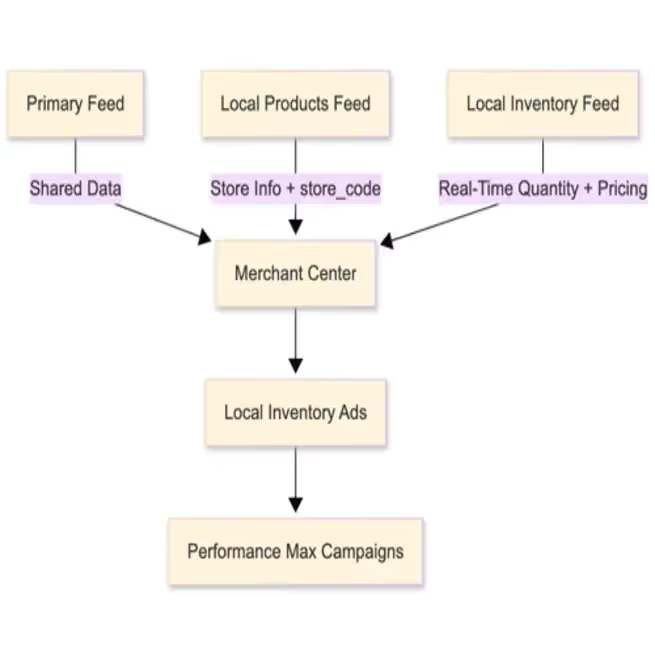
[Winning with Local Inventory Ads starts with structuring your data the right way. If you need a blueprint, this Complete Guide to Google Local Inventory Ads breaks down every component.]1. Primary Feed
All three feeds must be connected and in sync. If one fails, your entire LIA setup can break.
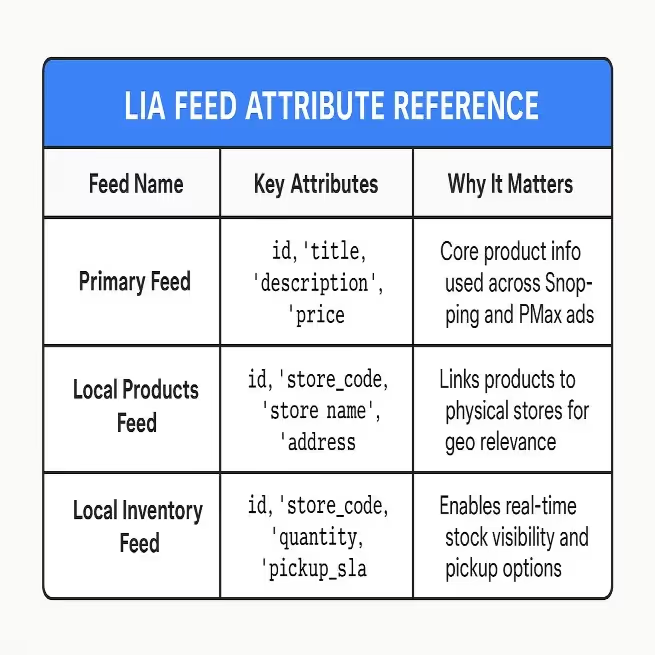
If your feed updates once per day, you're already behind. Fast-moving inventory needs updates hourly.
Fix: Use incremental inventory updates and feed automation platforms like GoDataFeed to sync every 1–4 hours.
“Store_001” ≠ “store001.” Google is case-sensitive. This code must perfectly match the store_code used in your Google Business Profile locations.

Fix: Create a single canonical format and enforce it across your POS, Merchant Center, and feed.
Omitting pickup_method or pickup_sla means you miss out on “Pick up today” badges—which boost CTR by 20% or more.

Fix: Explicitly define your pickup_method (e.g., buy, reserve, or ship_to_store) and your pickup_sla (e.g., same_day or next_day) for all eligible items.
Your Business Profile must be verified and linked to Google Merchant Center. Otherwise, Google can’t match your feed data to a real location.
Fix: Complete verification for each store and check linkage in Merchant Center settings.
If your LIA says $49.99 but the product page says $59.99 or “Out of Stock,” Google will disapprove the feed.
Fix: Use the link_template attribute to pass the store_code to your product landing page, allowing the page to dynamically display the correct, store-specific inventory and pricing.

[Want step-by-step help with sync failures, attributes, or disapprovals? Visit our Help Center for guided walkthroughs.]
Activating LIAs within a Performance Max campaign allows Google’s AI to:
[Activating LIAs within a Performance Max campaign allows Google’s AI to optimize for local intent at scale.]
With LIA data flowing into Performance Max, you unlock higher relevance, lower CPCs, and increased ROAS on local campaigns.

Implementing LIA correctly—across multiple locations, updated inventory, dynamic pricing, and channel compliance—is technically complex.
Here’s when to DIY:
And when to Partner:
GoDataFeed, a certified LIA Feed Partner, handles the heavy lifting—from inventory syncs and attribute mapping to Merchant Center compliance and Performance Max integration.

Your physical store is now your last-mile advantage.
LIAs make your store visible. Performance Max makes it scalable. And feed-level control makes it accurate.
If you're not feeding Google, store-specific data, you're invisible to the most valuable shoppers—the ones ready to buy near you.
Get a free Local Inventory Ads Feed Audit:
We'll evaluate your current feed structure, pinpoint blockers, and give you a clear path to LIA success.
Bryan is a digital marketer with roots in journalism and creative writing. Over the past decade, he's helped hundreds of online retailers develop and implement ecommerce marketing strategies. When he isn't educating retailers on ecommerce, he's out exploring South Florida and stalking local breweries.
Run a free feed audit and see which of your titles are matching queries you'd never choose to bid on.

%20)%20(1).avif)