
If you're treating product feed specs like a one-and-done checklist, you're not just wasting ad spend—you’re actively hiding your best products from the platforms you’re paying to show them.
Feed specs shape how products are categorized, how campaigns segment them, and whether platforms like Google, Meta, or Amazon even know what you’re trying to sell.
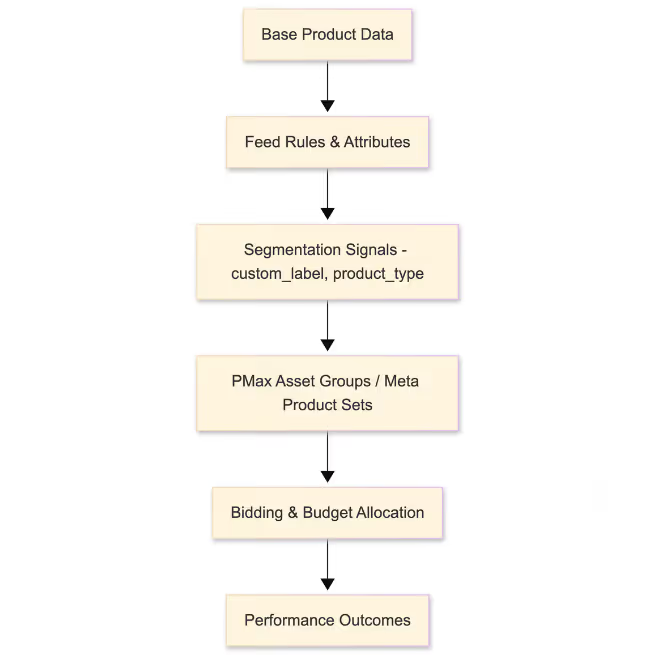
Copy-pasting the same feed structure across every channel? That’s probably where things are breaking.
Here’s where the spec sheet starts costing you performance.
Most merchants build their Shopping feed for Google Merchant Center first. That’s fine—GMC is strict, documented, and baked into Performance Max. But using that same structure across Meta, Amazon, and TikTok? That shortcut tanks relevance.
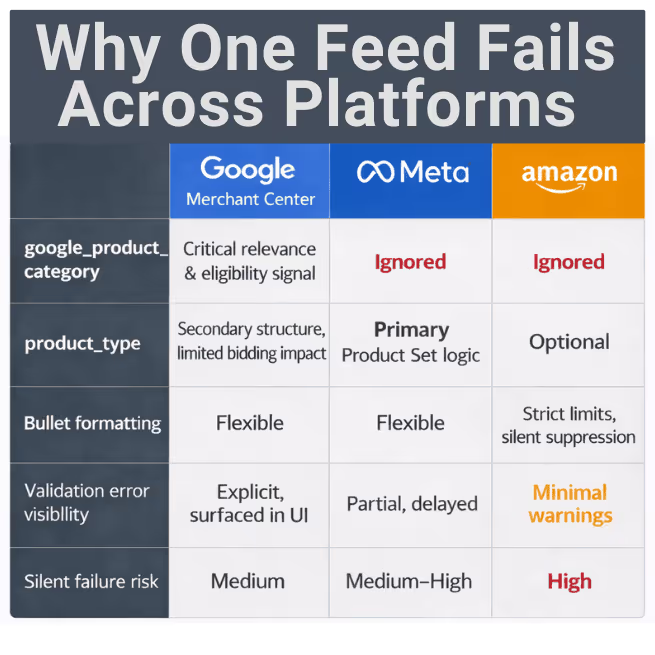
Meta doesn’t use google_product_category for audience targeting. It leans on product_type and custom attributes to build Product Sets. If you’re piping in Google’s taxonomy, you’re likely dumping everything into a single, unusable category.
Amazon enforces character counts and formatting constraints on bullets and descriptions. Google might accept your tags, but Amazon will quietly suppress them—without warning.
If you’ve launched Meta dynamic ads and seen all 2,300 SKUs dumped into one Product Set—this is why.
Fix this upstream. Use your base product data as a clean source of truth. Then build channel-specific spec logic using a feed manager like GoDataFeed. Set rules that rewrite attributes and adapt taxonomy per platform—before things go live.
Not using a feed management platform yet? Google Merchant Center’s Feed Rules or supplemental feeds can handle some light remapping, but they’re not scalable for multi-channel ops.
Passing validation doesn’t mean you’re campaign-ready. Google won’t flag it. But your campaigns will feel it.
Take custom_label_0. Sure, it’s flexible. But if it’s filled with vague internal tags, outdated promos, or legacy logic, you can’t segment your campaigns cleanly.
%20Custom%20Label%20Strategy%20Stat%20Block.avif)
Want to create separate PMax asset groups for top sellers, clearance items, or seasonal inventory? You need that logic embedded in your feed. Otherwise, you're either running overly broad campaigns—or maintaining painful manual lists.
Same deal with google_product_category. It’s technically optional. But for Google, it’s a key signal that helps contextualize your products. It doesn’t control targeting directly, but it supports auction-time relevance—especially in Smart Shopping and PMax where machine learning does the heavy lifting.
What you actually want:
Dynamic rules that tag products by margin band, inventory level, or sales rank—then push those tags into custom_label fields or supplemental attributes. Don’t handcuff your campaign logic just because the spec validator gives you a green check.
Every platform has silent behaviors that aren’t in the documentation—but break your campaigns anyway.
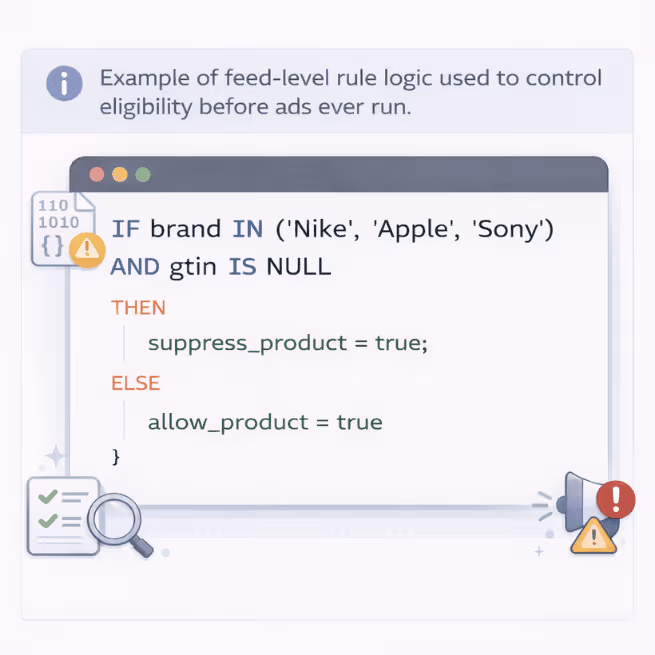
GTIN isn’t just “required if known.” If Google expects one based on brand and category and you don’t provide it, your product gets quietly demoted.
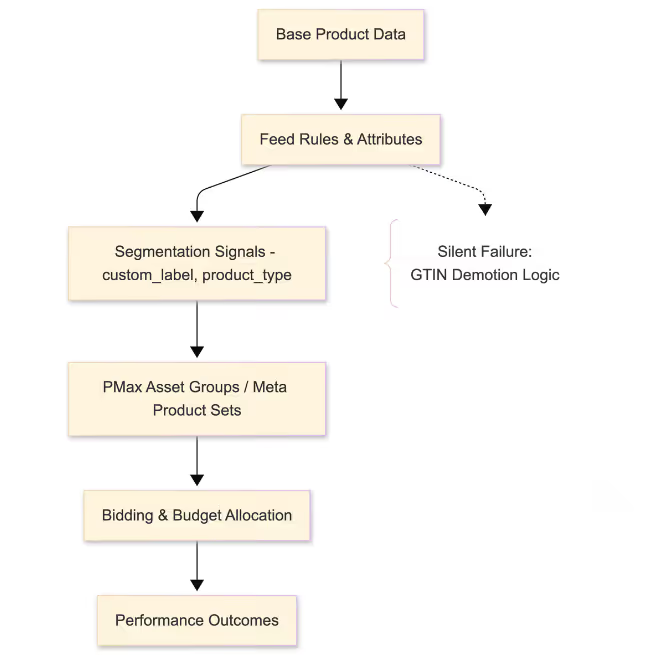
Tactic:
If brand in [Nike, Apple, Sony], enforce GTIN. Else, leave blank or flag for manual review.
That single rule helps restore visibility without triggering errors for SKUs that don’t have GTINs.
Meta doesn’t consistently pause products when inventory hits zero. If your feed says “in stock” but your inventory system says otherwise, Meta might still serve the product—especially if the feed hasn't refreshed yet. That means you're spending to promote dead SKUs.
Tactic:
If inventory = 0, override availability to “out of stock” before the feed hits Meta. Do it in the feed layer—not manually, and not inside your ecommerce platform.
⚠️ Note: Meta's ingestion timing and product catalog sync behavior are not always real-time. Feed-based availability overrides help, but aren’t a silver bullet.
Amazon won’t warn you about bad formatting. But if your bullets exceed character limits or include unsupported HTML tags, the listing disappears.
Tactic:
Strip or transform bullets before submission. Set rules to remove tags like <ul>, limit characters, and format to Amazon’s safe spec.
Amazon won’t tell you when you mess this up—but your suppressed listings will.
This is where teams get stuck.
They restructure campaigns—break out brands, launch new asset groups, split Meta by product line—but leave the feed untouched. That’s backwards.
Your feed is your campaign’s inventory blueprint. If it doesn’t reflect how you’re buying and bidding, your campaigns are flying blind.
Let’s say:
What to do:
Build feed rules around your campaign logic. Segment by gender, brand, margin band, seasonality, inventory risk—whatever matches how you actually run media. Don’t let “compliant” specs bottleneck strategy.
Feeds are inputs to automation. If your inputs aren’t cleanly segmented, platforms will blend performance across SKUs you meant to treat differently.
A feed audit isn’t just for fixing Google Merchant Center errors. It’s about making sure your feed supports how you scale.
Here’s what to look for:
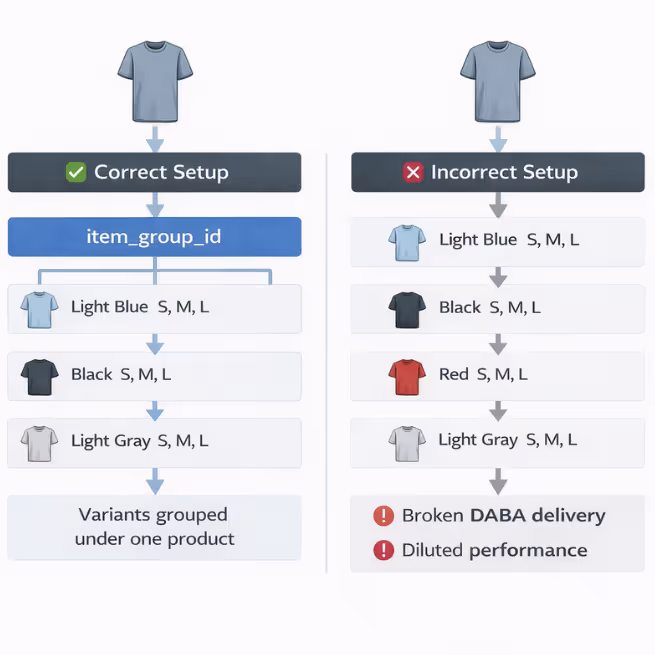
Pro tip:
Use conditional suppression. If a product is missing GTIN (for branded SKUs), or inventory is zero (on Meta), suppress it or flag it using staging attributes.
⚠️ Risk tip: Always test suppression rules on staging feeds first. A misconfigured condition can knock out hundreds of SKUs without warning.
GoDataFeed makes this easy with rule-level controls. But even if you’re not using a feed manager, flagging risky SKUs via supplemental attributes is a solid interim step.
If you’re still cloning spreadsheets per channel, you’re scaling chaos.
As SKU count and channel complexity grow, so does the risk of errors and wasted time. The only fix is a modular, rules-based architecture.
Here’s how you do it:
Now your feed is testable, scalable, and aligned with campaign logic—without waiting on dev.
Specs don’t just get you listed. They decide how your campaigns see your products.
If your feed doesn’t reflect platform behavior or campaign strategy, you’re not just under-optimized—you’re blind.
Run a feed audit that checks:
Then build conditional rules in your feed manager (like GoDataFeed) to catch and fix the problems upstream—before they drain your performance downstream.
Carlos Rodriguez is a seasoned content marketer with a background in marketing and advertising. Formerly at the helm of his own marketing agency, he now dedicates his expertise to guiding ecommerce merchants and marketers in mastering multichannel strategies. Outside of work, Carlos is an avid reader and hiker, often found traversing the mountain ranges of Cundinamarca like El Quinini.
Run a free feed audit and see which of your titles are matching queries you'd never choose to bid on.