





















































Price changes don’t break performance.
Bad sync does.
You can build the smartest repricing logic in the world. If your feed updates lag behind your site, Google doesn’t care. It sees a mismatch and starts limiting items.
Dynamic pricing isn’t risky.
Loose feed timing is.
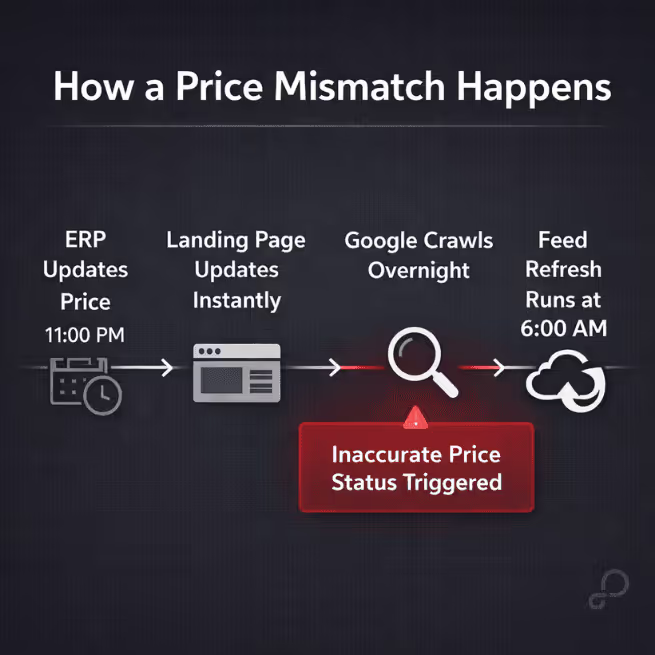
Here’s a familiar sequence:
Now the landing page and the feed disagree.
That’s how you trigger inaccurate price status in Merchant Center. Sometimes it’s a warning. Sometimes items stop serving. Either way, coverage drops.
The issue is timing. How quickly your feed reflects price changes determines whether items keep serving.
If prices change more than once a day, scheduled feed uploads aren’t enough.
Google still references the Content API in older help docs. New builds should use the Merchant API. The difference that matters:
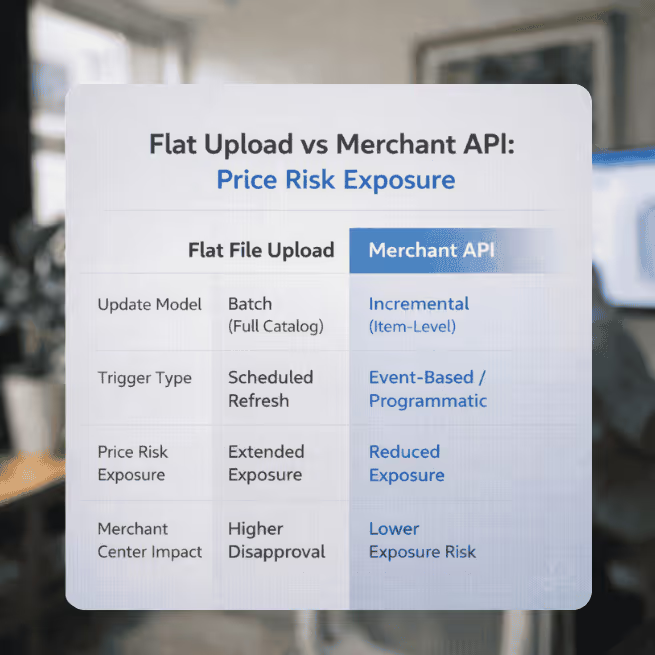
That’s what reduces overnight mismatches.
If you’re running competitive repricing, margin-based rules, or inventory-based discounts, incremental updates aren’t optional. They’re infrastructure.
And there’s a second layer many teams ignore.
Merchant Center can automatically update price and availability using structured data from your site.
Don’t treat this like a shortcut. It won’t fix a messy catalog.
But if your API queue stalls or crawl timing drifts, it can prevent small mismatches from escalating into disapprovals.
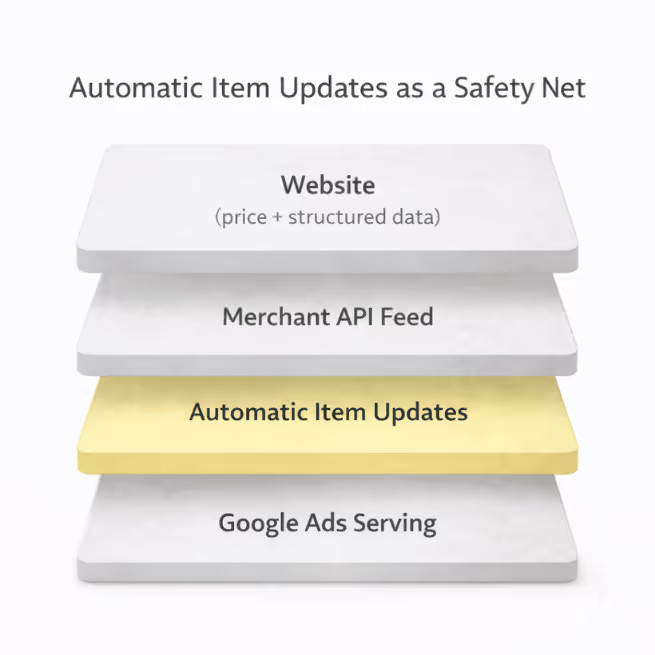
Run dynamic pricing without this enabled and you’re flying without a safety net.
Sale logic is.
This is where feeds usually fall apart:
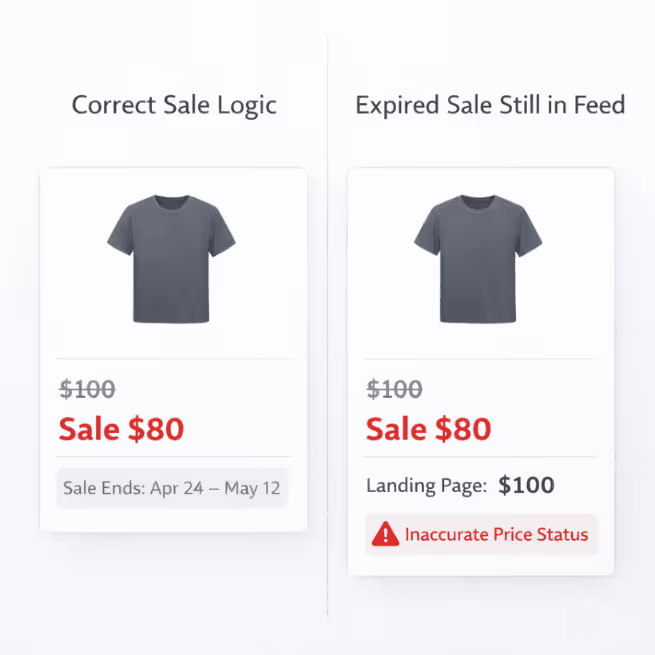
Promotion ends on site
sale_price stays in the feedGoogle’s spec calls sale_price_effective_date optional. If you run scheduled promos, treat it as required.
Without clear promo windows, stale sale annotations linger.
And once you’re in mismatch status, recovery isn’t instant.
Automatic updates might correct small gaps. They won’t manage your promo calendar for you.
If your ERP can’t control sale windows cleanly, fix that before layering in dynamic pricing.
Meta catalogs are feed-driven. You won’t see Google-style crawl enforcement.
That doesn’t make sloppy feeds harmless.
If sale fields are wrong, Meta will:
It won’t warn you the way Google does. It’ll just render the wrong thing.
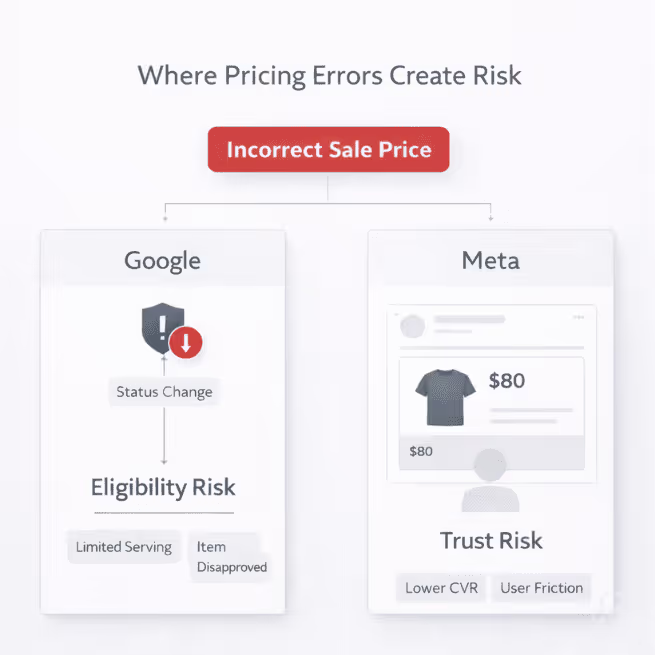
If pricing changes daily, increase feed refresh frequency in Commerce Manager.
And make sure promo logic is explicit in the feed — not implied in backend logic.
If you drop prices on a subset of products and don’t restructure campaigns, Smart Bidding keeps optimizing to revenue.
It doesn’t see margin. It sees conversion value.
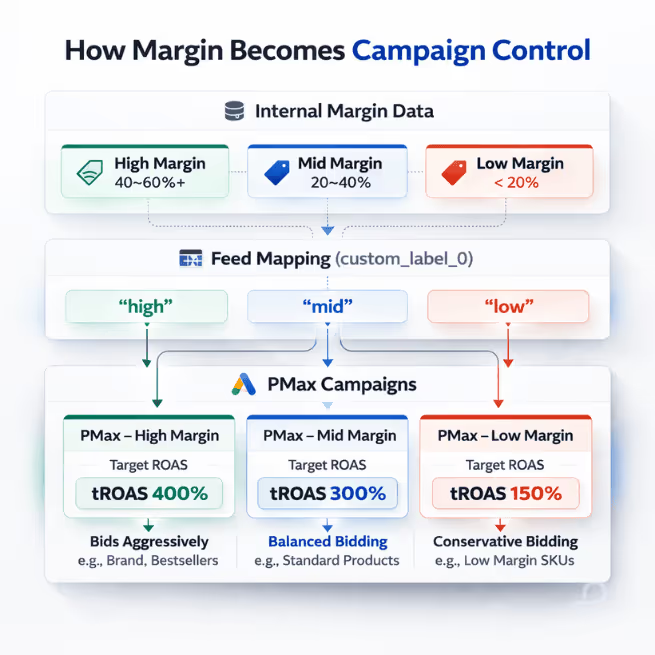
Custom labels don’t “teach” the bidder profitability.
They let you separate inventory so you can control it.
That’s the difference.
custom_label_0–4 buckets.For PMax, you can split campaigns or isolate tiers via listing group filters.
One warning: if a tier can’t sustain volume, don’t spin up a dedicated campaign. You’ll starve the model. Collapse tiers or control at the asset-group level instead.
No segmentation means no margin control.
The bidder can’t optimize around a signal you never exposed.
You can’t invent custom attributes in Merchant Center and expect them to work.
If you want to price down aging inventory, do this instead:
aged_60_90, aged_90_120, aged_120_plus).Now you’re not just discounting old inventory.
You’re isolating it operationally.
If you skip that last step, margin compression bleeds into the rest of your catalog and Smart Bidding absorbs it without context.
That’s where profit leaks quietly.
Feed rules can branch pricing by channel.
Google will still compare what you submit to what users see.

If you send one price to Google and the landing page renders something different for that user, you’ve created your own mismatch problem.
Channel pricing requires:
Without landing page alignment, dynamic channel pricing increases risk.
If the plumbing is right, dynamic pricing does four things:
If the plumbing isn’t right, platforms optimize around your mistakes.
Dynamic pricing lives in your feed architecture.
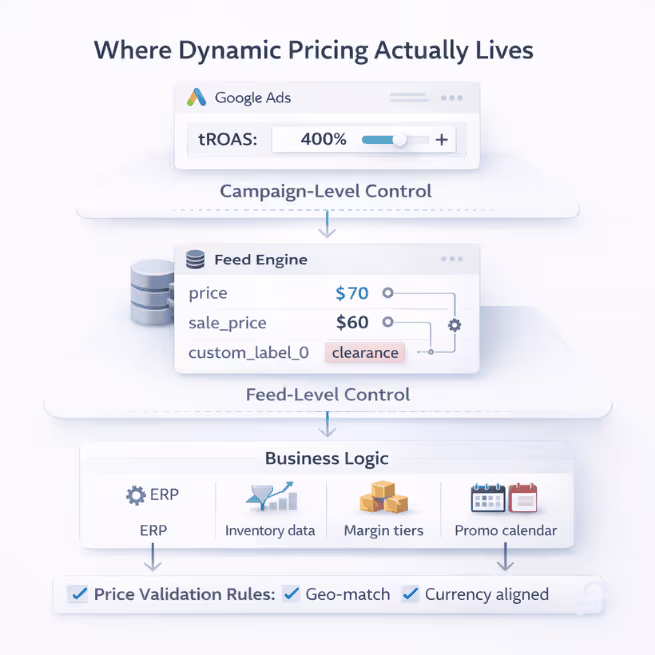
Treat it like a small bidding tweak and you’ll miss where the real leverage is.
Get the infrastructure right first. Then scale the strategy.
Carlos Rodriguez is a seasoned content marketer with a background in marketing and advertising. Formerly at the helm of his own marketing agency, he now dedicates his expertise to guiding ecommerce merchants and marketers in mastering multichannel strategies. Outside of work, Carlos is an avid reader and hiker, often found traversing the mountain ranges of Cundinamarca like El Quinini.
Run a free feed audit and see which of your titles are matching queries you'd never choose to bid on.

%20What%20Merchant%20Center%20Checks%20Every%20Time%20Your%20Prices%20Change.avif)