





















































No one really saw it coming, yet here we are. Google Shopping is now mostly made up of free listings.
If you haven’t already opted-in your products, check out our guide on setting up surfaces across Google.
If your listings are already live, let’s talk about what else you need to know.
Before we get into it, it’s important to point out that these free listings are rarely found on Google Search results pages and never found in the traditional ad spaces of those pages. Instead, they’re bound to Google Shopping and the Shopping tab.
That’s the line between free and paid Google Shopping.
Nevertheless, participating in surfaces across Google is simple... but you shouldn’t just step away as soon as your listings go live.
Consider the following:
With perfect data, surfaces across Google is a largely autonomous, free opportunity… with perfect data.
If you aren’t already prioritizing data quality, first focus on sharpening your catalog. Your success on a platform like Google Shopping heavily depends on clean, optimized data – especially when we’re talking about the free end of the platform.
Simply put: your product listings will be as good as your product data.
Check out Google’s product data specs for all the attributes that Google can use to better reference your products. You want all of your data to be detailed and complete, but give extra attention to the fields that really matter.
Google really wants to see your products have:
But the more optional fields you also include, the better. Optimal product data leaves no questions unanswered.
Even then, the most “optimal” data won’t necessarily always be optimal; requirements change, trends shift, products are updated, etc. Product data optimization should be an ongoing initiative that is guided by industry research and customer feedback.
That said, optimal data is going to give your products the best possible chance to show at the right place, at the right time – not just on Google Shopping, but on any shopping platform!
So let’s say you’re prioritizing data quality and you’re just looking to give your listings a little pizzazz – that one coupon that everyone loves, free shipping, or something else.
Good products can go far with a good promotion. Everyone loves a good deal, after all.
Merchant Promotions is a free feature that allows you to distribute online promotions through Google Shopping, including surfaces across Google listings.
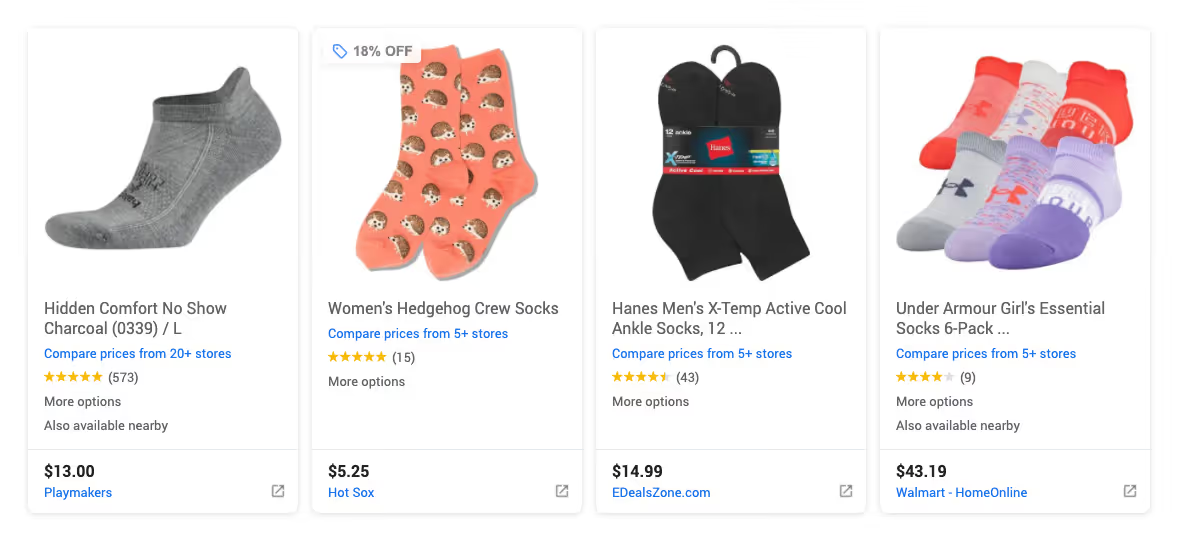
With Merchant Promotions, you can give relevant products a promo badge that highlights some incentive to customers. It’s an easy way to appeal to customers and potentially drive up click through rates.
You’ll need to be approved for the program (be sure to check out the details), but this is a great way to make your products stand out.
So there’s nothing wrong with leveraging the opportunity that is free exposure on Google, leaving the rest of the offerings on the table...
But you can always take things to the next level with Google Ads.
Have you thought of the inverse implications of Google making so much of its Shopping realty free? This shift gives ads a whole new lease on life.
The Shopping tab has always generated a much smaller portion of traffic compared to ads on Google Search results pages, and that’s likely not going to change… but there’s the distinction between free and paid Google Shopping again.
Ads now hold so much more weight, and with free listings on Google Shopping, you’ll have personalized performance insights to reference when considering what to promote.
At a very basic level, you can always experiment with ads for your winners and leave the rest as free listings.
If you’re looking to get more advanced, strategies are well documented online (this recent shift doesn’t change much) – but there is one particular strategy we want to shoutout, Omnitail’s 3-Tiered approach. It qualifies the level of buyer intent of keywords, and gives you guidelines to bid accordingly on Google Shopping.
Some of it obvious, some of it not so obvious.
When Google shifted its Shopping gears, they also announced a new PayPal integration for Google Merchant Center.
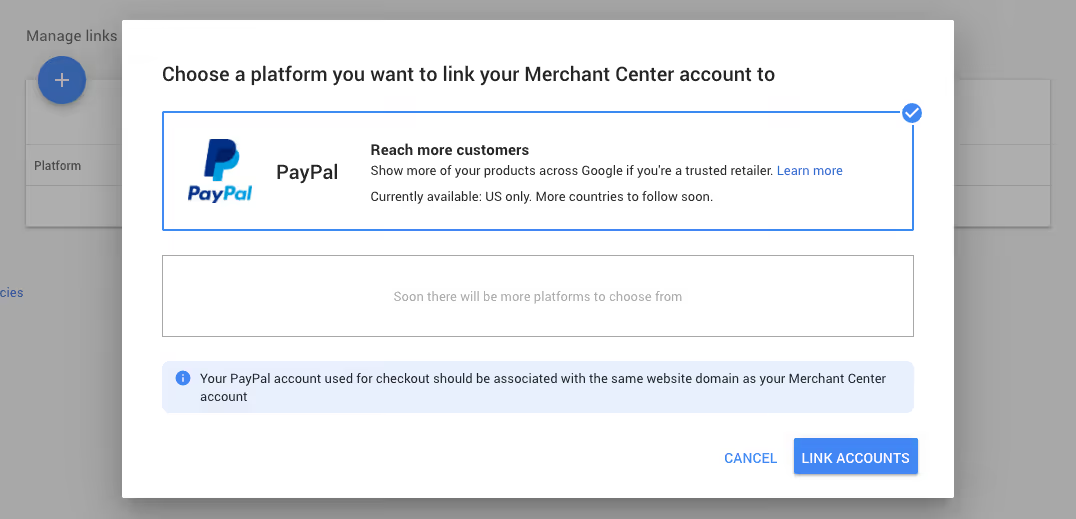
Currently labeled as something to “Show more of your products across Google if you’re a trusted retailer,” we know this is tied to enhanced listings for surfaces across Google – which as they put it, are “content-rich listings on the Google Shopping tab.”
Eligibility for these enhanced ads is based on account status and data quality; you need to be golden on both fronts. However, you can influence your eligibility by providing Google with high-quality info that helps build your credibility:
There’s yet to be a clear indicator for these listings, but there’s plenty of room for them to develop what exactly this means. Regardless, this is essentially a way for Google to gather information, refine its systems, and improve how they push your products.
Picture all of your products in one giant bin, Google calls this the “All Products” product group.
Now no strategy is going to have you leave it as so – you’ll want to set bids based off profit margins, levels of competition, etc., so Google allows you to take that bin and split it up into smaller bins. If those bins aren’t granular enough, you can segment them further and make even smaller bins.
There’s many ways to go about segmenting your products, but as you go splitting your groups, you’ll end up with “Everything Else” groups. Google automatically generates these catch-all groups for you as your segmenting gets more precise.
Our word of advice: set bids in your “Everything Else” product groups lower than the specific groups – especially “Everything else in 'All products,'” which you might want to exclude entirely.
Ignoring these “Everything Else” groups or treating them with equal priority can lead to some chaos. For example, you might find your “black polo for men” showing up as an ad for “red polo for women.”
Remarketing lists for search ads (RLSA) is a feature that lets you customize campaigns for people who have previously visited your site, and tailor your bids and ads to these visitors when they’re searching on Google.
Shopping remarketing lists are similar to RLSA; all of the same rules apply. Using remarketing lists gives you the ability to segment your visitors by previous site engagement, such as “repeat visitors,” shopping cart-abandoners,” and so on.
If you happen to use or plan to use Smart Bidding like Target ROAS, remarketing lists should lead to even better results.
Check out Google’s guide on getting Shopping remarketing lists set up.
It should go without saying, you need to keep your pricing competitive. If you don’t, your competitors will – and they’ll have an easier time doing so.
A study done by PPC agency Clicteq found that products priced competitively received up to 135% more impressions and clicks, 61% more click-throughs, and 280% more conversions. Keep that in mind for products that you’re choosing to promote.
And now that selling on Google Shopping is free, you can rest easy knowing that even your lowest-margin products should still see Google airtime. It’s a bit of a consolation prize for the more inflexible products in your catalog.
Don’t forget that your pricing on Google has to match that of your site!
Bidding for Shopping ads is known to be more volatile than bidding for Search ads. Finding that sweet spot is tricky, to say the least.
If you’re going it alone, be sure to test your bids extensively. Alternatively, you might want to use Google’s automated bidding – especially if you’re not totally comfortable with bidding.
Using advanced machine learning, smart bidding works off of your campaign’s historical performance, future goals, and real-time shifts. It always sets the right bid for you so you can focus on high level goals.
There are currently four smart bid strategies for 4 different goals:
Once your free listings are live you shouldn’t just turn your back on Google.
There’s almost always room for optimization, a good promo can put your products over the top, and free listing performance leads to great insights for ads – which are better than ever!
You definitely want to link up your PayPal with Merchant Center if applicable, and keep your eyes peeled for any info on more platform integrations and enhanced listings in general.
If you have any questions on how GoDataFeed integrates with Google Merchant Center, are interested in surfacing your products on Google, or have any other product data inquiries, feel free to reach out to us!
Gio is a marketing specialist with a passion for digital design. A particular gamer, dog enthusiast, meme connoisseur and science appreciator, he has too many interests to list. When he's not involved in GoDataFeed's marketing, he's usually focused on mysterious projects.
Run a free feed audit and see which of your titles are matching queries you'd never choose to bid on.

