Most teams think of feed management like maintenance. Something you fix when SKUs go offline or disapprovals spike.
But if you're running shopping ads or selling on marketplaces, that mindset can cost you.
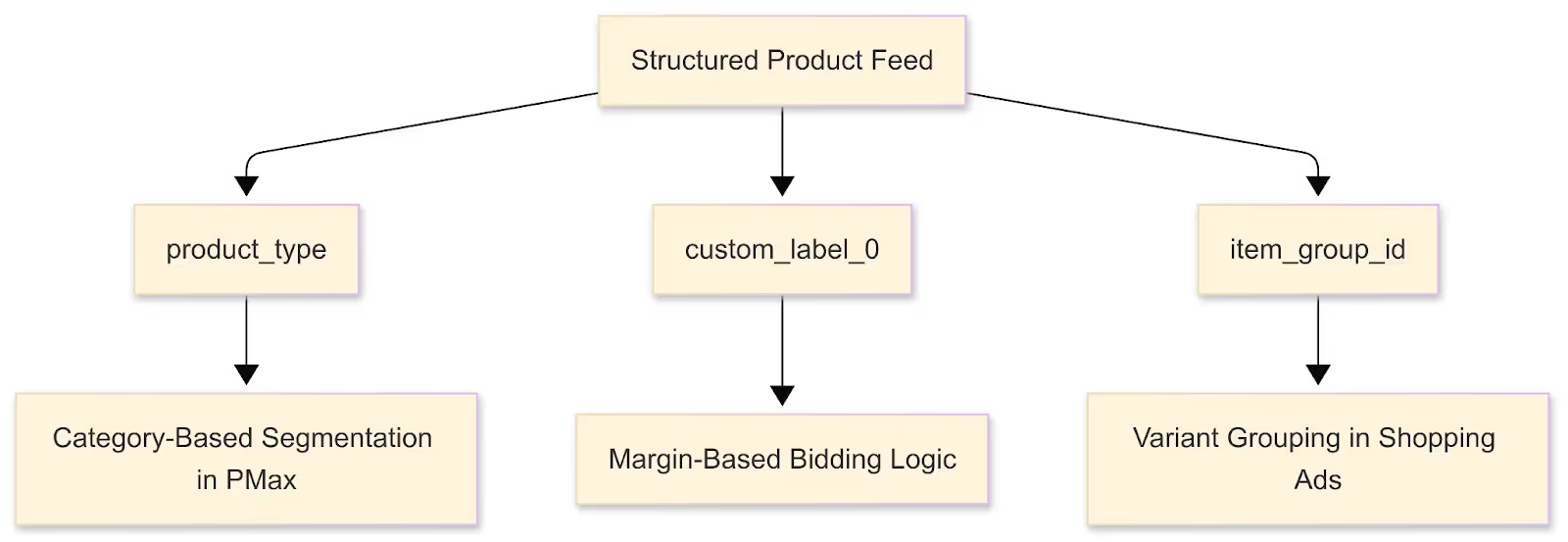
Because your feed isn’t just infrastructure. It is the campaign.
It tells platforms what products exist, who they’re for, what they’re worth, and how they should be prioritized. Done right, it doesn’t just prevent problems—it gives you campaign-level control most ad platforms don’t expose in the UI.
Your data feed is where campaign optimization lives—not just where you go when something breaks. In this post, we look at 10 ways your product data drives ecommerce success. If you do it right.
Every platform reads your product feed as its source of truth. And that “truth” only works in your favor when the structure reflects your strategy.
If your product_type just says “Shirts” across 2,000 SKUs? Google’s algorithm loses a critical lever for segmentation and strategic product grouping. You can’t segment PMax by category. You can’t control product grouping. You are ceding critical strategic control to the algorithm with no high-level guardrails.

You want a structure that mimics how you think about your business:
Think of product_type like folder structure. If it’s flat, so is your campaign logic.
[You can build nested logic—like margin tiers—using operators like >, <, and = to target high ROI products. Here's how feed rules work under the hood.]
Your source system isn’t built for campaign speed. ERP, PIM, and ecommerce platforms move slow—and they don’t care about your promo schedule.
Supplemental feeds give you a second layer of agility. You can:
[Use GoDataFeed to set up feed schedules and supplemental logic ahead of promos—so you’re not scrambling on launch day. → How to schedule feed rules to run automatically]
Here’s a mistake too many teams still make: Trying to hack campaign performance by stuffing everything into the product title.
Example:
“Nike Air Zoom Pegasus 40 Men’s Running Shoes Red Size 10 – Lightweight Cushioned Performance Sneaker”
It’s bloated, redundant, and breaks field-level logic.
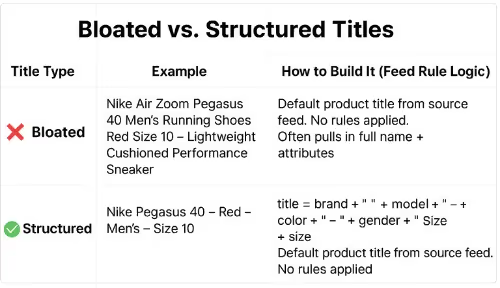
Cleaner move:
In GoDataFeed, that’s just:
IF product_type contains “Shoes” → title = {brand} {name} {color} {gender} {size}
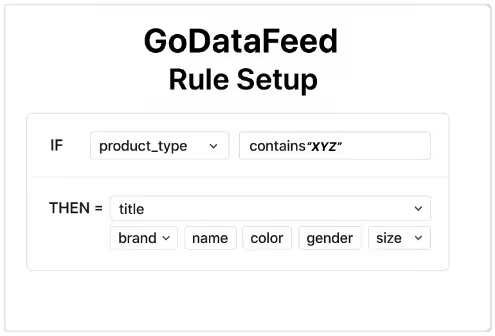
[Use GoDataFeed feed rules to apply consistent formatting logic without touching your catalog. You can even schedule rules to run ahead of product drops, price changes, or seasonal shifts—no last-minute scramble needed.]
Let the feed do the work—don’t improvise in the copy.
While Performance Max doesn't expose traditional ad group or keyword controls, your product feed becomes your primary segmentation engine via asset groups. Performance Max doesn’t expose traditional ad group or keyword controls. But it does let you group products into asset groups—and that’s where your feed becomes your segmentation engine.
Here’s how it plays out in practice:
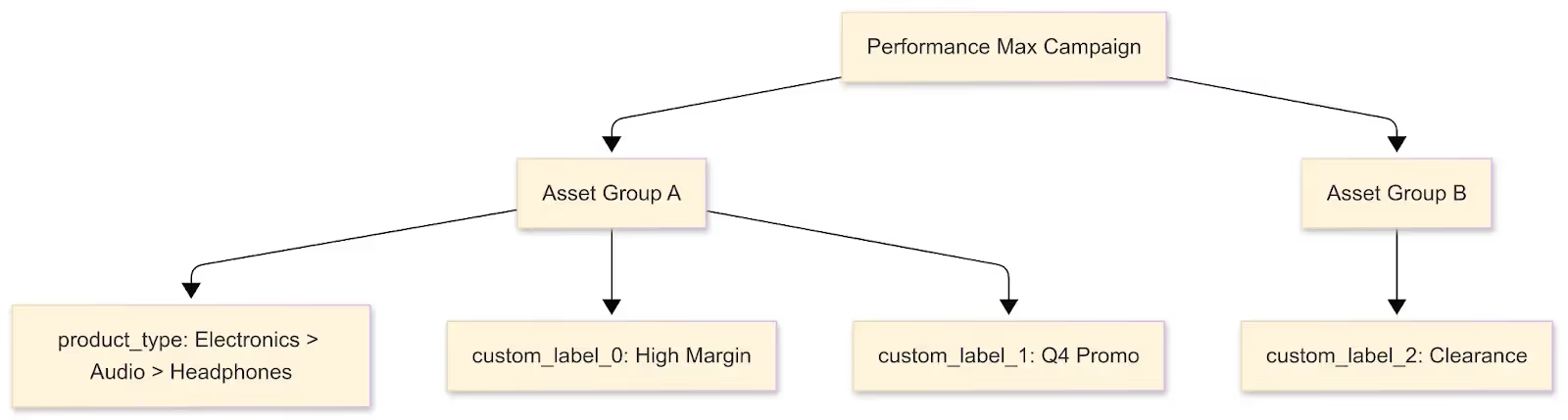
Example setup for Q4 scaling:
Now you can:
If your feed doesn’t segment your catalog, the algorithm won’t either.
For Dynamic Ads campaigns, Meta requires variant suppression to be handled at the catalog level, as campaign settings do not offer granular SKU-level exclusion. If your catalog includes 200 SKUs for every size and color, Meta will happily show the least desirable one.
The fix? Suppress them in the feed.
You can exclude SKUs based on:
In GoDataFeed, that’s just:
IF size = XS OR size = XXXL → Exclude from Meta feed
or
IF custom_label_4 = “Low Velocity” → Exclude from Meta
[Here’s how to do it step-by-step: How to create feed filters to exclude products]
Smart Bidding depends on clean input. If your feed includes:
...you’re polluting your bidding pool.
Use feed rules to suppress products that shouldn't be advertised:
availability = out_of_stock → Excludebrand = Unknown → Excludecustom_label_4 = Clearance → Exclude from PMax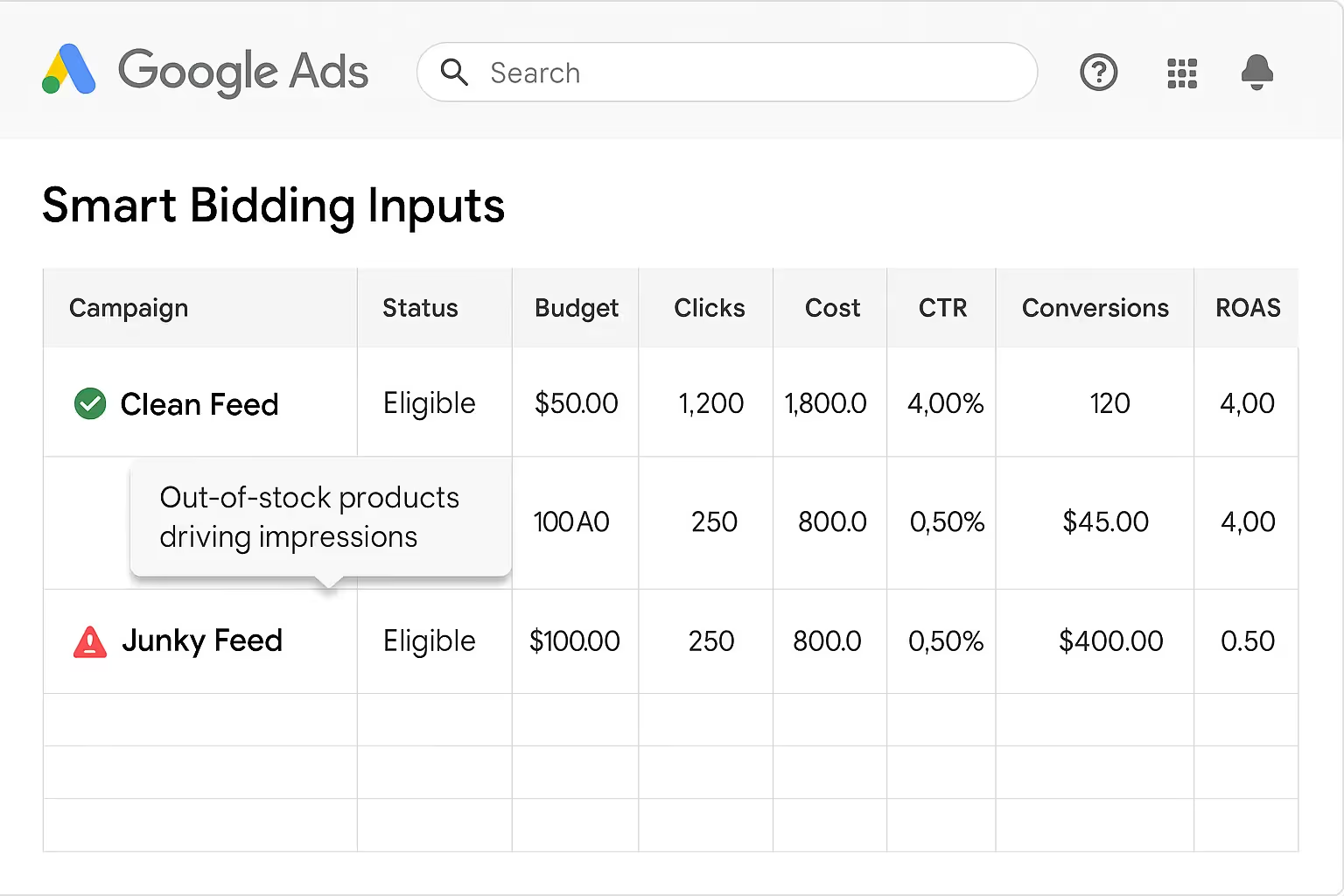
Think of this as feed-level QA. You're not just cleaning your catalog—you’re defending your ad budget.
Done right, custom labels turn your feed into a media-buying interface.
Example structure:
custom_label_0 = Profit_Tiercustom_label_1 = Seasonalitycustom_label_2 = Q4_Promocustom_label_3 = Clearancecustom_label_4 = Velocity_TierNow your media buyer can say:
“Exclude all Low Margin + Clearance SKUs from Christmas campaigns.”
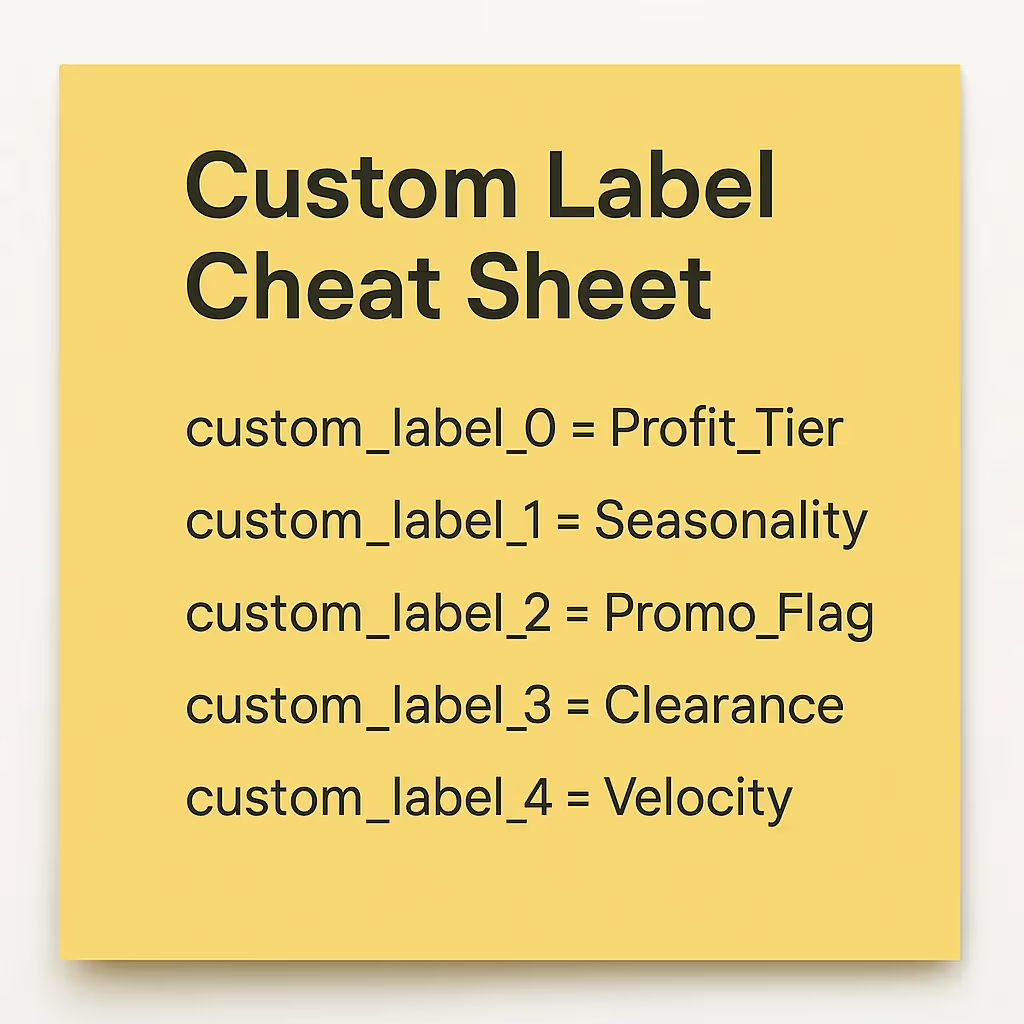
No code. No feed edits. Just logic embedded where the platform can read it.
GTINs seem like a minor detail until they break a campaign. They’re not just identifiers—they’re how Google maps your products to its ecosystem. If they’re missing, incorrect, or mismatched, your listings lose eligibility in Shopping and PMax. That means even your best SKUs can vanish from high-intent queries with zero visibility into why.
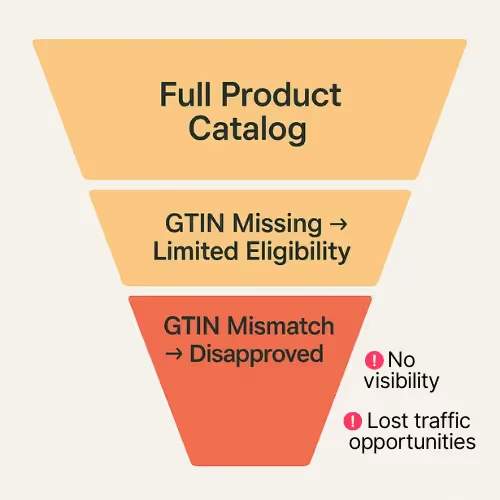
Without correct GTINs:
In Shopping and PMax, this means your best SKUs disappear from key queries.
(For a breakdown of how GTINs, MPNs, and other identifiers impact visibility and matching, check this guide from GoDataFeed.)
Use GoDataFeed to:
Try building a PMax structure with a flat taxonomy. You’ll end up with 10,000 SKUs under “Accessories.”
Now try this:
Now you’ve got segmentation that matches search intent and creative direction.
Clean taxonomy means:
If product_type is a mess, no campaign structure will save you.
Shipping doesn’t just affect logistics—it affects where and whether your products show. Google and Meta both use shipping fields to determine product eligibility, delivery estimates, and localized surfacing. Most advertisers overlook shipping data—until a product shows in the wrong region or fails to qualify for local inventory ads.
At scale, this leads to invisible performance gaps:
You can fix this in the feed.
Example logic:
IF warehouse = West AND price > 49.99 → shipping_label = Free_Shipping_West
Or:
IF region = Northeast → availability = in_stock
ELSE → availability = out_of_stock
Mapping regional fulfillment data into your feed layer gives you tighter geographic control — especially for local inventory ads or regionally segmented ad groups.
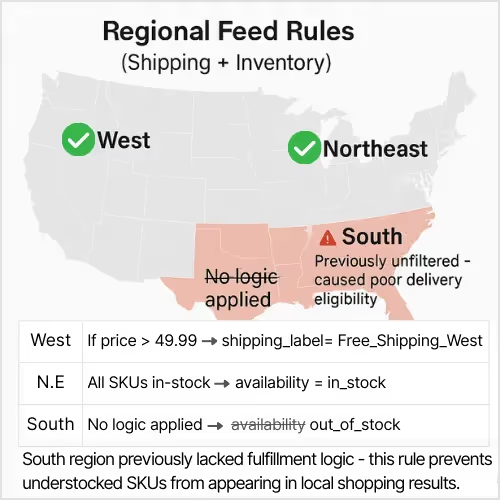
(For a technical breakdown of how to structure shipping fields and overrides in your feed, see this guide) help.godatafeed.com
Shipping data isn’t just backend cleanup—it’s a lever for regional targeting, user trust, and converting coverage.
Your product feed isn’t a technical asset. It’s a strategic one.
The way you structure, enrich, and buffer your data is the difference between campaigns that scale cleanly—and ones that silently burn through budget with no visibility into what’s broken.
You can’t outbid bad data, but you can out-optimize it. Start your free trial today and take control of your product data.
Carlos Rodriguez is a seasoned content marketer with a background in marketing and advertising. Formerly at the helm of his own marketing agency, he now dedicates his expertise to guiding ecommerce merchants and marketers in mastering multichannel strategies. Outside of work, Carlos is an avid reader and hiker, often found traversing the mountain ranges of Cundinamarca like El Quinini.
Run a free feed audit and see which of your titles are matching queries you'd never choose to bid on.