





















































Most teams think data quality means passing Google Merchant Center diagnostics. That’s not the real problem.
Structurally valid product data can still break clustering, segmentation, and Smart Bidding behavior across Shopping, Performance Max, and Meta catalogs. Your feed gets approved—but performance never stabilizes. [Passing Merchant Center checks doesn’t guarantee auction eligibility.]
If you’ve ever had a feed “look fine” while ROAS drifts week to week, this is usually why.
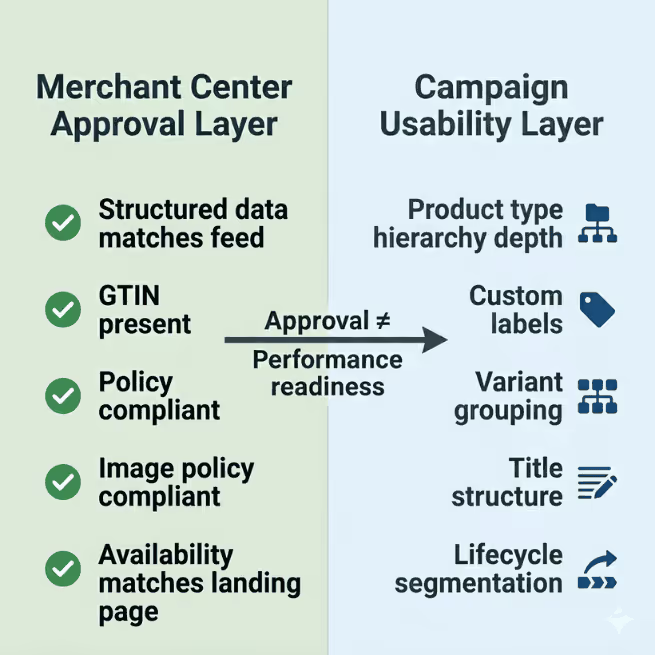
Merchant Center checks compliance. It doesn’t check whether your attributes support segmentation inside Performance Max.
Here’s where this breaks.
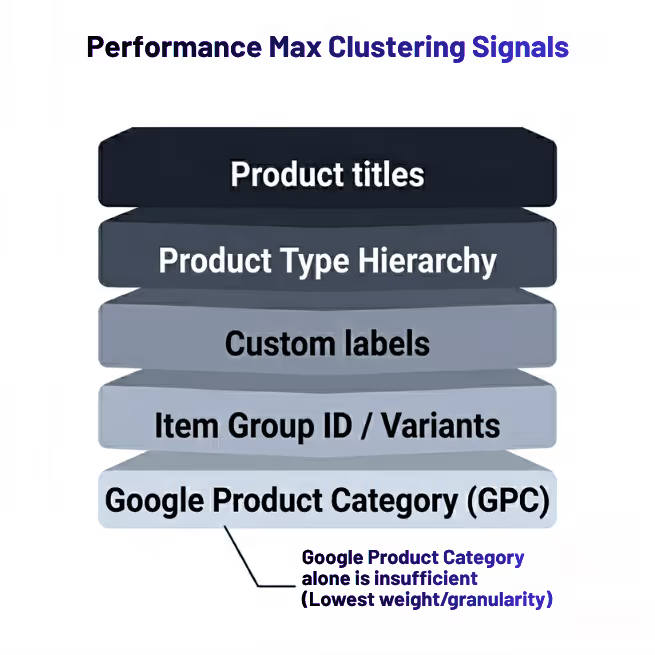
PMax builds internal clusters using:
Not just google_product_category.
[custom labels for campaign segmentation]
If your taxonomy looks like this:
Apparel
Google can’t isolate intent. Asset groups overlap. Search matching gets fuzzy.
What you actually want to look at is whether your taxonomy depth exists inside product_type, not just inside your ecommerce platform.
A simple rule fixes this:
IF category = Dresses
THEN product_type = Apparel > Women's Apparel > Dresses
Inside GoDataFeed, that becomes a transformation rule—not an engineering ticket.
Campaign impact shows up fast:
That might seem minor, but it’s the difference between a feed that works and a feed that just gets approved.
If spend distributes unevenly across sizes or colors—even when demand is stable—you’re looking at variant structure problems.
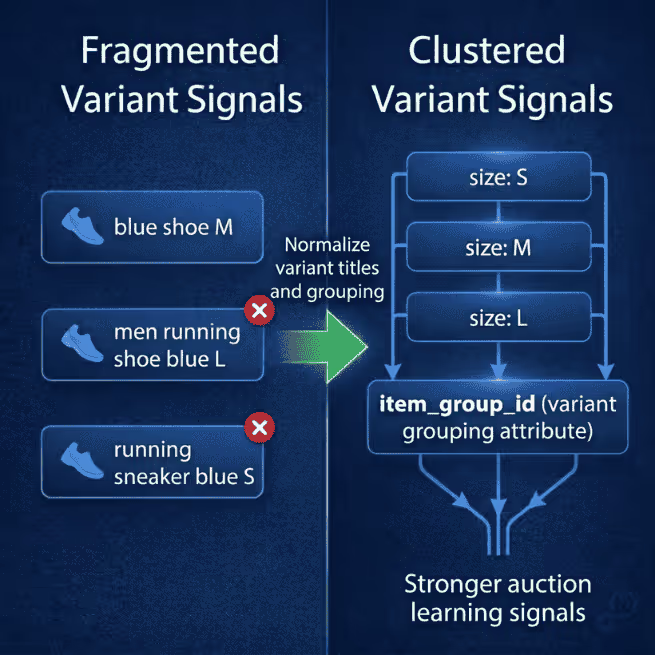
Google clusters variants using item_group_id. Meta relies on catalog relationships differently. Microsoft sometimes surfaces only one variant if formatting isn’t aligned. [Why variant mapping affects catalog visibility]

If those signals don’t match, platforms treat siblings like strangers.
It’s like splitting reviews across duplicate PDPs instead of consolidating them. The signal exists—but it’s diluted.
Symptoms usually look like:
Meta loses confidence in which variant represents the product family, so spend concentrates on whichever SKU wins early signals.
One apparel retailer we worked with had strong conversion data on medium sizes but weak delivery across the rest of the variant set. Demand wasn’t the issue. Title formatting across variants wasn’t consistent.
Google split the family into separate auction entities.
The fix looked like this:
IF size exists
THEN append size to title suffix
Variants clustered correctly. Spend normalized across the group.
Inside GoDataFeed, you can apply this per destination without rewriting your source catalog. That matters because Meta often performs better with trimmed variant sets while Google benefits from full variant depth.
Most teams check whether GTIN exists. Fewer check whether it’s correct at the packaging level.
Google doesn’t always flag mismatched GTINs as errors. Products stay approved. Diagnostics stay green.
But placement drops inside comparison surfaces.
You’ll usually see:
Google can’t match your SKU to identical competitor listings, so it stops placing you inside price comparison clusters.
One supplement retailer ran into this across bundle packs. Single-unit GTINs were reused across multipacks. Everything approved. Performance still dropped.
The fix was conditional removal:
IF GTIN duplicated across variant set
THEN remove GTIN
Google falls back to brand + MPN matching instead of incorrect clustering.
Check Merchant Center → Products → Diagnostics → Incorrect product identifiers if impression share drops without disapprovals. That’s often where this starts.
Inside GoDataFeed, you can apply this override only to Google while leaving marketplace feeds untouched.
GTIN accuracy affects auction position more than eligibility. Don’t treat it like a checkbox attribute.

Smart Bidding doesn’t understand margin. It understands probability.
It optimizes like a blackjack player, not a merchandiser.
So if your feed doesn’t describe lifecycle stage, Google treats clearance inventory the same as hero SKUs. That’s where ROAS instability starts.
You’ll usually see this first in asset group search term drift before revenue shifts show up.
Typical symptoms:
This happens because the feed never tells the system which inventory deserves priority.
Lifecycle labeling fixes it quickly:
IF inventory_age > 180
THEN custom_label_0 = Clearance
IF publish_date < 30 days
THEN custom_label_0 = New
Now you can segment:
Inside PMax this controls asset groups. Inside Meta it controls catalog sets. [Segment products with lifecycle-based custom labels]
Inside GoDataFeed, lifecycle tagging can be derived from timestamps already in your feed—no ERP dependency required. This is usually the first segmentation lever that stabilizes ROAS.
Most teams optimize titles for keywords. Platforms cluster using structure.
Google treats titles as entity identifiers inside clustering layers—not just keyword carriers.
Example:
Men's Lightweight Running Shoes Blue
Blue Men's Trainer Lightweight Running Shoe
Same product intent. Different semantic structure.
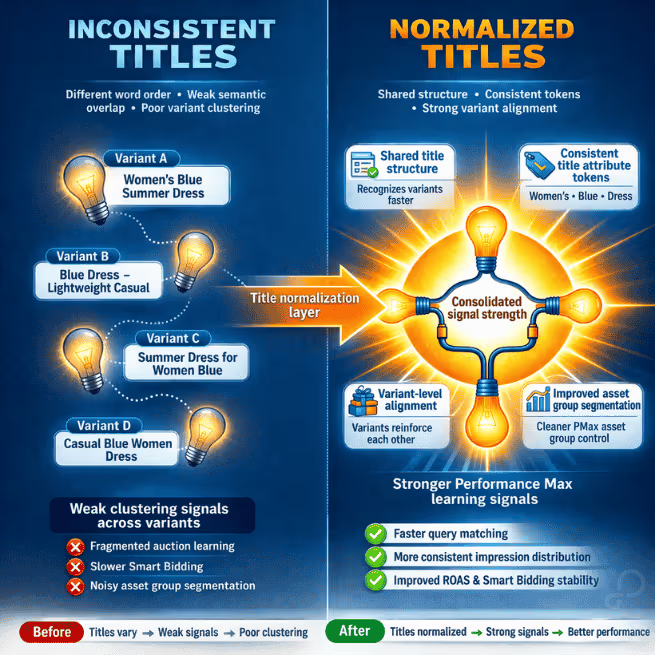
Platforms interpret these as separate listing entities. Signal dilution follows:
What you want instead is deterministic formatting:
[Brand] + [Gender] + [Category] + [Feature] + [Color]
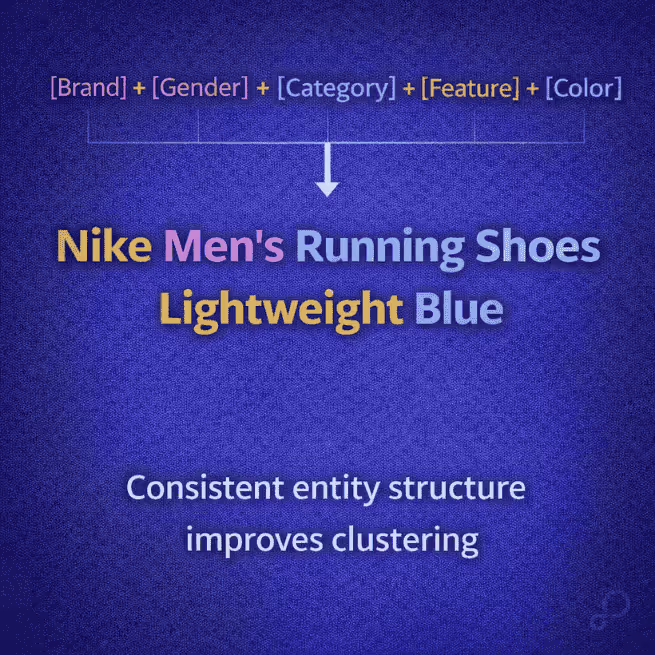
One footwear account normalized titles across 6,000 SKUs using this template. Within two weeks:
No keyword additions required.
GoDataFeed lets you normalize titles per destination without overwriting source data. That’s what lets you structure titles differently for Google and Amazon without breaking either channel.
Once segmentation signals exist in the feed, campaign structure stops depending on manual exclusions.
Now you can:
This is where feed logic becomes campaign logic.
Most teams stop once diagnostics turn green.

You don’t need a full audit every week. You do need a repeatable check.
Monthly:
Quarterly:
Inside GoDataFeed, this becomes rule monitoring instead of manual inspection. That’s the shift you’re aiming for.
Feed quality isn’t about passing diagnostics.
It’s about whether your attributes support clustering, segmentation, and bidding decisions inside the platforms actually spending your budget.
If those signals aren’t structured correctly, Smart Bidding guesses.
And guessing is expensive.
Next step: export your top 100 SKUs from Merchant Center and check whether product_type, variant titles, and lifecycle labels actually match how your campaigns are segmented today. That gap is where most performance loss starts.
Carlos Rodriguez is a seasoned content marketer with a background in marketing and advertising. Formerly at the helm of his own marketing agency, he now dedicates his expertise to guiding ecommerce merchants and marketers in mastering multichannel strategies. Outside of work, Carlos is an avid reader and hiker, often found traversing the mountain ranges of Cundinamarca like El Quinini.
Run a free feed audit and see which of your titles are matching queries you'd never choose to bid on.

