





















































Most ecommerce categorization problems are not taxonomy problems.
They're campaign control problems disguised as feed structure issues.
If your product_type values are inconsistent, your Google Shopping campaigns become harder to segment. If your Meta catalog categories drift, product sets become harder to manage. If your marketplace mappings rely on whatever came out of Shopify collections three years ago, reporting turns into guesswork.
Categorization is not about keeping the catalog tidy.
It's about giving platforms cleaner inventory signals so campaign structure, reporting, bidding, and product organization stay manageable as the catalog grows.
This is where most feeds go sideways.
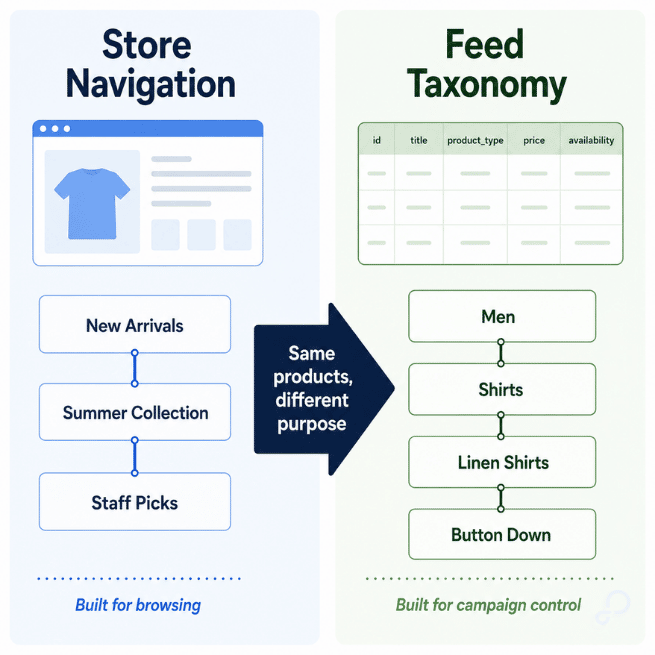
Most ecommerce catalogs are organized for onsite merchandising, not paid acquisition. That works fine until those same category structures get pushed into Google Merchant Center, Meta Commerce Manager, Amazon, Walmart, and Performance Max campaigns.
You end up with category paths like:
New Arrivals
Summer Collection
Staff Picks
That might work for shoppers browsing your site. It tells advertising platforms very little about what the product actually is.
If you've ever had products show for irrelevant Shopping queries even though titles looked fine, weak categorization may have contributed to the problem.
Example:
Shopify collection: Summer Collection
Actual product intent: Men's Linen Button Down Shirts
Product titles, descriptions, GTINs, and landing-page content do most of the heavy lifting for query matching.
Categorization provides additional context, but its larger operational role is helping merchants organize inventory for reporting, segmentation, bidding strategies, and channel management.
Approved inventory is not the goal.
Controllable inventory is.
That is the difference between a feed you can segment intentionally and a feed where the platform has to make too many assumptions on your behalf.
A lot of teams over-focus on google_product_category because it feels like the "official" taxonomy field inside Merchant Center.
Operationally, product_type often matters more for campaign management.
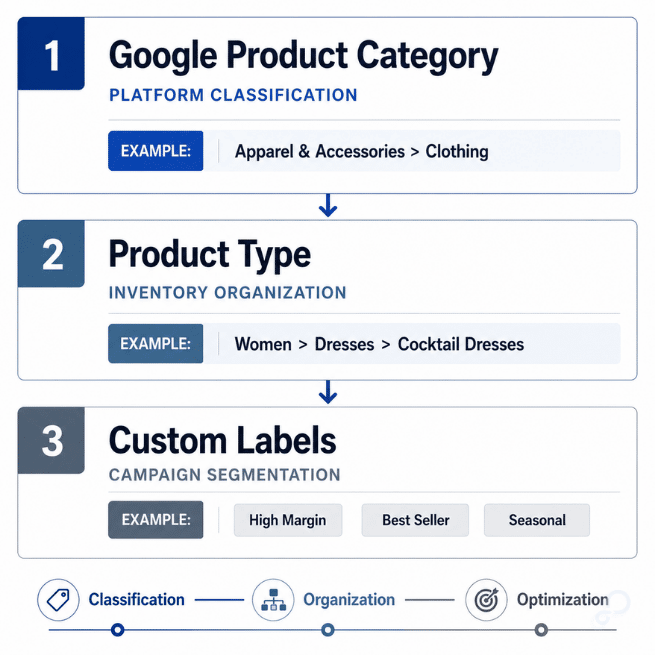
Quick shorthand:
google_product_category = Google's standardized classification systemproduct_type = your merchant-defined organizational structurecustom_label_0–4 = campaign overlays for bidding and reportingThe distinction matters because these fields solve different operational problems.
google_product_category helps Google classify products correctly within its ecosystem. product_type helps merchants organize inventory for segmentation, reporting, exclusions, and bidding logic.
Bad example:
Apparel & Accessories > Clothing
Better example:
Women > Dresses > Cocktail Dresses > Satin
The real test is whether the taxonomy supports how you manage campaigns operationally.
Can you isolate product categories cleanly?
Can you split seasonal inventory without rebuilding campaign structures?
Can you create listing groups without regex nightmares?
If you need six exclusion rules just to isolate winter jackets, the taxonomy already failed.
PMax amplifies feed problems because it relies heavily on Merchant Center data to organize inventory inside campaigns.
If your catalog contains:
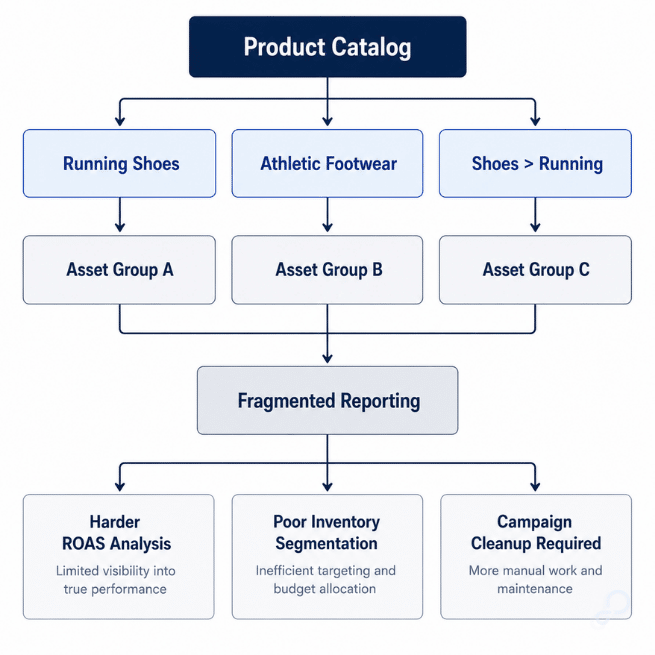
Running Shoes
Athletic Footwear
Shoes > Running
...you create inconsistent organizational signals around products that are functionally very similar.
That does not mean Google creates separate machine-learning clusters based solely on taxonomy values. But it does mean listing groups, reporting structures, and inventory segmentation become harder to manage cleanly.
Now asset groups fragment.
ROAS comparisons become harder to trust because similar products live under different organizational paths.
It's common for large catalogs to accumulate thousands of overlapping or inconsistent product_type paths over time, especially when multiple merchandising, ecommerce, and marketplace teams contribute to feed management.
Once category paths are normalized, reporting becomes cleaner, segmentation becomes easier, and inventory performance becomes much easier to evaluate across campaigns.
Feed structure influences how manageable campaign organization becomes over time.
And once campaigns are built on fragmented inventory groupings, cleanup becomes harder later because reporting history and segmentation logic are already tied to bad structure upstream.
Catalogs rarely break all at once.
Usually it happens slowly:
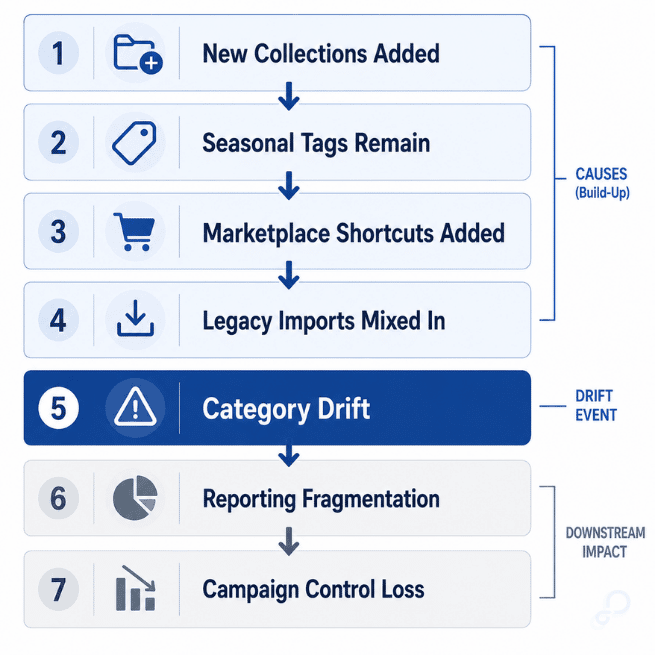
Over time, merchandising labels, marketplace shortcuts, and legacy imports start colliding inside the same taxonomy.
Meta Commerce is especially sensitive to this because product sets rely on consistent attribute filtering.
Example:
Parent product:
Women > Boots
Child variants:
Winter Footwear
Sale
Clearance Boots
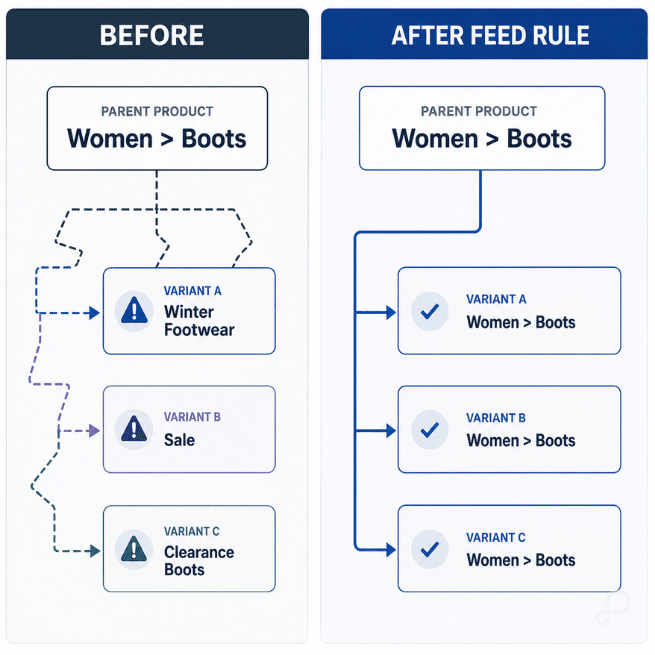
Now products that should belong to the same product set may stop grouping together consistently because variant-level categorization no longer aligns.
Dynamic ads become harder to control.
Retargeting filters stop behaving predictably.
Now your "Winter Boots" retargeting set is accidentally pulling clearance inventory that should have been excluded from prospecting campaigns.
Reporting fragments because similar products no longer belong to the same logical inventory group.
The fix usually is not rebuilding the entire catalog.
It is enforcing inheritance rules consistently.
Inside GoDataFeed, this often looks like:
product_type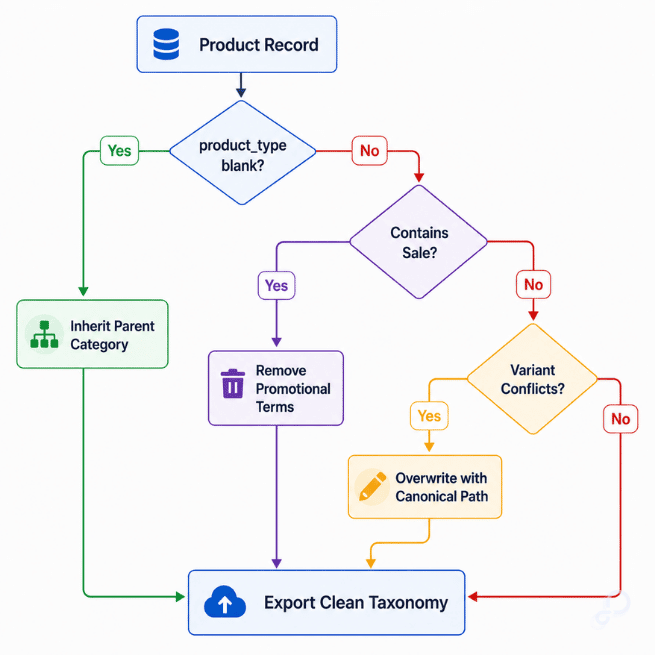
Simple rule logic solves more of this than people expect:
IF product_type is blank → inherit parent category
IF product_type contains "Sale" → remove promotional taxonomy
IF variant category conflicts with parent → overwrite with canonical path
That cleanup work matters because every platform handles categorization problems differently.
Google may misclassify products.
Meta product sets may fragment.
Amazon browse placement can become inconsistent.
Walmart setup errors can increase when incorrect product types trigger the wrong attribute requirements.
Different symptoms. Same root issue.
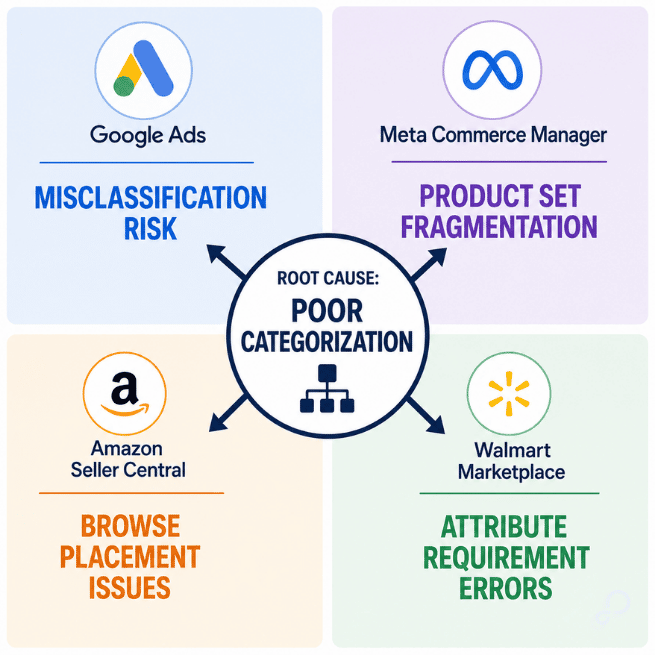
This distinction matters because marketplaces and advertising platforms use categorization differently.
Amazon and Walmart rely heavily on category structures to determine product classification, required attributes, browse placement, and listing eligibility.
Google and Meta are generally more concerned with how inventory can be grouped, segmented, filtered, and managed within advertising workflows.
The challenge for ecommerce teams is that one source catalog often needs to satisfy both requirements simultaneously. Feed rules help bridge that gap by transforming category data for each destination without changing the underlying catalog.
This is where feed logic becomes campaign logic.
Once categories stabilize, segmentation becomes dramatically easier across platforms.
This is also where teams often blur the line between taxonomy and campaign segmentation.
Strong taxonomies describe what a product is.
Custom labels describe how you want to manage it.
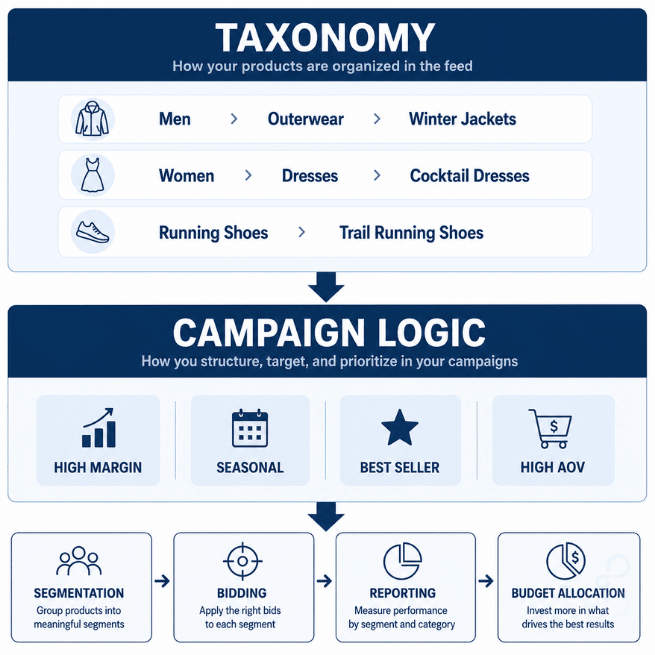
Product categories should help platforms and internal teams understand product relationships:
Men > Outerwear > Winter Jackets
Women > Dresses > Cocktail Dresses
Running Shoes > Trail Running Shoes
Custom labels can then layer business logic on top:
custom_label_0 = High Margin
custom_label_1 = High AOV
custom_label_2 = Seasonal
custom_label_3 = Best Seller
That separation gives you the best of both worlds: a clean taxonomy for organization and flexible segmentation for bidding, reporting, and budget allocation.
Now you can:
Taxonomy defines product relationships.
Custom labels define business priorities.
The strongest feed strategies use both.
You do not need to rebuild your storefront taxonomy to fix this.
That's usually the fear.
Your ecommerce team can keep onsite collections optimized for UX while the feed layer transforms taxonomy specifically for advertising channels and marketplaces.
This is usually the point where teams realize they don't actually have a campaign problem.
They have a feed-governance problem.
Inside GoDataFeed, you can:
product_type values during exportExample:
Shopify collection: New Arrivals
Google export: Women's Running Shoes
Amazon export: Marketplace-Specific Browse Node
Meta export: Normalized Product Set Taxonomy
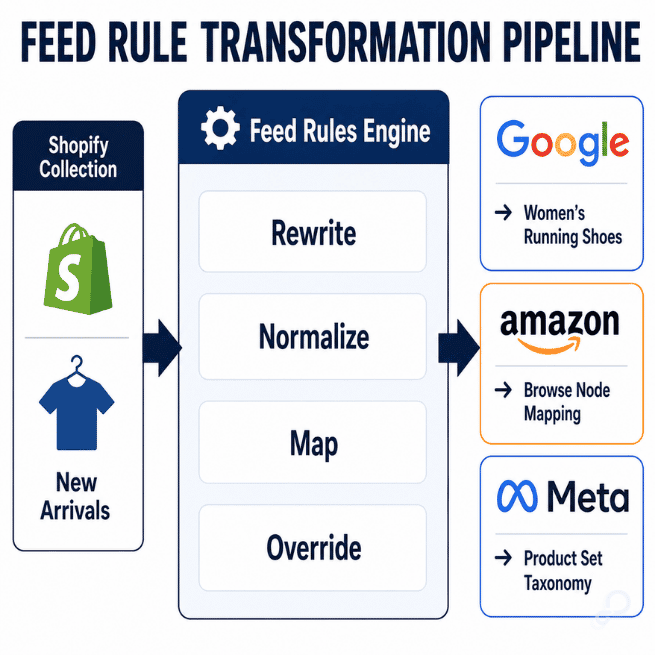
That separation matters because every platform interprets categories differently.
Trying to force one universal taxonomy across Google, Meta, Amazon, and Walmart usually creates compromises everywhere.
A better operational model looks like this:
Paid media teams often discover the symptoms first, but feed governance requires ownership across merchandising, ecommerce operations, marketplace management, and advertising workflows.
Don't overcomplicate this.
You don't need a taxonomy committee.
You need repeatable feed QA.
Monthly checks should include:
product_type formatting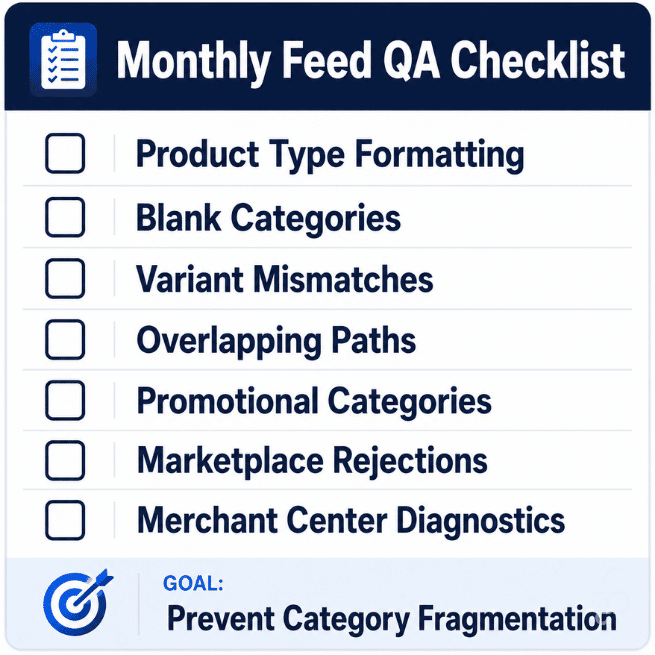
What you're really looking for is category fragmentation.
If similar products appear under multiple naming conventions, campaign reporting becomes harder to interpret.
And when reporting becomes harder to interpret, optimization slows down.
That's the operational cost.
Good categorization gives you leverage.
It improves segmentation, stabilizes reporting, reduces marketplace friction, and gives automation systems cleaner inventory organization to work with.
Bad categorization forces platforms to make assumptions about product relationships themselves.
And once Google, Meta, Amazon, or Walmart starts compensating for inconsistent structure, you lose visibility into how inventory gets grouped, filtered, matched, and optimized across channels.
Most teams eventually discover the same thing:
The campaign problem started in the feed months ago.
Carlos Rodriguez is a seasoned content marketer with a background in marketing and advertising. Formerly at the helm of his own marketing agency, he now dedicates his expertise to guiding ecommerce merchants and marketers in mastering multichannel strategies. Outside of work, Carlos is an avid reader and hiker, often found traversing the mountain ranges of Cundinamarca like El Quinini.
Run a free feed audit and see which of your titles are matching queries you'd never choose to bid on.

.png)