




















































July 23, 2020
Google has taken another massive step to make it easier to sell on Google. They've removed the commission fees from Google Shopping Actions.
That's right, the previous commission fees that ranged from 5-15% depending on product category... are no more.
"By lowering the cost of doing business and making it even easier for retailers of all sizes to sell directly on Google, starting with a pilot that we'll expand to all eligible sellers in the U.S. over the coming months." - Bill Ready, President of Commerce, Google
This new model will let you use your own payment provider, manage your customer service, and control more of your processes, like returns.
Link your payment service provider in Merchant Center
To streamline payments, you're now able to integrate your preferred payment service provider with your Merchant Center account. You'll need to link your account using the Linked accounts section in Merchant Center.
This also means your payment service provider will now handle your income tax, TIN verification, withholding, and 1099 reporting.
Get ready to handle customer support directly
You'll now be responsible to directly resolve customer support issues. If a customer isn't satisfied with your response, they'll be able to file a Google Guarantee claim that will be handled by Google customer support. Reconfirm your customer service contact email in Merchant Center.
Decide how to generate return labels
Going forward you'll need to manage returns in one of two ways:
More on new Shopping Actions requirements.
You'll be invited to migrate your account to the new 0% commission version if you haven't been already – keep your eyes on your inbox. In the meantime, commission rates are automatically capped at 5% or less.
You'll be started off in this new 0% version of the program. To join the program, you'll need to sign up here.
June 29, 2020
Up until now, the caveat to Surfaces Across Google – the promise of free listings – was that these free listings would rarely appear on Search results pages… more specifically, only the products of certain categories would appear in “Popular products” modules under highly-targeted conditions.
That's all changing, as Google is adding product knowledge panel buying options to the mix.
Knowledge panels are a type of rich results module found on Search results pages that display “official” information on people, places, businesses, products – generally any known thing. They’re automatically generated with vetted information and can be modified by verified entities.
Product knowledge panels include key information and options to buy the product.
Right now, product knowledge panel buying options are all sponsored links – but soon these listings will be free. Google plans to roll this change out first on mobile, later on desktop.

This is Google's first consistent product "surface" on Search driven exclusively by merchants’ product feeds. Once a product has a knowledge panel, anyone marketing it on Google will soon appear as a buying option. Not to mention, product listings see far more engagement when served on Search results than they do when served on Google Shopping.
This presents more options to shoppers, gives more opportunities to merchants, and further breaks the mold that we all thought Surfaces Across Google was bound to.
“Free listings on Google Search are a big step forward in democratizing access to digital commerce, benefiting shoppers and merchants with more choices across the board.” - Bill Ready
June 29, 2020
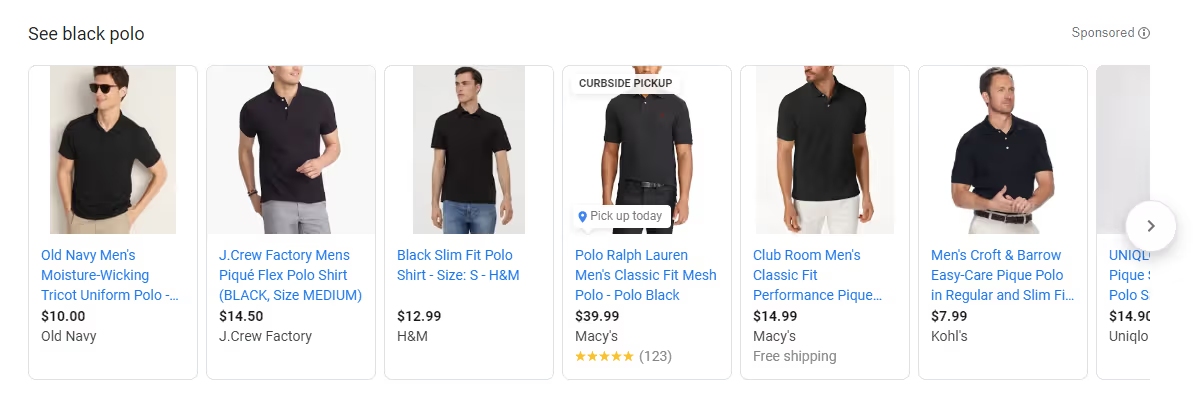
A few days ago, Google changed the way Search ads are labeled on desktop browsers.
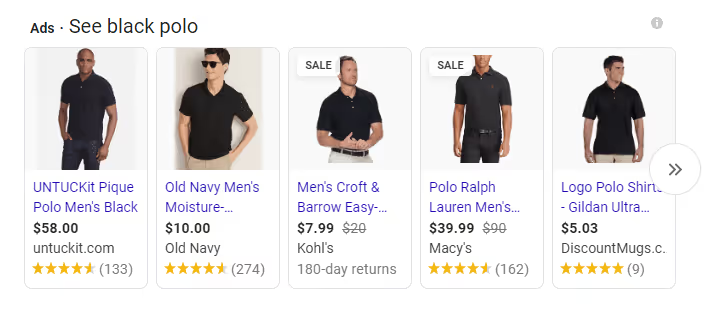
This has yet to reach Google Shopping, where the “Sponsored” tag and the old “i” icon remain over Shopping ads. Additionally, ads within Google Shopping don't show sale price annotation.
June 15, 2020
Every year, Google makes changes to its Merchant Center product data specifications with the goal of creating a better experience for shoppers. This year’s focus was on improving data quality.
The update announced some immediate changes as well as some coming in the fall.
Values for the installment and subscription_cost attributes will be accepted for wireless products and services in approved countries for Shopping ads online.
Previously an attribute exclusive to Shopping Actions, product_detail now applies to free listings, Shopping Ads, Shopping Actions, and dynamic retargeting ads on the Google Display Network.
This optional attribute can be used to provide technical specs that aren’t covered by other attributes. It lets you provide readable, structured data and enhances Google’s ability to surface individual products based on user queries.
Another attribute that was previously exclusive to Shopping Actions, product_highlight now applies to free listings, Shopping Ads, Shopping Actions, and dynamic retargeting ads on the Google Display Network.
This optional attribute lets you add short sentences to showcase your product’s most important features.

Google has toned down the requirements for displaying sale price annotations in Shopping ads.

New standards for annotation to show:
These next updates are set to go into effect starting September 1, 2020.
Products that fall within certain categories – including some sub-categories of Media and Apparel & Accessories – will require additional attributes and/or a combination of unique product identifiers. If these required attributes (such as gender, age_group, size, color, etc.) are not provided, your products will remain eligible but their performance may be limited. Similar products that do include the required attributes will be prioritized above those that are missing them.
The description attribute will be required for all products. Products without a description will still be eligible to serve, but their performance may be limited. Similar products that do include a description will be prioritized above those that are missing one.
Products with more than one value submitted for material, pattern, or image_link attributes will receive warnings. If your product contains multiple materials or patterns, you’ll be able to specify more than one material or pattern value using slashes and hyphens (not with commas). The additional_image_link attribute can be used to submit additional images.
In this post
Gio is a marketing specialist with a passion for digital design. A particular gamer, dog enthusiast, meme connoisseur and science appreciator, he has too many interests to list. When he's not involved in GoDataFeed's marketing, he's usually focused on mysterious projects.
Run a free feed audit and see which of your titles are matching queries you'd never choose to bid on.

.avif)